24
STEPS TO CHANGE THE FILTERS ON THE CLEANSPACE HALO (CS3002 & CS3025)
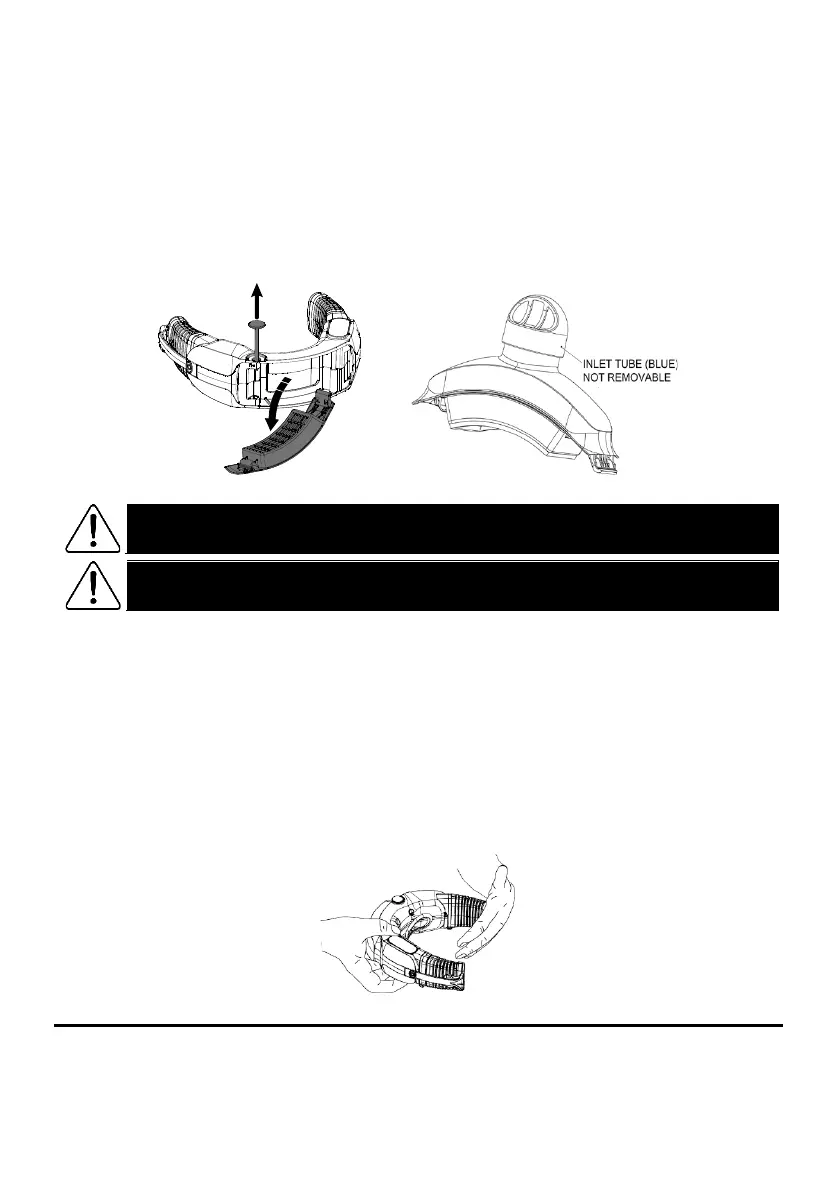
• To change the filter on the CleanSpace Halo, unlock the filter cover by pulling the silver pin up. The pin is
located on the left side of the power unit (see Figure 25).
• The filter will become loose and fall out. Do not touch the contaminated filter. If necessary, tilt the power
unit down so the filter falls out.
• Visually check the area where the filter sits. Ensure there is no dust or liquids on the inside before
replacing the filter. If necessary wipe the area with a clean cloth or a non-alcoholic cleaning wipe.
• To fit a new filter, locate the short edge on the right-hand side of the filter. Ensure the “CleanSpace
HALO” label is the right way up. Fit the short edge to the inside (see Figure 25) on the right of the
respirator. Swing the filter shut into the closed position. Hold the filter firmly against the body of the
respirator with one hand and press the pin down and back in place. The filter should sit securely in place.
Figure 25 – Replacing the filters in the CleanSpace HALO
WARNING
When fitting a new filter the blocked filter alarm shall be tested before the respirator is put
back into service. See the heading “Testing the Blocked Filter Alarm” below.
WARNING
Use only CleanSpace
™
filters with the CleanSpace HALO
™
respirator. Use of other filters may
result in overexposure to contaminants and lead to sickness or death.
TESTING THE BLOCKED FILTER ALARM
After changing the HEPA filter, check that the Blocked Filter Alarm is audible and the Filter LED is working.
1.
Remove the mask from the power unit. Using your hand, completely cover the air outlet (see Figure 26).
2.
With the power unit in Standby mode (one or more green battery indicators lit), press and release the Power
button. The blue LED will light and the power unit will start blowing. If no LEDs are lit, press the Power button
once to enter Standby mode.
3.
After 5 - 10 seconds, the red Filter LED will light and the blocked filter alarm will sound (2 beeps, repeated
every second).
4.
Reset the power unit by pressing the Power button.
If the red Filter LED does not light or the alarm does not sound, check that the outlet is completely blocked.
The outlet is on the left side as you wear the device (see illustration below). If the Filter LED and/or audible
alarm are still not working, do not enter the contaminated zone. Contact CleanSpace for assistance.
Figure 26 – Blocking the air outlet for a blocked filter alarm test


 To Next Page