Chapter 4: Using The CHAT Application
1199
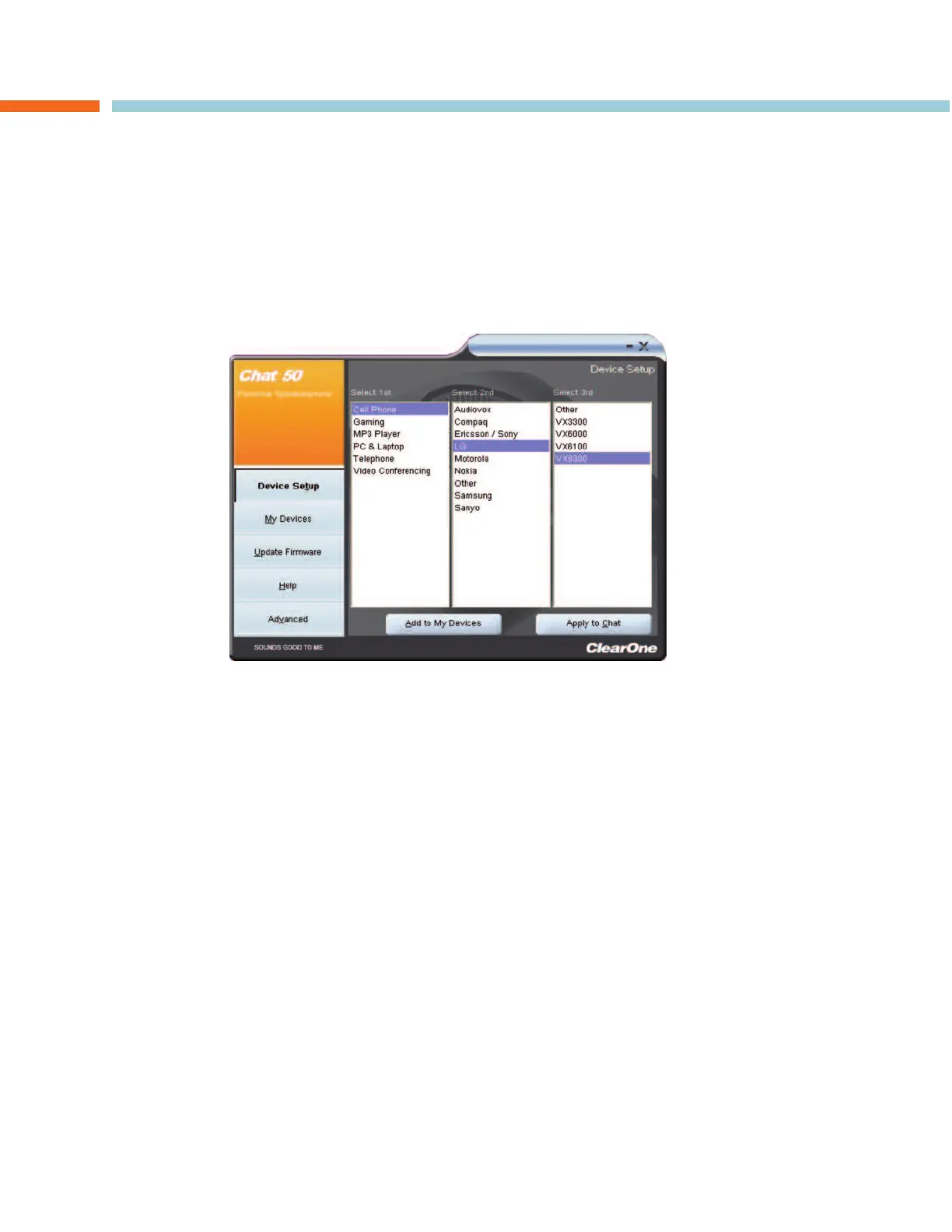
DEVICE SETUP
DDeevviiccee SSeettuupp
configures the CHAT 60 for use with specific hardware devices, other than a PC, to ensure
optimal sound quality. To configure the CHAT 60, use the procedure shown below.
1. Select a device in the
SSeelleecctt 11sstt
column.
2. Select a manufacturer in the
SSeelleecctt 22nndd
column.
3. Select a model in the
SSeelleecctt 33rrdd
column.
4. Click the
AAdddd ttoo MMyy DDeevviicceess
button to add this device to your
MMyy DDeevviicceess
list.
5. Click the
AAppppllyy ttoo CCHHAATT
button to apply these audio settings to the CHAT 60.
If the device, manufacturer, or model is not available, select either the
OOtthheerr
or the
AAllll
option in the appropriate
column. Doing so provides a basic audio configuration for the device, and allows you to change it as needed
to achieve optimal sound quality. See the
Optimizing Sound Quality
section of Chapter 3 for instructions.
CHAPTER 4: USING THE CHAT APPLICATION



 To Next Page