Chapter 4: Using The CHAT Application
2255
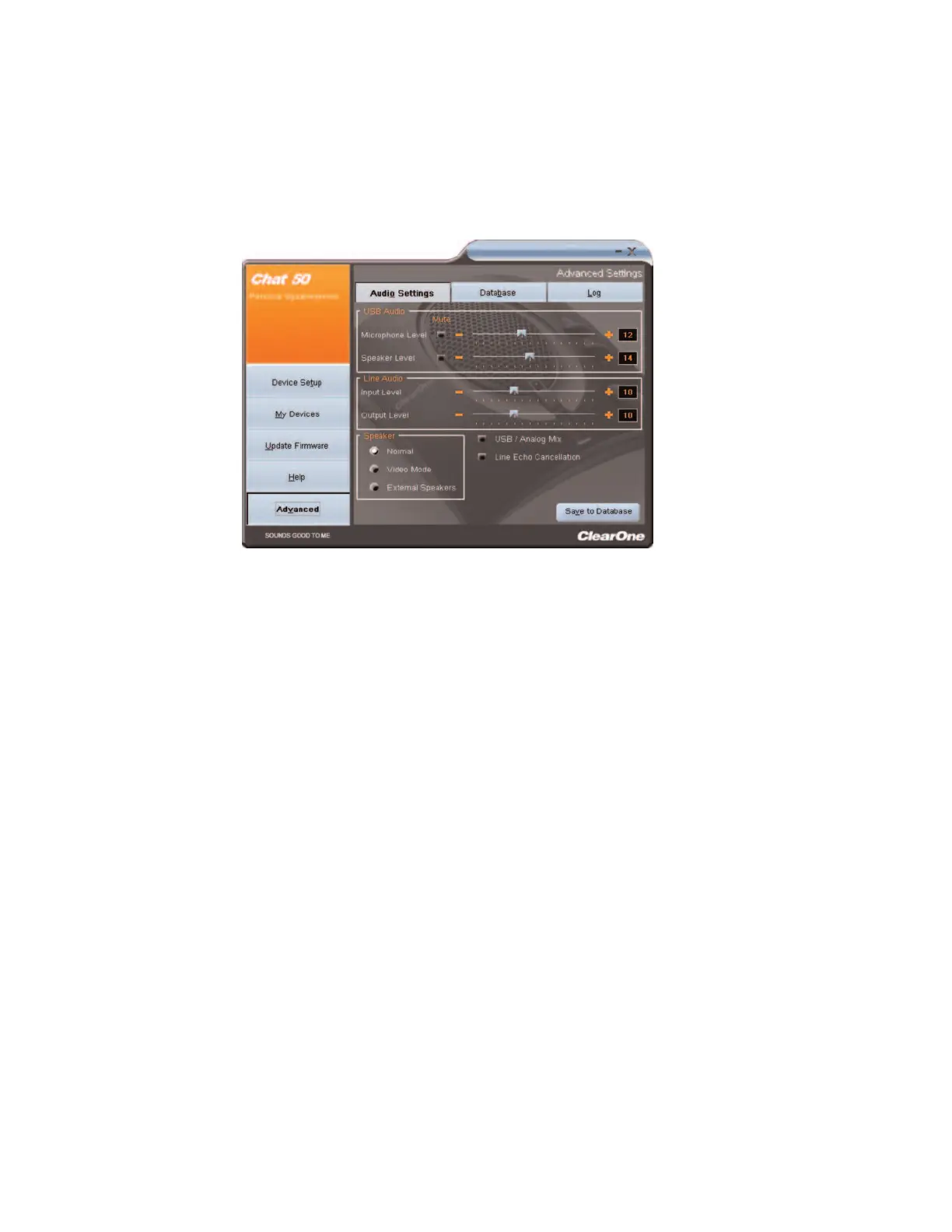
AAddvvaanncceedd SSeettttiinnggss:: AAuuddiioo SSeettttiinnggss
The
AAuuddiioo SSeettttiinnggss
screen displays the current audio settings and allows you to change them. You can also
create custom audio settings for a particular device (see the
Advanced Screen: Database
section for more
information).
Available audio settings include:
•
UUSSBB AAuuddiioo
: Controls CHAT 60 audio settings when it is connected via USB to your computer. Use the
mute buttons to mute the microphone or speaker on the CHAT 60. Use the sliders to adjust the
microphone level and speaker level. Speaker and microphone level adjustments made in the CHAT
software will automatically change the speaker and microphone volume levels in Windows.
•
LLiinnee AAuuddiioo
: Controls line-in and line-out audio levels when the CHAT 60 is connected to devices through
its 3.5mm jack. These controls are grayed out (unavailable) when there are no devices connected to the
3.5mm jack. Use the input slider to adjust the level of the incoming audio to the speaker; use the output
slider to adjust the level of the outgoing audio to the far end.
•
SSppeeaakkeerr
: Controls speaker settings when the CHAT 60 is connected to devices through its 3.5mm port:
•
NNoorrmmaall
: USB audio and line-in audio from the 3.5mm jack are mixed through the CHAT 60 speaker.
•
VViiddeeoo MMooddee
: Routes audio from the far end of the conference call to the connected video
conferencing device or application instead of the CHAT 60 speaker. USB audio is routed through the
CHAT 60 speaker. Ensure that the CHAT 60 is properly connected using the appropriate accessory
adapter cable (sold separately).See figure 2.19 for the connection diagram.
•
EExxtteerrnnaall SSppeeaakkeerrss
: Routes both USB and line-in audio sources to external speaker(s) connected to
the CHAT 60’s 3.5mm jack. In this mode, the CHAT 60 functions as a microphone only. This is useful
for video conferencing to ensure the audio and video originate from the same point in the room.
•
LLiinnee EEcchhoo CCaanncceellllaattiioonn
: Enables line echo cancellation, which eliminates echo when the CHAT 60 is
connected to a telephone. Telephones route audio from the mouthpiece to the earpiece so that you can
hear yourself talk, which causes feedback when using a speakerphone.
>
NNoottee::
Enabling line echo cancellation may cause audio problems if the CHAT 60 is not connected to a
telephone.



 To Next Page