12 13
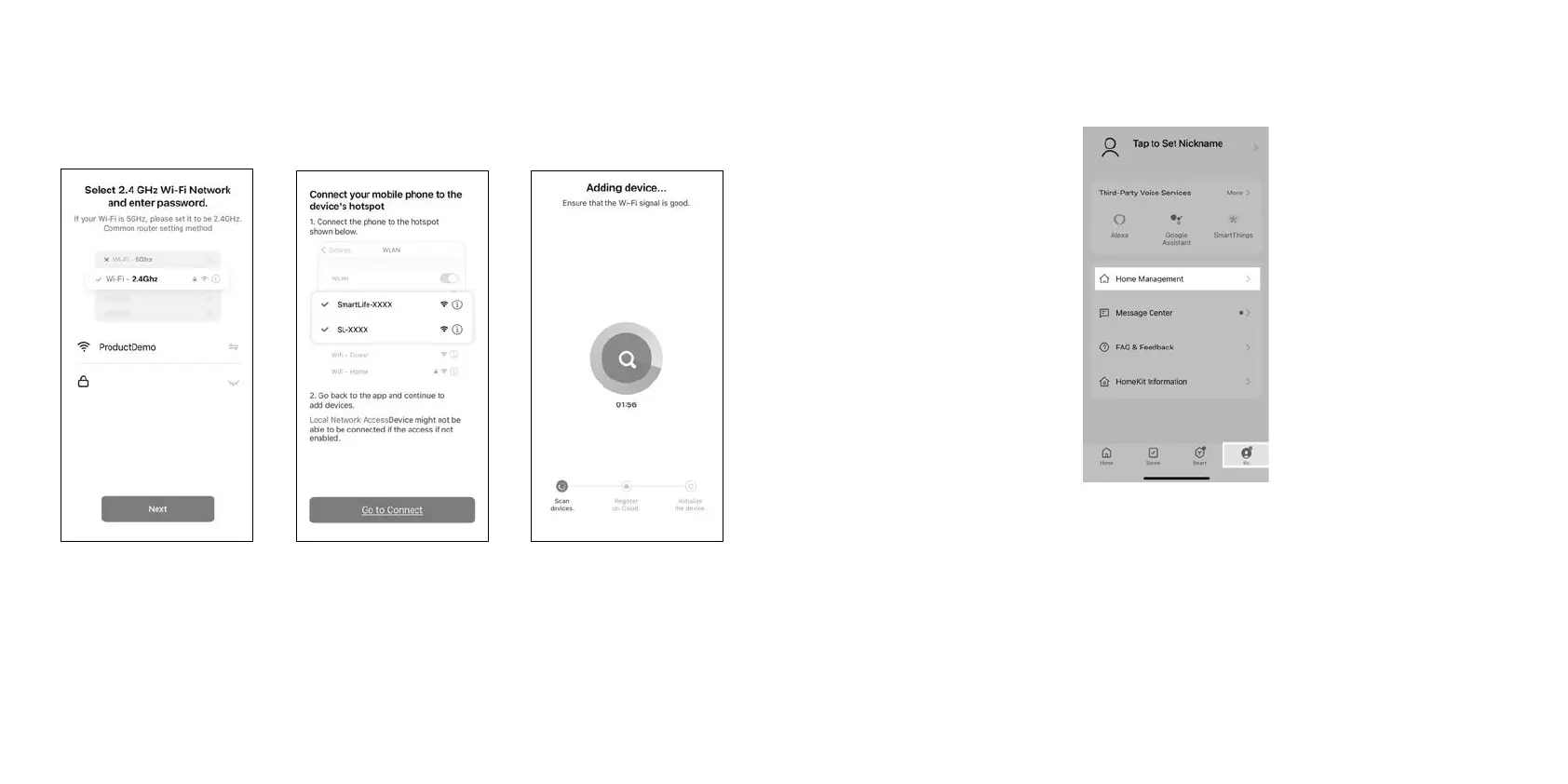
b) Follow the steps below to complete adding the device:
c) Once ClevaPure™ Air Purifier is connected it will automatically appear under “All
devices”.
You can share the ClevaPure™ Air Purifier with other users under your profile: Me > Home
Management.
6. Switch the ClevaPure™ Air Purifier of
To switch of the ClevaPure™ Air Purifier, touch the power of buton (between the eyes) or
switch of via Smart Life app.
Connect with Amazon Alexa™ or Google Home™
You can use the Smart Life app to connect your ClevaPure™ Air Purifier to Amazon Alexa™
or Google Home™. Please follow in-app instructions to set up your voice control device.
1. Select 2.4 GHz Wi-Fi Network
and enter your Wi-Fi password.
Click Next.
2. Click “Go to connect” to
connect your mobile phone to
the device’s hotspot.
3. The app will start connecting
to the device, it’ll take 2 min to
connect.


 To Next Page
 Loading...