EasyManua.ls Logo

Clevertouch CTL-55DS4KV - Page 33

Clevertouch CTL-55DS4KV
70 pages
Print Icon
To Next Page IconTo Next Page
To Previous Page IconTo Previous Page
Loading...
English - 32 -

A suitable utility can be used such as described below.
Secure Commands

registered as secure.

ADMIN level privilege.
Currently there are 2 modes for user: NORMAL and ADMIN

SETUSERSECLEVEL ADMIN <password>

Connecting to the Display (LAN port)

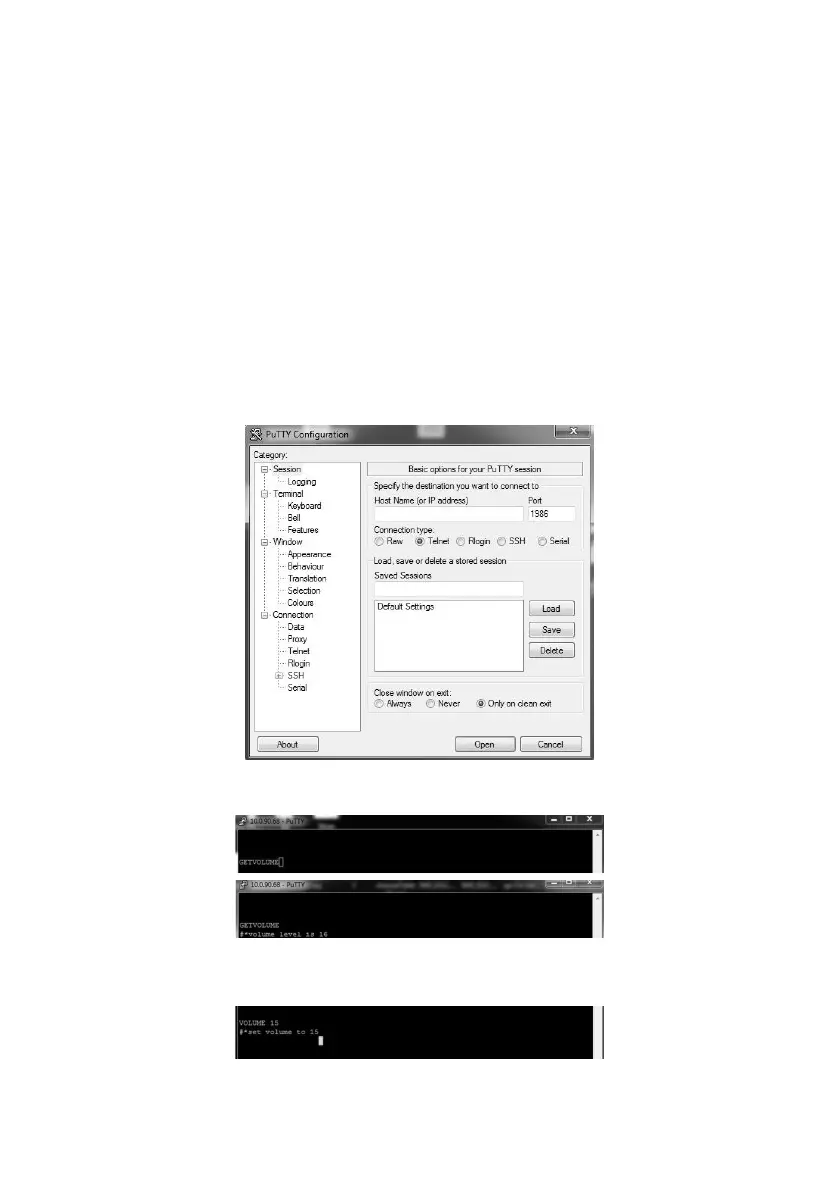
Host Name1986
PortTelnetConnection type and click the Open button.
Note: Refer to the Connectivity section of this manual for information on connecting the Display to a network and displaying
the IP address of the Display.
Use the commands in the RS232 Command Table
current volume level should be displayed on the putty window as shown in the pictures below.
Another example;

the changes from the Display.
The last example ;
             
shown in the picture below.

Related product manuals