English - 31 -
In some circumstances video contents might not be
able to be played.
OSD Rotation Support
You can change the OSD (On Screen Display) rotation
of your Display if desired. While performing First
time installation set the OSD Orientation option as
desired when the Signage menu is displayed. You
can also change this setting later from the Signage>-
Controls menu. Available options are: Landscape
Portrait 1 and Portrait 2.
HDMI Out
The HDMI port located on the rear left side of the
thus no source devices should be connected to this
port. Only the content received from the HDMI input
port located also on the rear left side of the Display
This is a default function and you can not disable/
enable through any menu option. HDMI output port
will always function if a source device is connected
Real Time Clock (RTC)
Your Display has an RTC. It is used to maintain the
real date and time information for a period of time if
the energy supply is interrupted by separating the
Display from the mains or by a power blackout. In this
case the Display will use the date and time information
stored in RTC.
All time sources are able to override RTC date/time.
Display tries to connect to the NTP server period-
ically (6 hours after last update) to get the current
date and time information. If the Display successfully
updates itself and RTC with the received date and
Display uses RTC time and date to update itself.
The RTC battery provides power to the integrated
real-time clock and the calendar. Without any
a minimum of 14 days.
is enabled from Date/Time option in the Settings>
System menu.
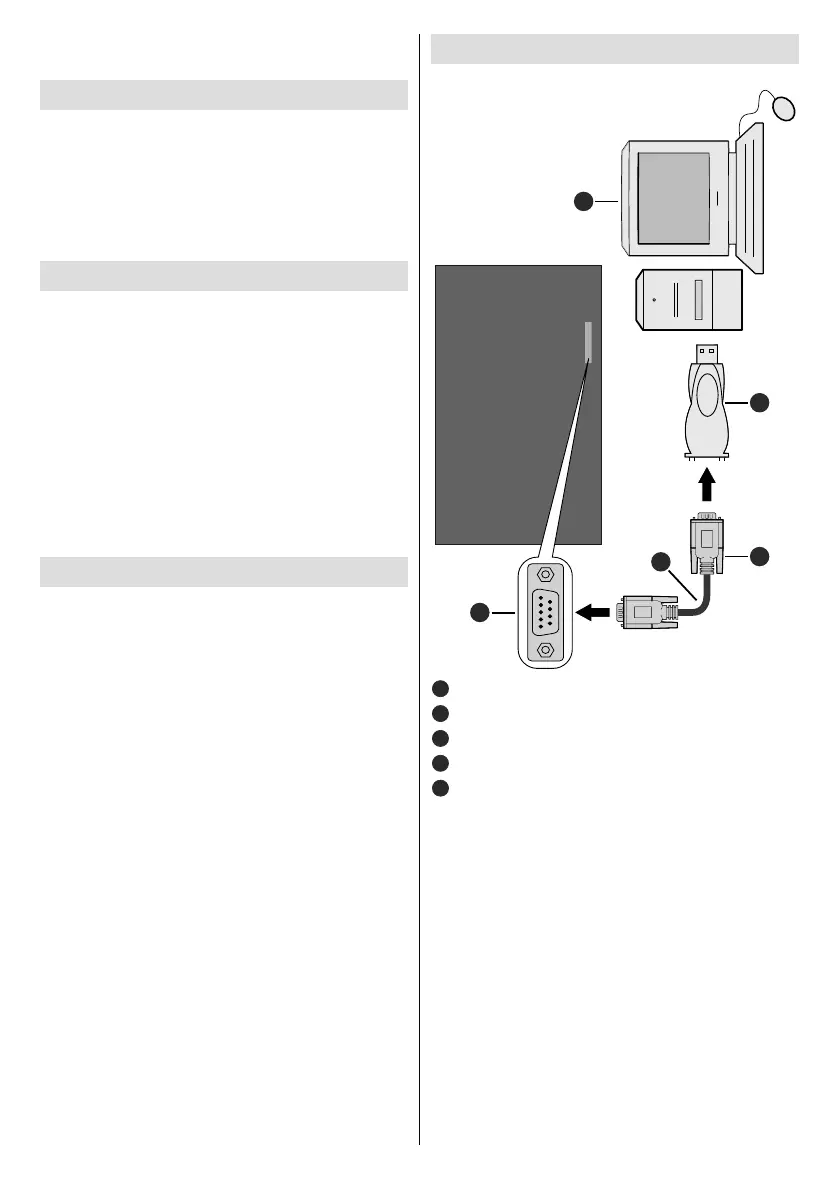
1
2
3 4
5
RS-232 Input Socket
2
To COM port
4
RS-232 to USB Adaptor
PC
You can control the product from an external PC via
RS-232 (COM port) or LAN (Ethernet port) on the
RS-232 from remote computer. When a command is
according to the received command and sends a
response message to the PC.
Equipment/Tools:
RS-232 (female) to RS-232(male) cable or LAN
cable (connected via router)
USB to RS-232(male) cable
Notebook or PC which has USB or LAN port
Installed program on remote PC to send commands:


 To Next Page