English - 8 -
Connecting the IR Receiver
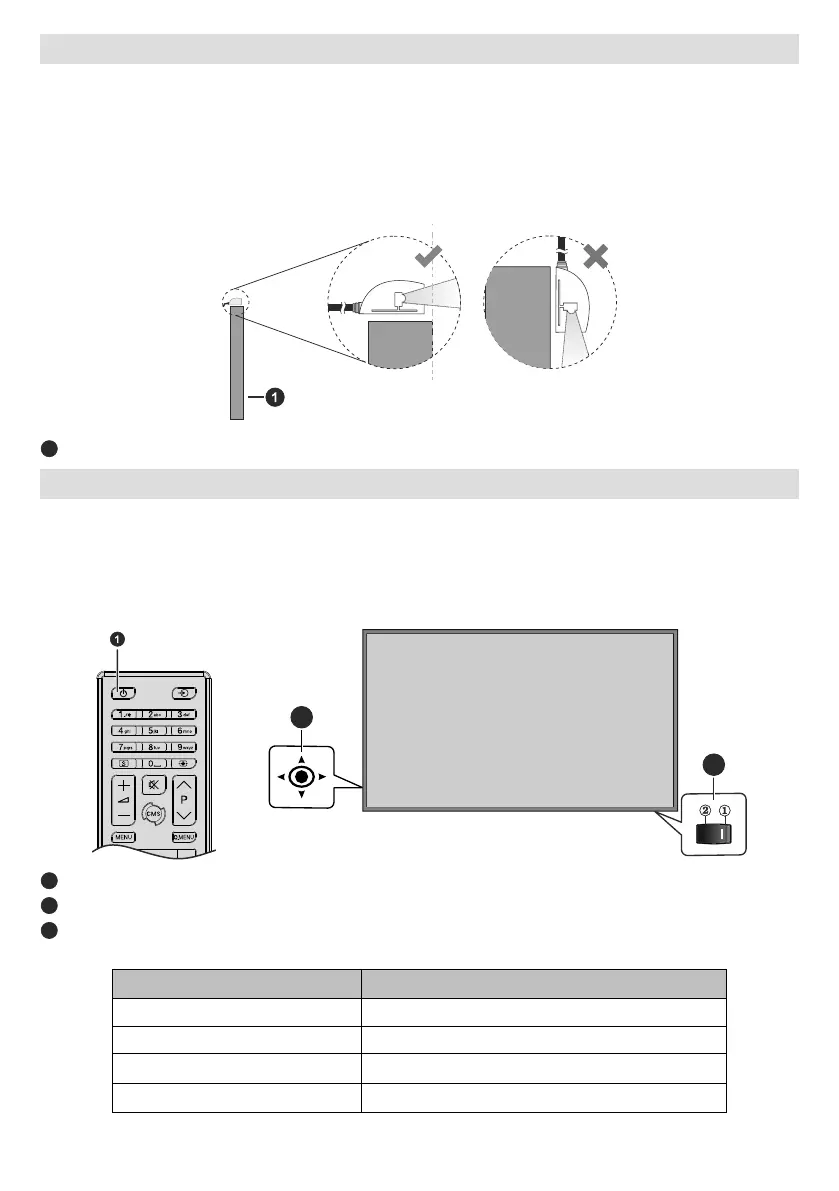
Display. Place the IR receiver in sight of your own remote control. Simply operate your remote control whilst
pointed at the IR receiver and it will relay the control signal to your Display.
In case your Display has touch screen feature and if the IR receiver is going to be placed on the Display it
may interfere with each other. To improve the performance of your remote control place the IR receiver as
shown in the drawing below.
Front side of the Display
Turning the Display On/O
into standby mode. Press the Standby button on the remote or press the centre of the joystick in located on
the rear left side of the Display and hold it down for a few seconds to switch it on from standby.
Press the centre of the joystick in and hold it down for a few seconds or press the Standby button on the remote
2
3
Standby button
2
Joystick
(*)
(*) The location of the On/O switch may dier depending on the model.
LED Status Status of the monitor
Power LED not lit Power on
Power LED lit
Scheduler active (optional)
Software update


 To Next Page