4
English
TERMINAL EVOLUTION
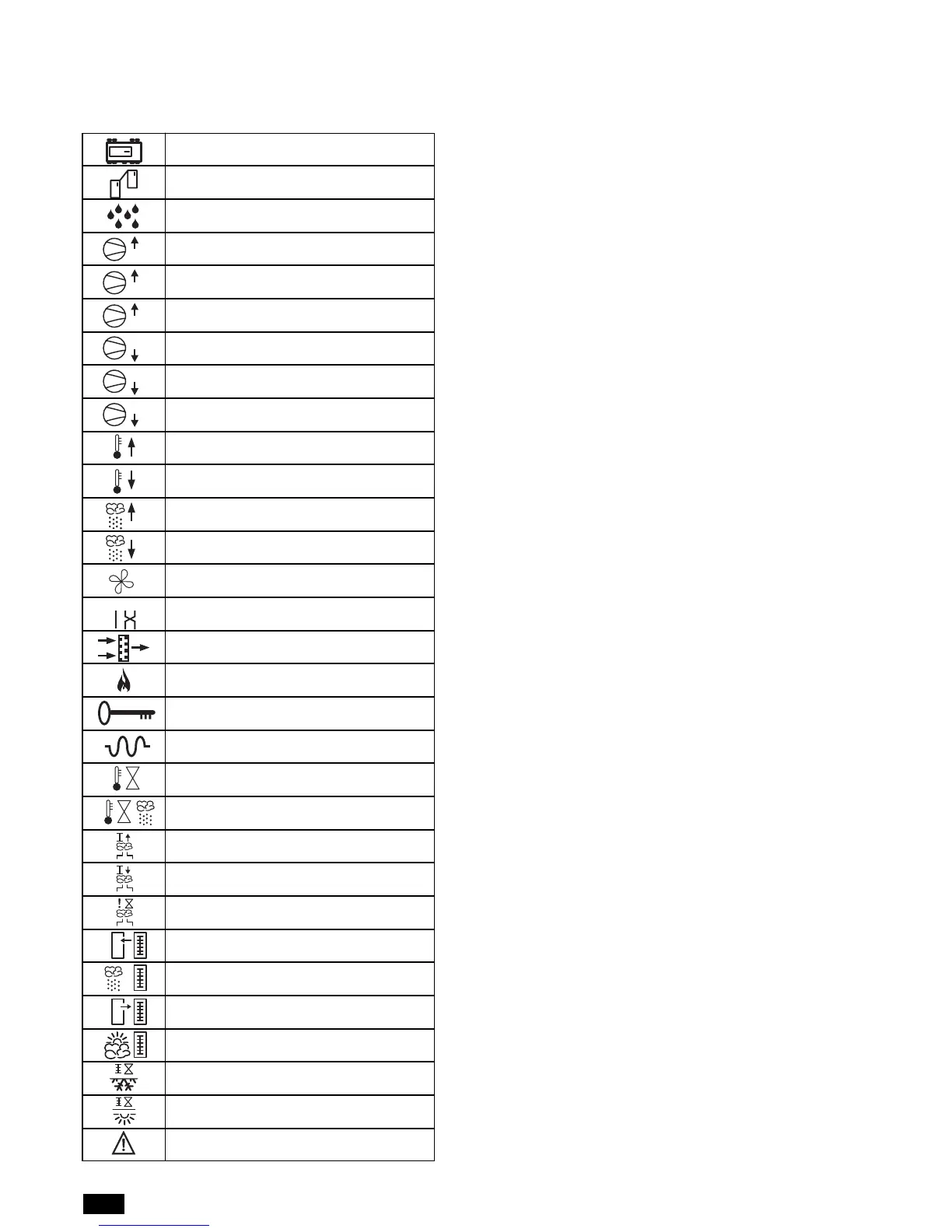
EEPROM fault
LAN disconnected
Water leak (flood)
High pressure in circuit 1
High pressure in circuit 2
High pressure
Low pressure in circuit 1
Low pressure in circuit 2
Low pressure
High ambient temperature
Low ambient temperature
High ambient humidity
Low ambient humidity
Air flow alarm
Incorrect phase sequence
Filters blocked
Fire/smoke detected
Wrong password (5 attempts)
Electric heater overheat
High water temperature
High water temperature during dehumidification
High humidifier current
Low humidifier current
No water in humidifier
Room temperature probe fault
Room humidity probe fault
Outlet air temperature probe fault
Outside air temperature probe fault
Cold water temperature probe fault
Hot water temperature probe fault
Emergency mode active
Area 3 - ALARMS LIST
This area displays an icon that, in the event of alarms or maintenance signals, respectively indicates the type of alarm and the device that
requires maintenance.
EVENT OF ALARM
In case of Alarm event:
• Acoustic signalling is activated (buzzer);
• Red led under the alarm button s activated;
• Green leds on main screen are activated
• AREA 2 on main screen is showing the alarm icon;
• AREA 3 on main screen visualized an icon who represent the
kind of active alarm .
With a single press on the alarm button the acoustic signalling is
de-activated.
RESET OF ALARM STATUS
To make the ALARM RESET, we split the alarms in 3 different
kind:
• Alarms with only Automatic Reset:
in this category we found only the alarm “LAN DISCONNEC-
TED”.
• Alarms with Automatic/Manual Reset (based on the customer's
settings on screen I3); in this category we found:
- Ambient Temperature Limits overcoming
- Ambient Humidity Limits overcoming
- Chilled Water too high
- Water Flow missing
- Low Pressure alarm
- Humidifier alarm
- Air filter alarm
By default alla bove are setted with AUTOMATIC RESET.
• Alarms with only Manual Reset:
After removing the alarm cause, it's required to push alarm but-
ton for few seconds to remove completely the alarm signalling
and will desappear any Alarm icon from AREA 2 and AREA 3.
With “Wrong Password Alarm”, the RESET is only manual after
the right input of the correct password.
ALARM LIMITS
With User Password (screens “I”): it's possibile to modify the
alarms limits setted like,Ambient Temperature Limits overcoming,
Ambient Humidity Limits overcoming, Chilled water too high( 2
limits: 1 for standard functiuoning, 2 for dehumidification functio-
ning) anyway based on unit configuration.
ALARMS OUTPUTS
With User Password (screens “I”): it is possible to configure the
alarms output available on the main board. Based on unit configu-
ration we can have 1 Alarm output (marked A) or 2 Alarm out-
puts (marked A & B).
We can also set:
• Status of Alarm Contacts (normally Open or Closed in OFF
position: in this second case we can also raise the “power mis-
sing alarm”);
• Address the desire alarm in contact A or B , depending on
customer choice.


 To Next Page