5
English
TERMINAL EVOLUTION
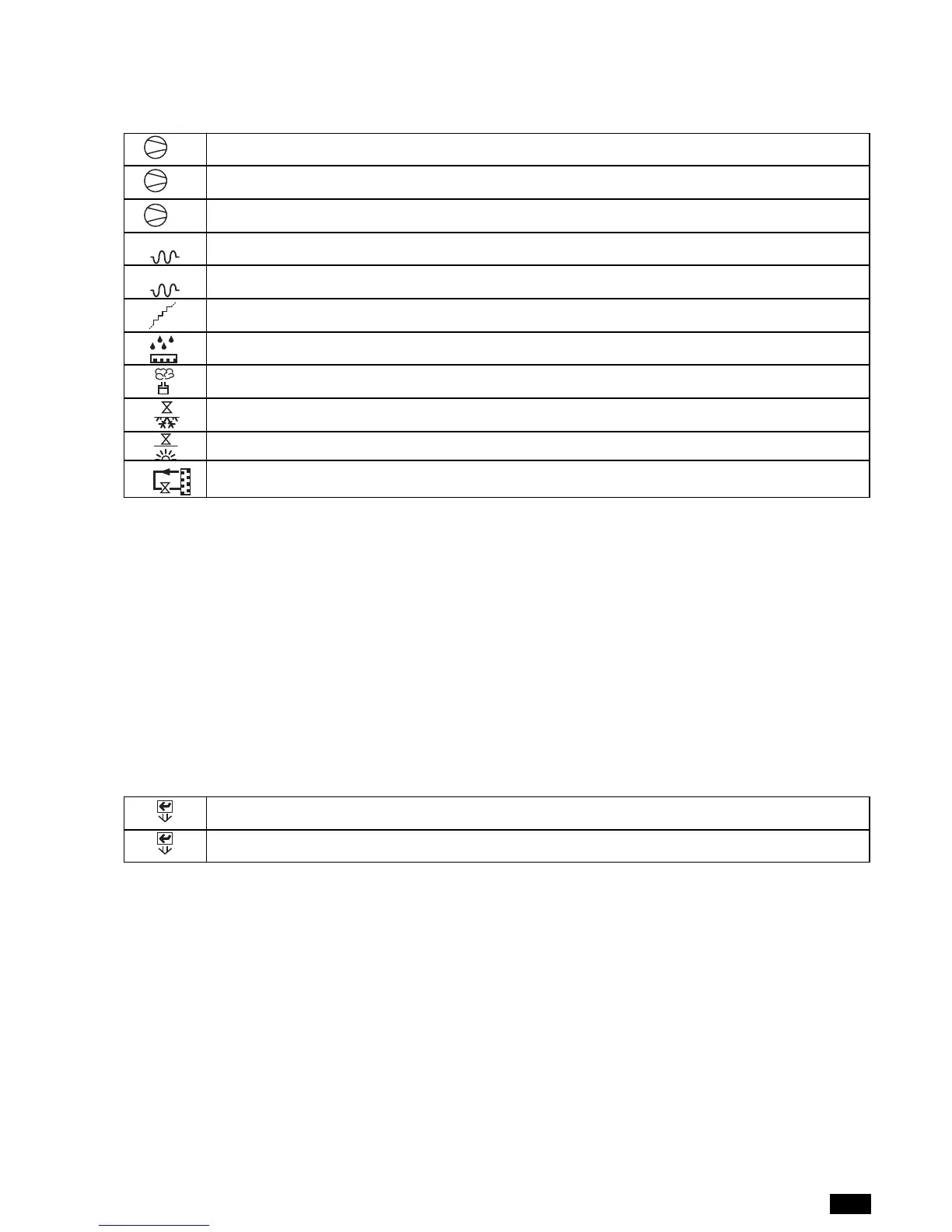
compressor 1 active
compressor 2 active
compressors 1 and 2 active
first electric heater stage active
second electric heater stage active
first and second heater stages active (third stage active)
Dehumidification active
Humidification active
Cold water valve open
Hot water valve open
Hot gas active
Area 4 ACTIVE COMPONENTS
This area displays icons corresponding to the devices currently installed on the unit.
Area 5
This area displays the time and date, if the clock board is fitted.
Area 6
This area displays the room temperature currently read by the probe on the unit (even if the control is enabled based on the average of
the values read by the units connected in the LAN).
Area 7
This area displays the relative humidity currently read by the probe on the unit (even if the control is enabled based on the average of the
values read by the units connected in the LAN).
Area 8
This area indicates the LAN address of the unit, if connected to other units.
Area 9
This area indicates the unit on/off mode from the user terminal.
press ENTER to switch the unit off
press ENTER to switch the unit on


 To Next Page