22
Climax Air Inc. www.climax-air.com
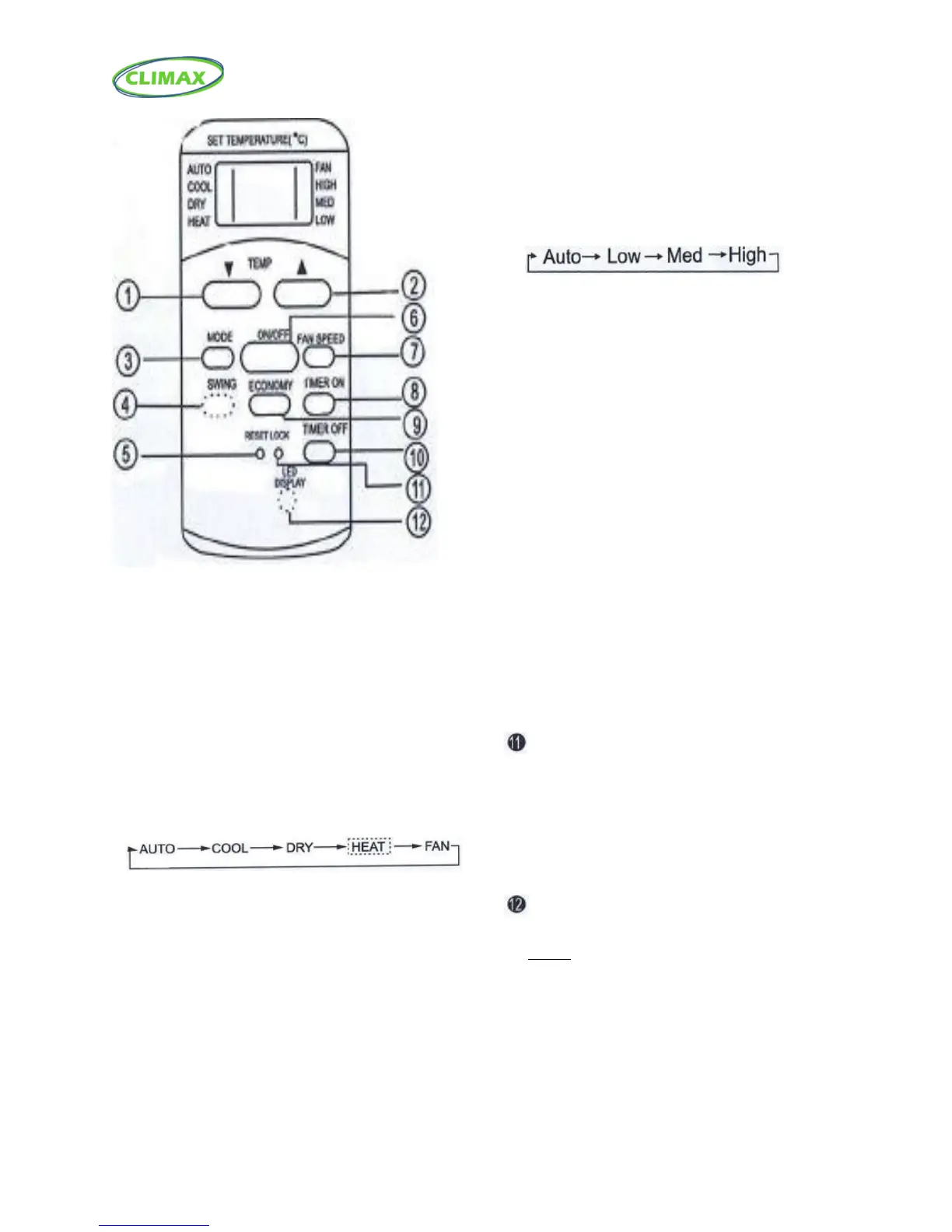
❶ TEMP DOWN Button
Push this button to decrease the indoor
temperature setting in 1°C (2°F) increments to 17°C
(62°F).
❷ TEMP UP Button
Push this button to increase the indoor
temperature setting in 1°C (2°F) increments to 17°C
(62°F).
❸ MODE Button
Each time the button is pressed, the operation
mode is selected in the sequence of the following:
NOTE: Do not select HEAT mode if the machine you
purchased is cooling only type. Heat mode is not
supported by the cooling only appliance.
❹ SWING Button (on some models)
Used to stop or start louver movement and
set the desired up/down airflow direction.
❺ RESET Button
Once the recessed RESET button is pressed, all of the
current settings will be cancelled and the controller
will return to the initial settings. You must press the
“ON” button on the remote to reactivate the remote.
❻ ON/OFF Button
Operation starts when this button is pressed
and stops when the button is pressed again.
❼ FAN SPEED Button
Used to select the fan speed in four steps:
❽ TIMER ON Button
Press this button to activate the Auto-on time
setting. Each press will increase the time setting
in 30 minutes increments, up to 10 hours, then at
1 hour increments up to 24 hours. To cancel the
Auto-on time setting, just press the button until
The time setting is 0.0.
❾ ECONOMY (SLEEP) Button
Select this function during the sleeping time. It can
maintain the most comfortable temperature
and save energy. This function is available on
COOL, or AUTO mode only.
NOTE: While the unit is running under SLEEP mode,
It would be cancelled if ON/OFF, FAN SPEED, SLEEP or
MODE button is pressed.
❿ TIMER OFF Button
Press this button to activate the Auto-off time
setting. Each press will increase the time setting
in 30 minutes increments, up to 10 hours, then at
1 hour increments up to 24 hours. To cancel the
Auto-off time setting, just press the button until
The time setting in 0.0.
Lock Button
Press this recessed button to lock all current settings,
and the remote controller will not accept any
operation except that of the lock. Use the LOCK mode
when you want to prevent settings from being
changed accidentally. Press the lock button again to
cancel the LOCK function. A lock symbol will appear on
the remote controller display when the lock function is
activated.
LED Display Button
Press this button to clear the display on the
AC unit, press it again to light the display.



 To Next Page