CI-154 User’s Manual
Page 62
3.3.7 Status Bits Defined:
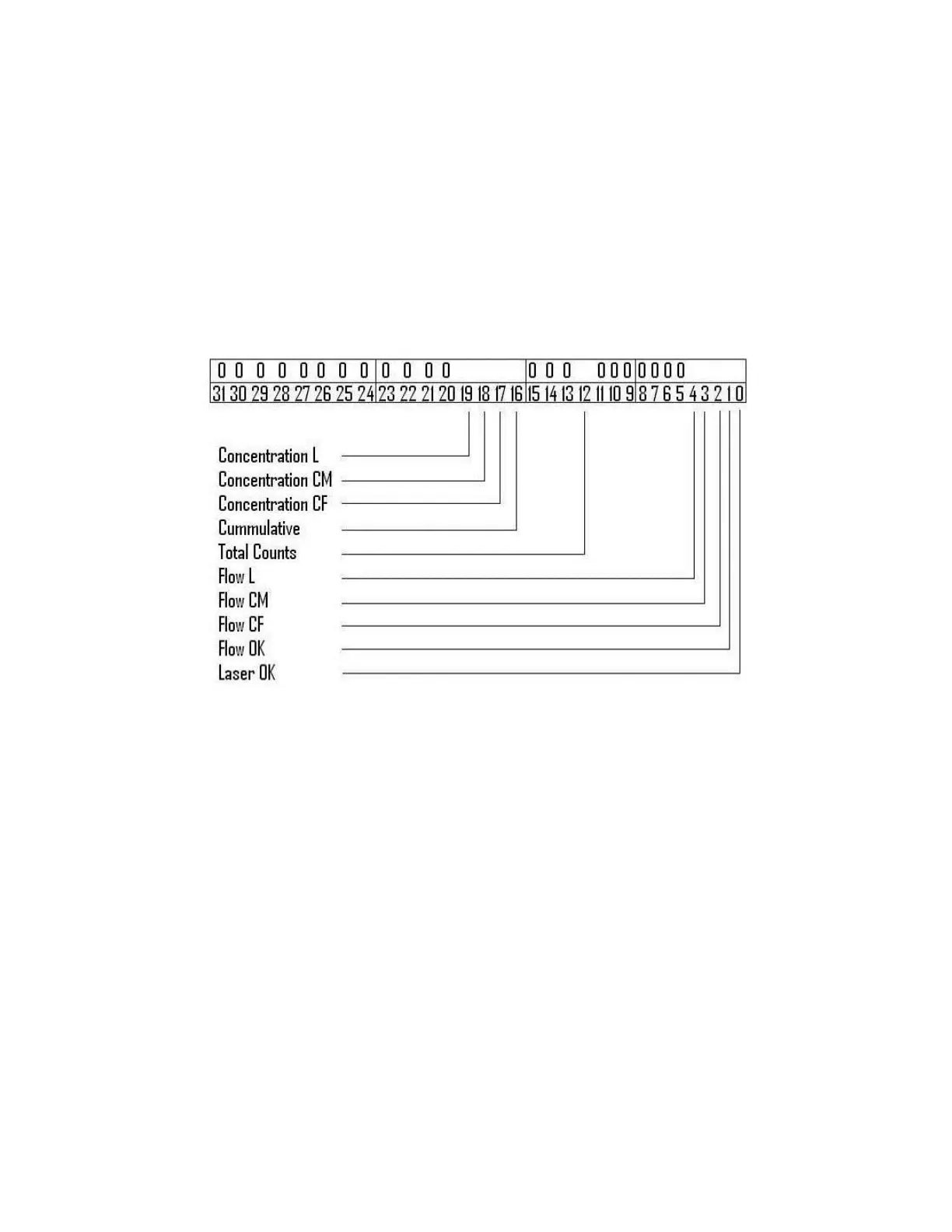
The status bits provide details about the last sample completed. At the end of a
completed sample the status bits are updated. Below is a diagram of the status bits.
When set to a one (1) the bit is active and indicates that the condition is true. As an
example when the Flow Ok bit is set to one, the flow during the last sample was at
the proper rate. If the bit was zero (0), then there was an error in the flow rate. A
one in the other bit locations would indicate that that item was active. Bits 2, 3, and
4 are only set one at a time. The same is true for bits 16, 17, 18 and 19. While bit
12 is set to one when Total Counts Mode is active and set to zero when Differential
Mode is active. Bit zero provides laser status; if not set to one the particle counter
will need to be serviced.
3.3.8 Unit web server pages:
The CI-154’s built in web server provides view only information from the CI-154.
This information is provided on four web pages, listed below. The first page provides
last sample information. The second page provides details about the CI-154. The
last two pages provide a list of samples, sampledatap1.htm provides up to 60 of the
most recent samples, while sampledatap2.htm provides a complete list of samples
stored in the unit (up to 3000). The following are the four web page addresses
(Example UnitIPAddress: 192.168.6.170) followed by screen captures of each web
page.
http://UnitIPAddress/
http://UnitIPAddress/info.htm
http://UnitIPAddress/sampledatap1.htm
http://UnitIPAddress/sampledatap2.htm
To access any of the above web page addresses, open a web browser of a computer
on the same network; edit the address bar to point the desired address. The web
pages are set to update every 30 seconds. Pressing F5 on the keyboard will refresh
the web page manually.



 To Next Page