…it’sallabout listening
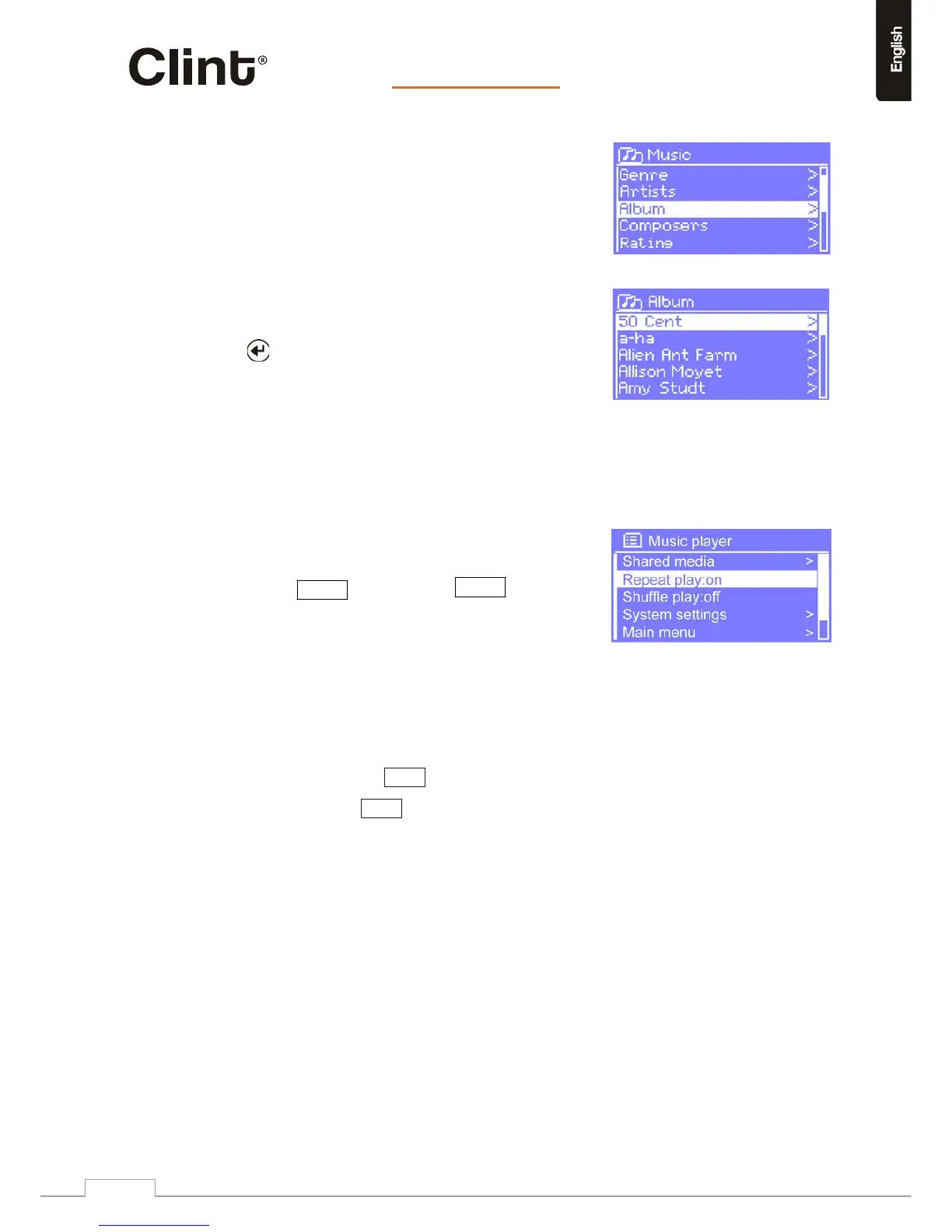
FromMusic, therearenumerouswaysofselecting
tracks,including:
o Genre,
o Artist,
o Album,
o Composer,
o Rating.
Onceyouhavefoundatrackyouwanttoplay,press
.H2willplaytheselectedtrack,thenanyfurther
tracksthatwerelistedonthesamescreen;usually
thisistherestofthealbum.
Duringplaybackoftracksstoredonnetworkstorageorfromplaylists,theusermay“skip”forward
orbackwardthroughthetracksusingtheforwardskipandbackwardskipbuttonsontheRCU.
10.2Repeat/shuffle
Youcanrepeattracksorplaytheminrandomorderby
selectingMenu>Repeatplayor
Menu>Shuffleplay.
10.3Nowplayinginformation
Whilethetrackisplaying,thescreenshowsitstrackandartist(UPnP).Atthebottomof
thescreen,aniconindicatesUPnPdependingonthe source.Toviewfurtherinformation
aboutthestream,pressInfo.
EachtimeyoupressInfo,anothersetofinformationisdisplayed,cyclingthrough:
o UPnP:artist ,album,URL,bitrate/codec/samplingrate,playbackbufferand
today’sdate.
www.clintdigital.com
23


 To Next Page