33
8 - CONTROL
1 3 4
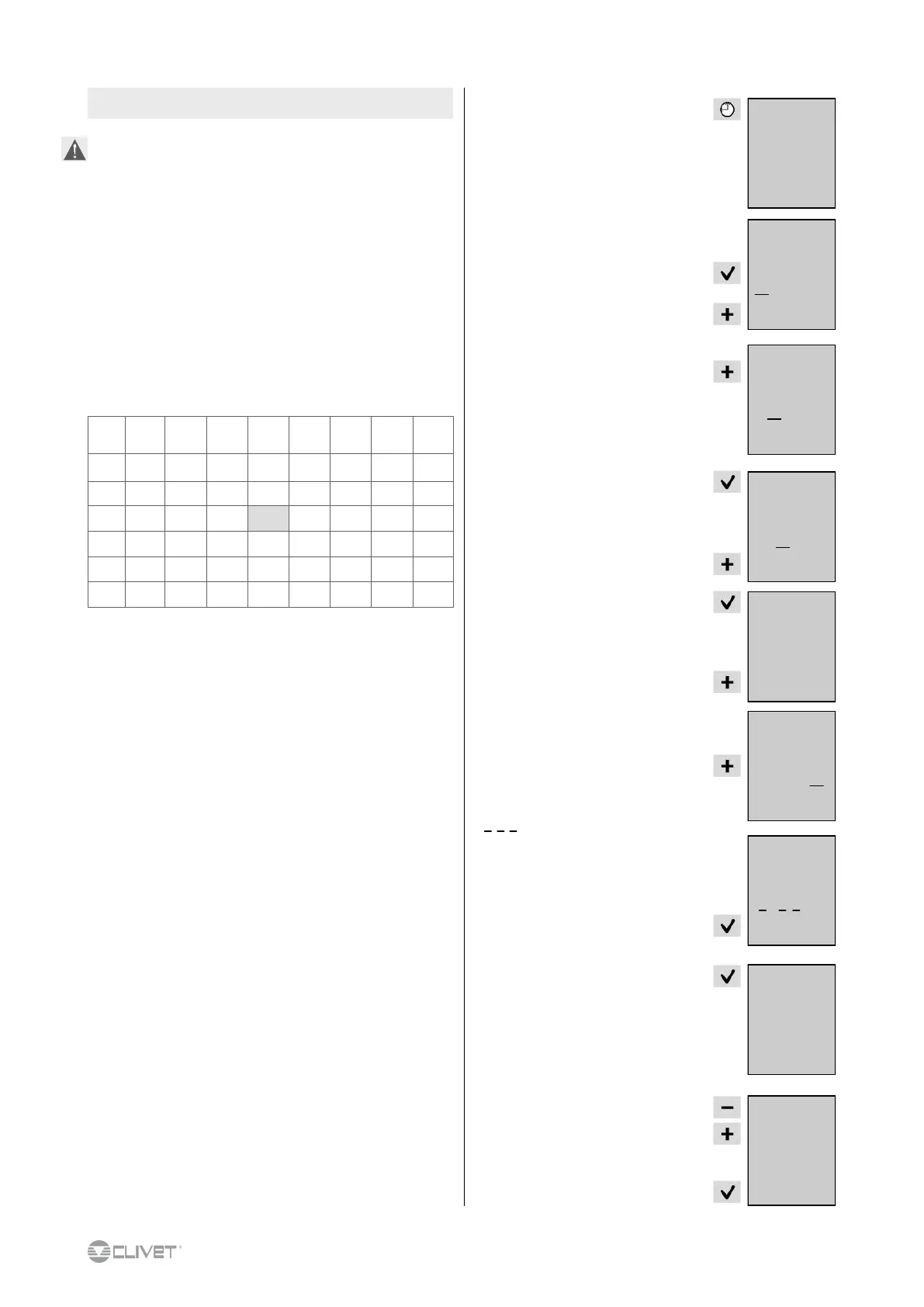
Press 2 sec
(only if the unit is not OFF)
day 1 starts flashing
to schedule day 1 press
(1 stays steady = day 1 scheduled)
to go to day 2 press
(2 starts flashing)
to schedule day 2 press
to schedule day 3 press
(3 starts flashing)
press
to schedule day 4 press
(4 starts flashing)
press
16.3 C°
17:00
1
1 2
1 3
1 3 4 7
8.6 SCHEDULER
It is possible to set up to 7 schedules (1 for every day of the
week)
It is possible to set up to 6 status changes for each day (On, Off,
Eco, Fan).
In the days not included in the schedule, the unit maintains the
most recent status defined in the schedule. Example:
Monday scheduled, 23h unit in ECO mode
Tuesday not scheduled, the unit remains in ECO mode
Scheduling example:
7 starts flashing
to confirm selected days press
1 3 4 starts flashing
press
press
(ref. A)
-- starts flashing
set
- time of the event
press
Enable scheduler ( 8.1 menu parametres)
Time Event
1
Monday
2
Tuesday
3
Wedne-
sday
4
Thursday
5
Friday
6
Saturday
7
Sunday
05:30 1 FAN
-
FAN FAN
- - -
08:00 2 ON
-
ON ON
- - -
13:00 3 FAN
-
ON FAN
- - -
15:00 4 ON
-
ON ON
- - -
18:00 5 ECO
-
ECO ECO
- - -
21:00 6 OFF
-
OFF OFF
- - -
Sequence of operations.:
Chose the days
(e.g. 1 = Monday, 3 = Wednesday, 4 = Thursday)
1. set event 1 time
2. set event 1
3. set event 2 time
4. set event 2
5. repeat for the other events (max. 6)
6. to insert other scheduling (max. 7) repeat from step 1 to 6
The most recent schedule saved overrides the existing one. For
instance, if a day is included in two different schedules, the most
recent one saved prevails.
1 3 4
000
--:--
1 3 4
000
05:--
1 3 4


 To Next Page