GRMON3-UM
June 2019, Version 3.1.0
57 www.cobham.com/gaisler
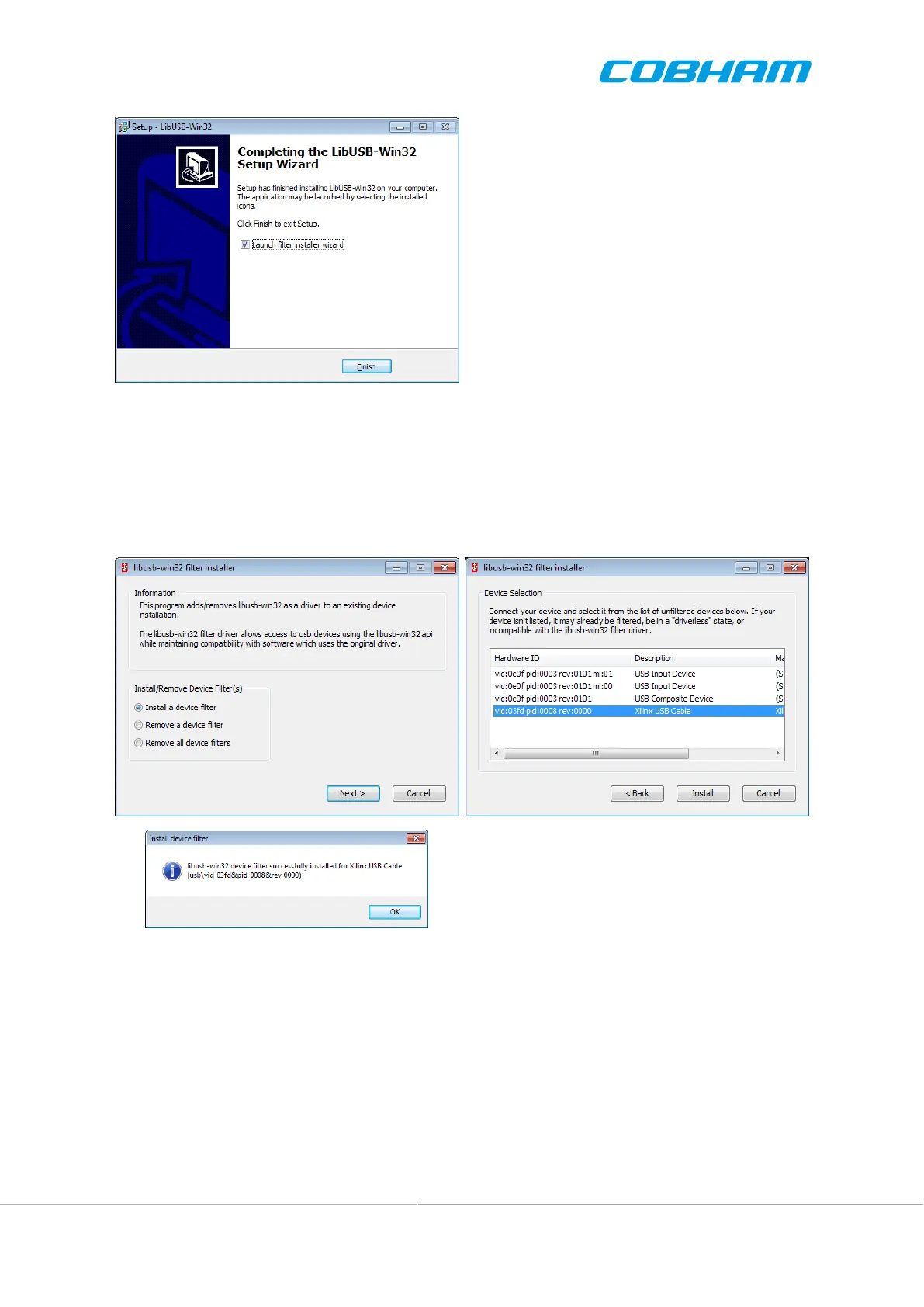
Figure 5.1.
4. At the first dialog, as seen in Figure 5.2, choose 'Install a device filter' and press Next.
5. In the second dialog, mark the Xilinx USB cable. You can identify it either by name Xilinx USB Cable
in the 'Description' column or vid:03fd in the 'Hardware ID' column. Then press Install to continue.
6. Press OK to close the pop-up dialog and then Cancel to close the filter wizard. You should now be able to
use the Xilinx Platform USB cable with both GRMON and iMPACT.
Figure 5.2.
The libusb-win32 filter installer wizard may have to be run again if the Xilinx Platform USB cable is connected
to another USB port or through a USB hub.
5.3.3. Altera USB Blaster or Byte Blaster
For GRLIB systems implemented on Altera devices GRMON can use USB Blaster or Byte Blaster cable to connect
to the system. GRMON is started with -altjtag switch. Drivers are included in the the Altera Quartus software,
see Actel's documentation on how to install on your host computer.
The connection is only supported by the 32-bit version of GRMON. And it also requires Altera Quartus version
less then or equal to 13.



 To Next Page