Chapter 3: Connectors & controls
12 Connectors
DC Power input 12–24 V DC (PWR)
The DC Power input connects to a DC supply with 12—24 V DC nominal
(10.8 to 31.2 V DC). The Power connector is a custom connector; a
matching cable with connector is included in the box.
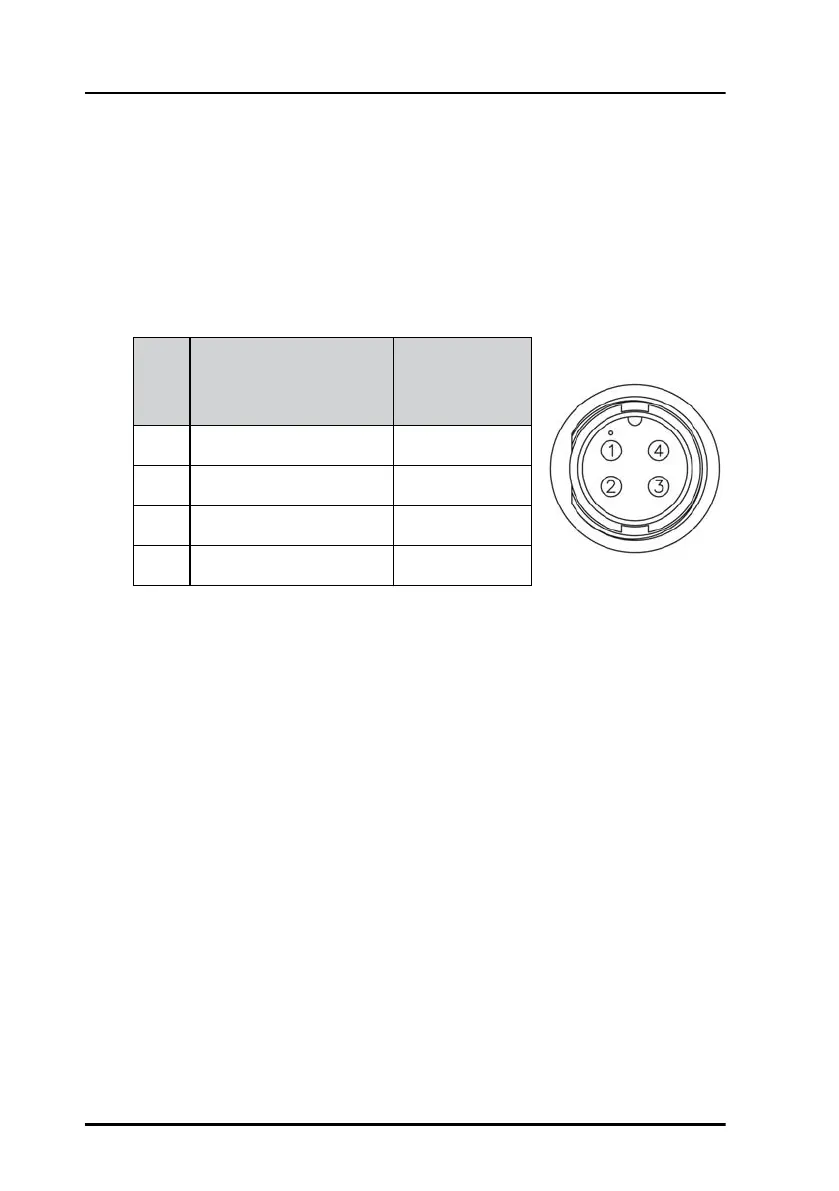
The figure and table below show the connector outline on the Control
Panel, pin assignments and wire color in the power cable.
Connecting DC power
Connect DC+ (red wire) to DC out + from your DC supply.
Connect DC- (black wire) to DC out - from your DC supply.
Do not connect the white wire nor the blue wire in the power cable, unless
you want to use the Remote on function or the on/off control function.
Pin Pin function
Wire color
in power
cable
1 DC+ (10.8 - 31.2 V DC) Red
2 DC- (0 V DC) Black
3 ON_IN White
4 ON_OUT Blue
Front view on Control
Panel lock, 4 pin male


 To Next Page