Smart
Tach
less Mode
Smart
Tach
less
Mode is available
only
if a tach signal
has never been learned to the
system and when activated
will automatically
change the Tach Mode feature
in
option
programming to Tachless without the need to enter the feature programming mode.
1.
Activate the remote start. The parking
lights
should begin flashing 7
times indicating no tach
signal
has been learned.
2.
Within the 7
flash
time period, press and
hold
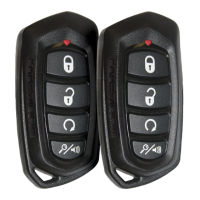
the
0
button.
3.
The system
will
chirp 1 time indicating the system is now
in
tachless
mode.
Feature
Descriptions
Feature
Bank
2-
Security
1
-Silent
Choice:
Controls the normal arm/disarm chirps
of
the security system.
ON
-
Silent arming/disarming upon first press
of
lock/unlock, pressing lock/
unlock a second time
will
activate the arm/disarm chirps respectively. The
system will only
sound the arm/disarm chirps upon a second press
of
the
lock/unlock
buttons.
OFF -
normal
arm/disarm chirps upon the first press
of
lock/unlock.
2 - 8
Not
available
on
this
model.
9 -
OBI
Port
Protocol:
Determines the protocol type
in
which the
OBI
port uses to
interface with external modules.
OBI
Protocol
ADS
Protocol
10 - Not
available
on
this
model.
11
-
L.E.D.
Output
when Armed:
Control
of
the LED when the
system
is
armed
I
locked.
ON
- LED
will
flash when system is armed
I
locked
OFF-
LED
will not
flash
when system
is
armed
I
locked. Only
applies to
normal operation (armed/locked) and does not affect programming,
valet
mode, diagnostics, passive
lock
countdown or PTN.
2014
Voxx Electronics Corporation.
All
rights reserved.
19



 To Next Page