FILTERBREW & SERVING CONCEPT
15
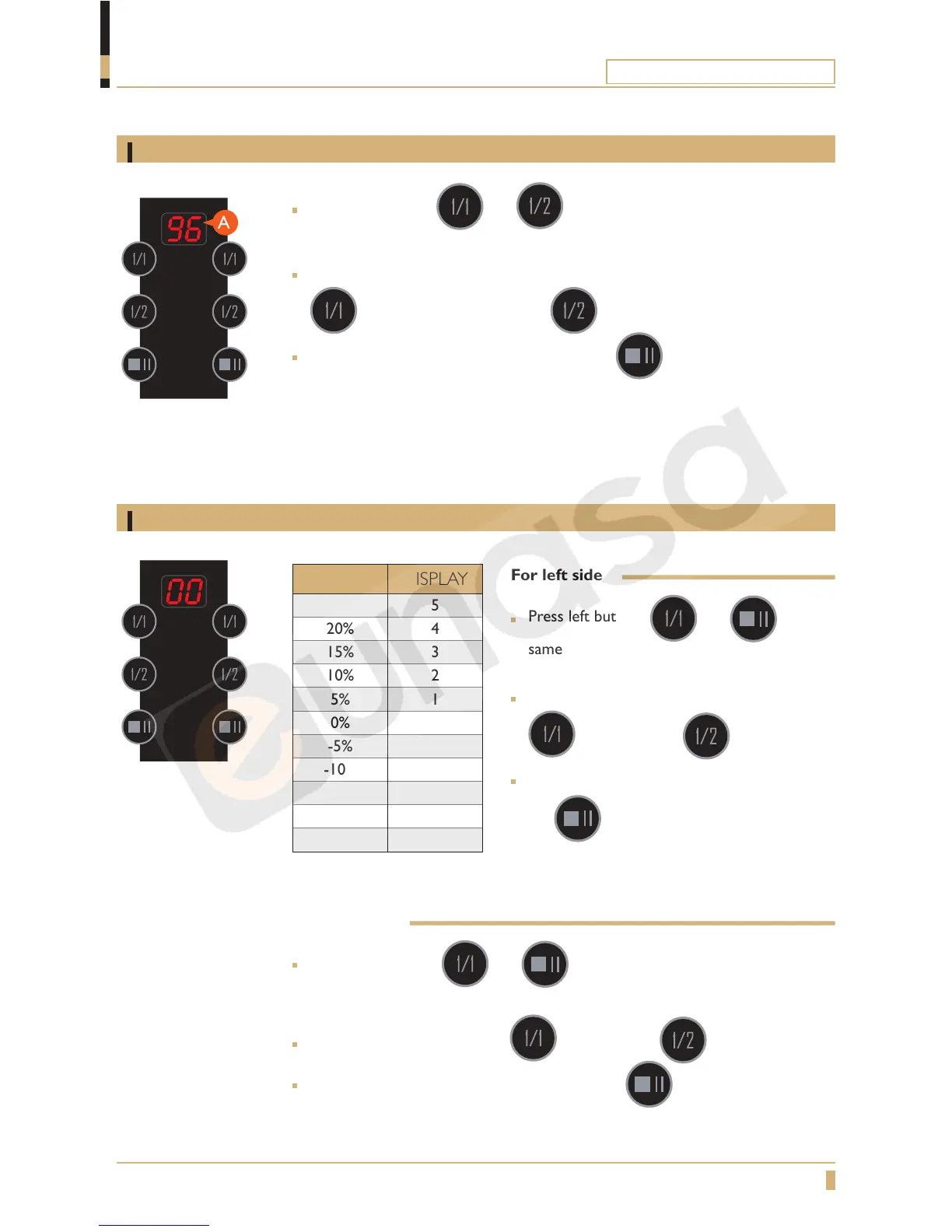
Adjusting water temperature
Adjusting water quantity
Press left buttons and at the same time for 5 seconds until
you hear1 beep. Display shows the present setting(A).
Adjust with the left buttons
(increase water temp.) and (decrease water temp.)
Confirm the new settings by pressing the left button once.
70°
0
C = min. temperature.
96°
0
C = max. temperature.
For left side
Press left buttons and at the
same time for 5 seconds until you hear 3
beeps. the display shows the current setting.
Adjust with the left buttons
(increase) and (decrease)
Confirm the new settings by pressing the
left button once.
For right side
Press right buttons and at the same time for 5 seconds until
you hear 3 beeps. the display shows the current setting.
Adjust with the right buttons (increase) and (decrease)
Confirm the new settings by pressing the right button once.
ADJUST DISPLAY
25% 5
20% 4
15% 3
10% 2
5% 1
0% 0
-5% -1
-10% -2
-15% -3
-20% -4
-25% -5
PROGRAMMING
To w e r





 To Next Page