6 DataMan 100 Quick Reference Guide DataMan 100 Quick Reference Guide 7
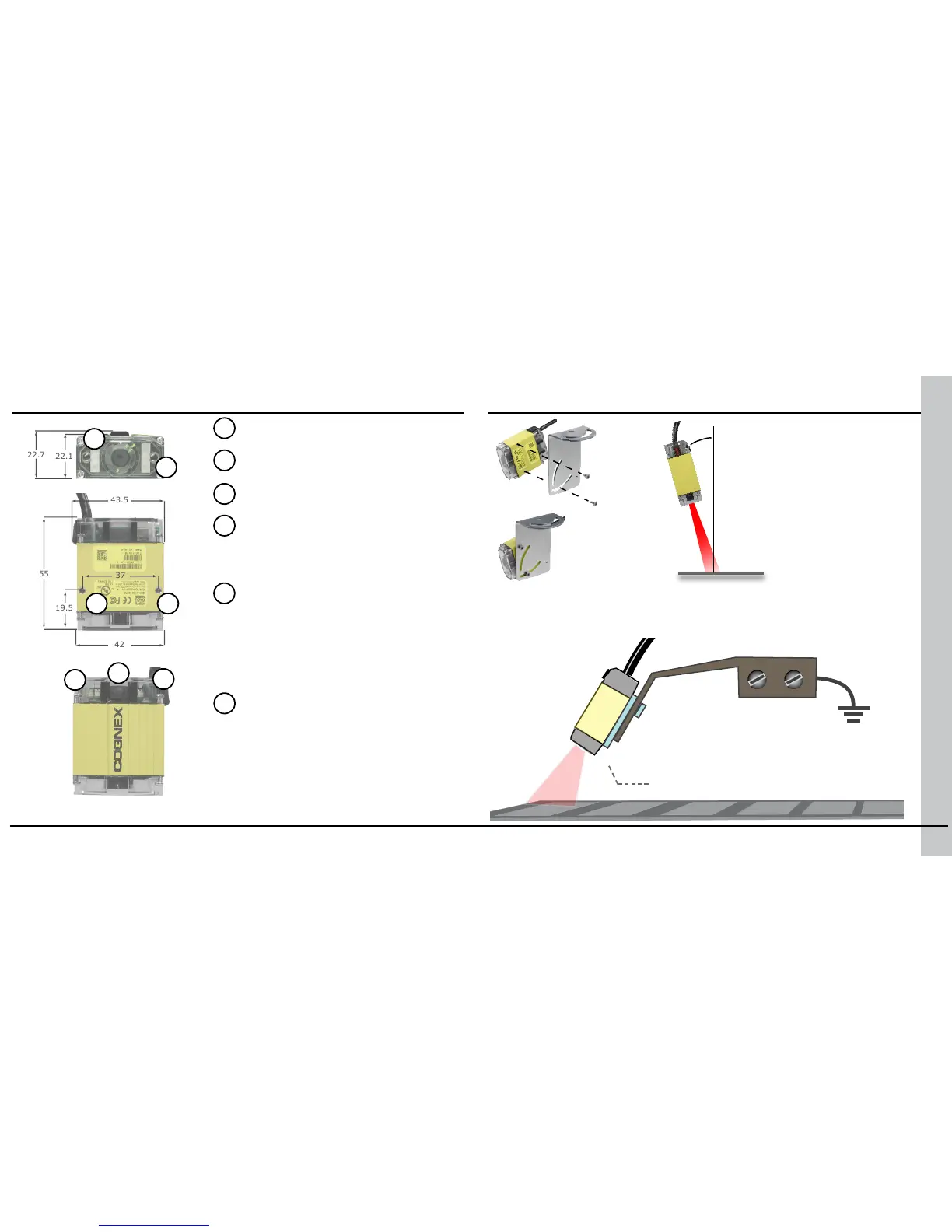
Product Overview Mounting
Aiming LED
Mounting holes (M3 x 3.5)
Status LED
• Red: no read
• Green: read
Pushbutton
• Push to read
• Push and hold 3 seconds
to train
• Use Setup tool to program
additional button functions
System LED
• Green: Trained
• Yellow: Untrained
• Steady: System OK
• Slow blink: Connected to Setup
tool
• Fast blink: Data transfer
Illumination LED
Angled Mounting
Mounting the DataMan
100 at a slight angle (15°)
can reduce reections and
improve reader performance.
DataMan 100 Ground Isolator
with non-conductive screws.
Use a DataMan 100 Ground Isolator to prevent mounting your DataMan 100
to conductive material that can provide an electrical path to ground, which
may cause data loss or unreliable operation.












 To Next Page