EasyManua.ls Logo

Cognex DataMan 100 - Setting the Focus Position; Field of View

Cognex DataMan 100
22 pages
Print Icon
To Next Page IconTo Next Page
To Previous Page IconTo Previous Page
Loading...
10 DataMan 100 Quick Reference Guide DataMan 100 Quick Reference Guide 11
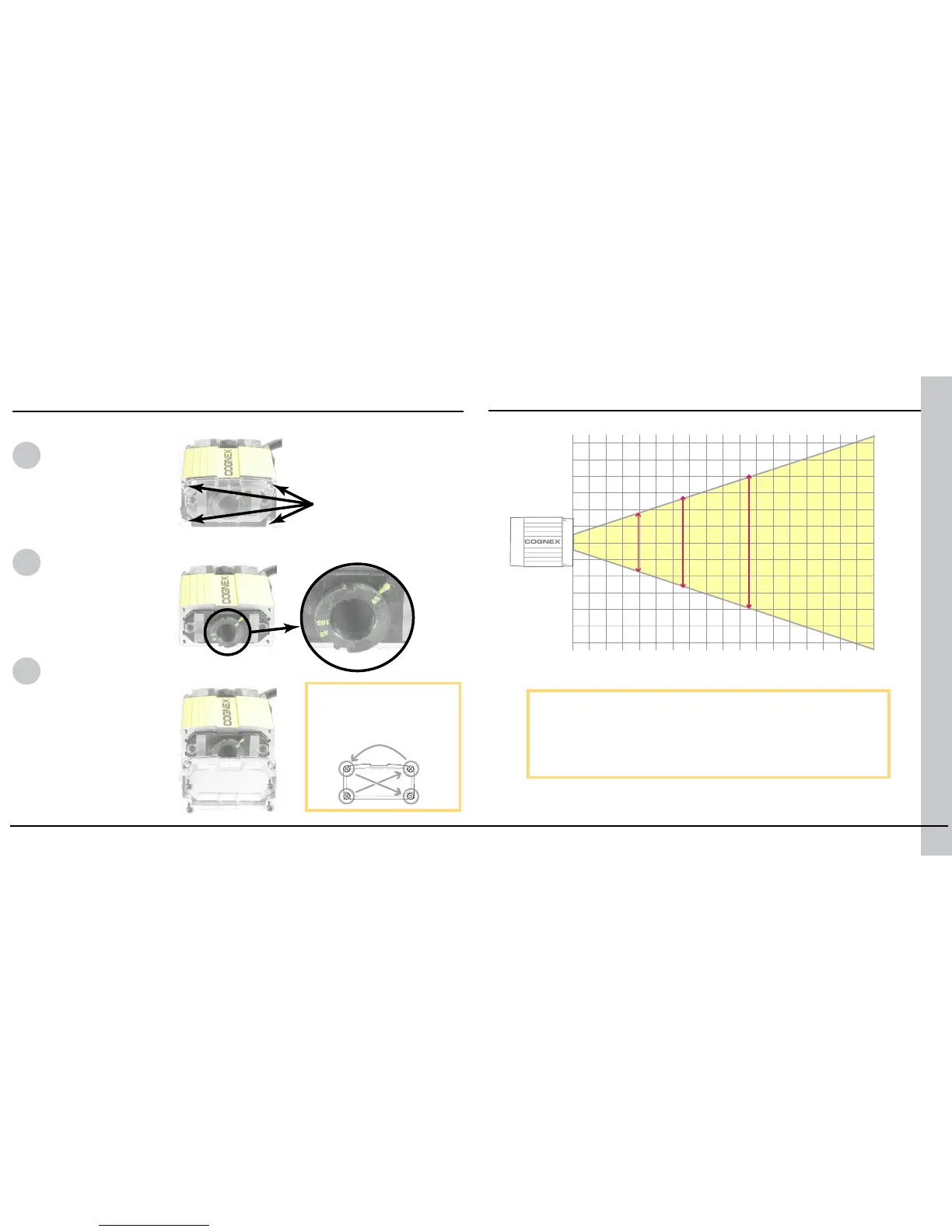
DataMan can operate in one of three distance ranges. To set the focus position:
Field of View
Remove screws
and lens cover.
Set focus
position.
Replace lens cover and
screws.
This chart shows the horizontal eld of view for the
DataMan 100 and DataMan 100-LA at a range of working
distances.
The horizontal and vertical eld of view is shown for
working distances of 40mm, 65mm and 105mm.
Setting the Focus Position
(40 mm)

COGNEX
mm
20
20
20
40
40
40
60
60
60 80 100 120
34 x 22 50 x 32 77 x 49
140 160 180
1
2
3
Tighten screws in order
shown. Maximum torque
for the cover screws is 9
N-cm (0.8 pound-inch).
The size of the holes in
the standard lens cover
is M2x6. For SHD, it is
M2x18. Maximum screw
head diameter is 4 mm.

Other manuals for Cognex DataMan 100

Related product manuals