16 DataMan 100 Quick Reference Guide DataMan 100 Quick Reference Guide 17
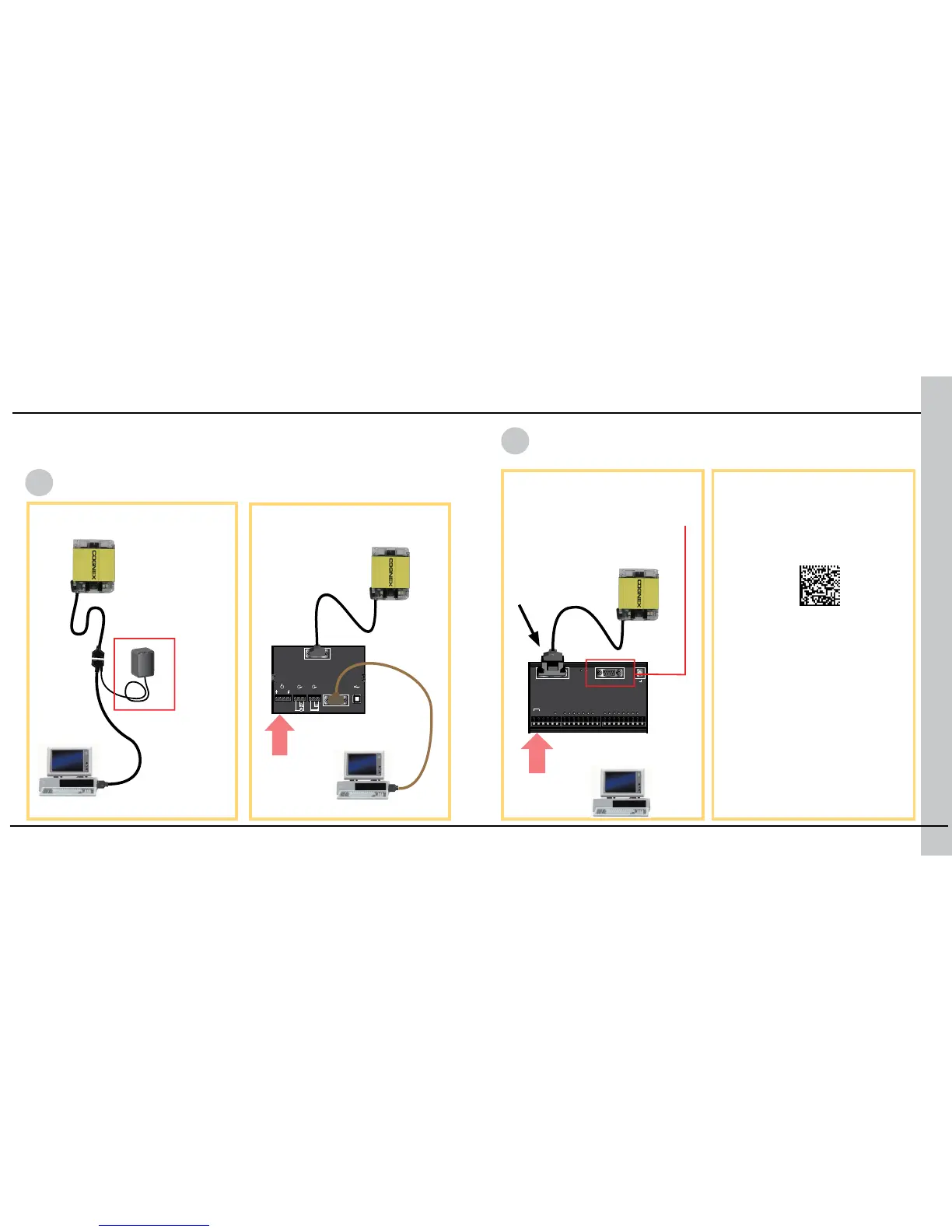
You can connect the DataMan 100 to a PC or other device over a standard
RS-232 serial connection. NOTE: You must supply external power to use this
connection type.
RS-232 Serial
See page 27 for codes to set
baud rate and other RS-232
parameters.
DM100-IOBOX-000
DM100-1400-000
24 VDC
24 VDC
DM100-PATCH-000
...connecting directly to the
PC:
...connecting to the PC
through basic I/O module:
null modem
cable
NOTE: Serial connections from
the extended I/O module to the
PC are only supported for short
(<60 bytes) data transmissions.
You must specify
DM100-1400-000 in the
Discrete I/O Settings pane.
Make the connection by...
Scan the connection code
RS-232 Connections
DM100-
RS232-000












 To Next Page