10
Chapter 2: Getting Started
Controls, Indicators, and Connectors
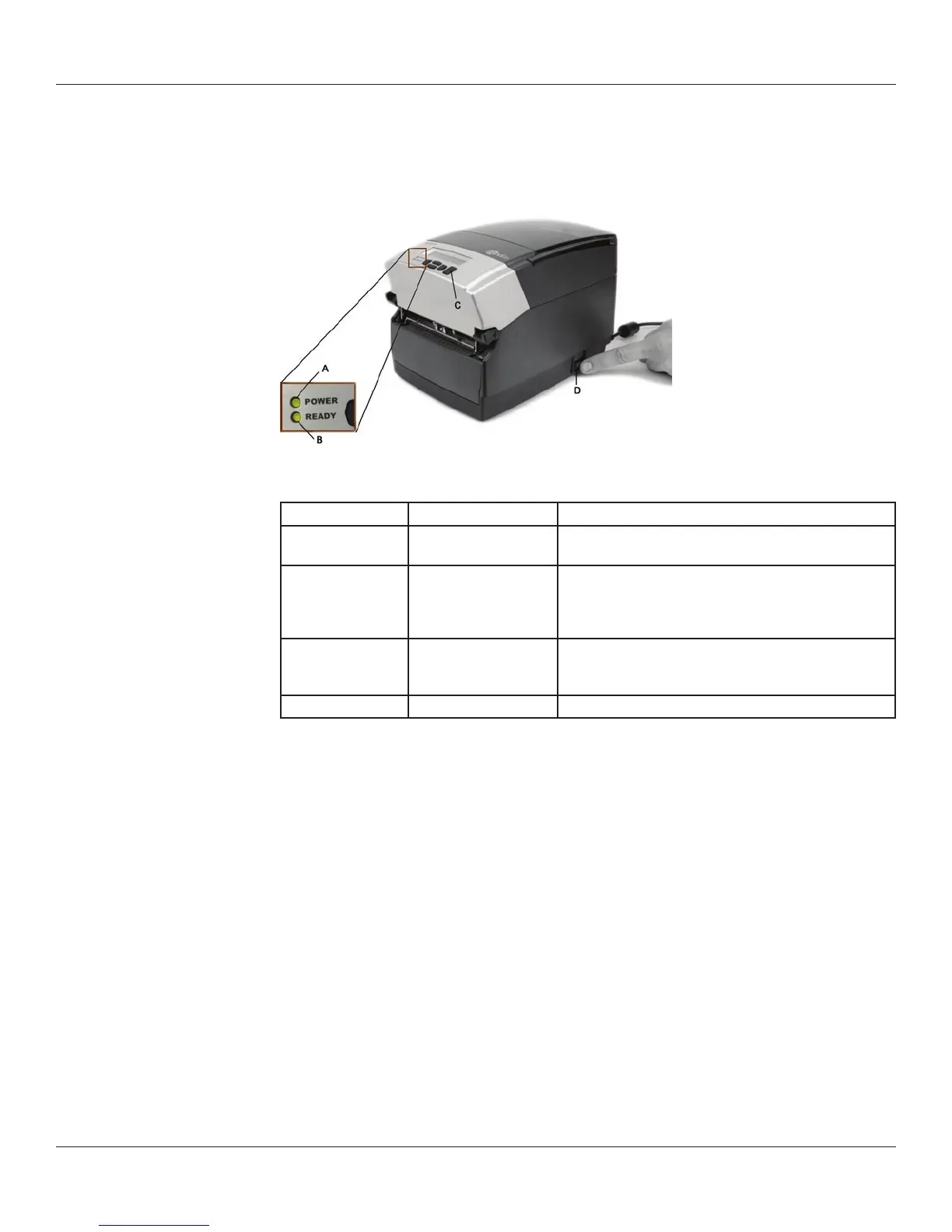
Controls and indicators for the C Series printer are located on the front panel and right
side of the printer. Cxi printers also have an LCD display on the user interface.
Figure 2-12. C Series Printer Controls and Indicators
Device Primary Function Use
A - POWER light Shows power status ON – printer on and ready to print
OFF – no power applied
B - READY indicator Shows printer status GREEN – printer ready to accept data
RED – printer error, empty media roll, or paused opera-
tion during batch mode processing
OFF – no power applied
C - FEED button Advances print media Press to advance media
Press and hold while turning unit on to initiate self test
and print current conguration
D - ON/OFF switch Controls printer power Press to turn printer on and o
Connecting Data Cables to the Printer
Connect one of the following data cables to the matching located on the back of the C
Series printer:
Ethernet cable •
USB cable (compatible with both USB-A and USB-B)•
CognitiveTPG custom parallel cable •
CognitiveTPG custom serial cable or serial adapter cable•



 To Next Page