20
4.6. RAMP-SOAK adjustment
The Ramp-Soak function is available ONLY for models with standard PID-Fuzzy algorithm (not with pattern
set point)! To program the RAMP function, follow the procedure below:
• From level 4, set SEt2 = ХХХ1 to enable AL3 access
• From level 4, set SEt4 = ХХХ1 to access ALd3
• From level 3, set ALd3 = 9 to enable RAMP function - it will replace AL3 by rAMP
• From level 1, adjust the rAMP slope from 00.00 to 99.99 [°C/min]
To program the SOAK function, follow the procedure below:
• From level 3, set ALd1 (ALd2) = 19 to use SOAK timer function
• From level 1, adjust the AL1 (AL2) Soak time from 00.00 to 99.59 [h.min]
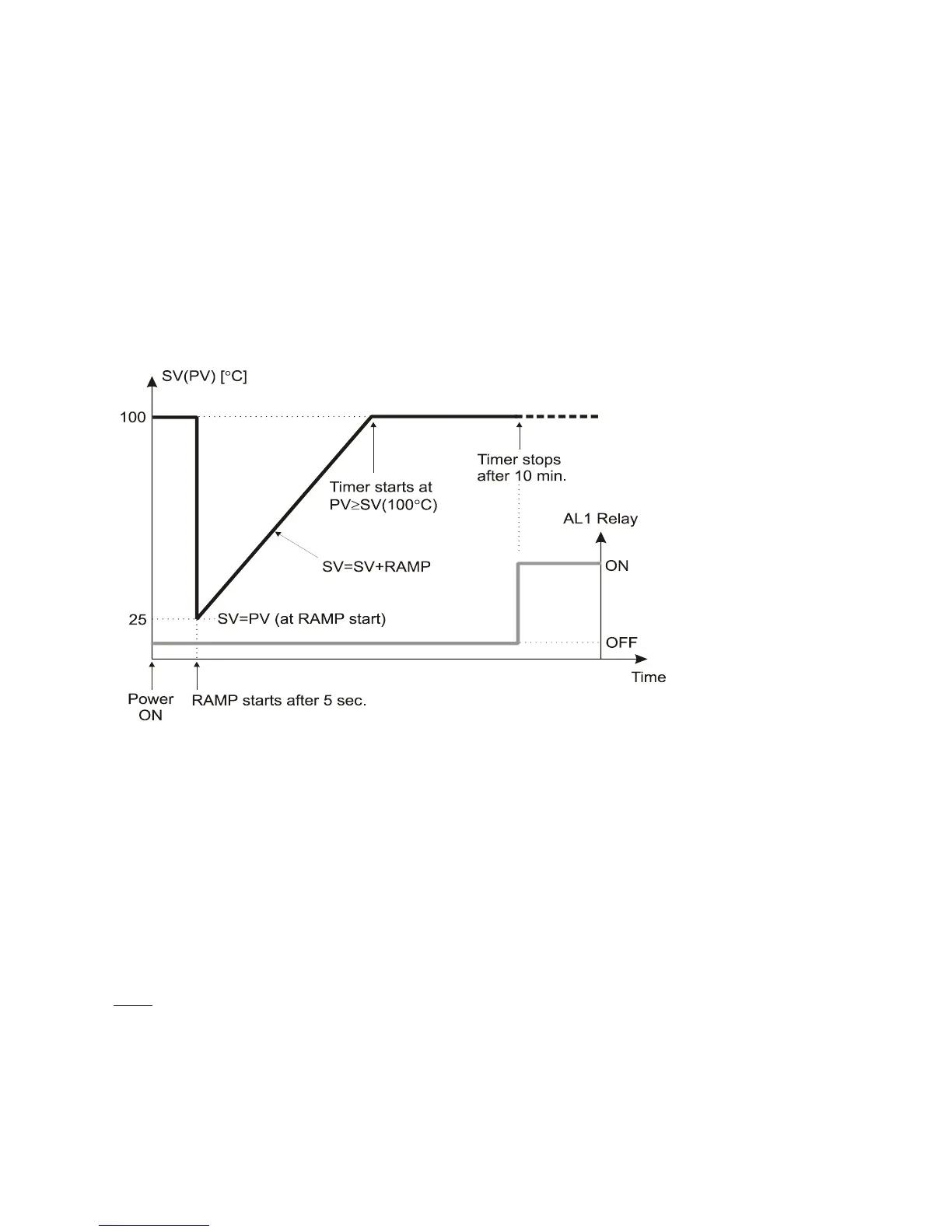
The following example illustrates RAMP-SOAK function:
• Let SV = 100 °C, rAMP = 10.00 °C/min, AL1 = 00.10 min, PV = 25 °C
4.7. Profile (pattern) control programming
The profile control with is available ONLY for models with PID-Fuzzy algorithm with pattern set point!
To program the profile control, follow the procedure below:
• From level 4, set SEt8 to adjust profile program repeat, start and power failure options
• From level 4, set SEt9 to adjust time units
• From level 3, set SEtA to adjust profile program run or end alarm
• From level 3, set WAit
to adjust WAIT option
• Set the alarm type "07" and alarm functions as described in 4.2
• From level 1 follow the steps below to create a pattern, consisting of RAMP and SOAK segments
(up to 2 patterns with 8 segments or 1 pattern with 16 segments can be created)
Note: If you want the program to stop before the 8
th
or 16
th
segment just set the last segment OUtto '0'.
4.7.1. Keyboard operating commands
• Program starts by pressing S. PRO front panel LED starts to blink
• Program holds by pressing T (pause). PRO stops blinking but lights
• To jump to previous segment press S+SET
• To continue a stopped program at segment end (WAit message) press S+SET
• Program stops (RESET) by pressing T+SET. PRO front panel LED will be off.


 To Next Page