18
c
a
b
d
a
b
c
7) App Directories Configuration
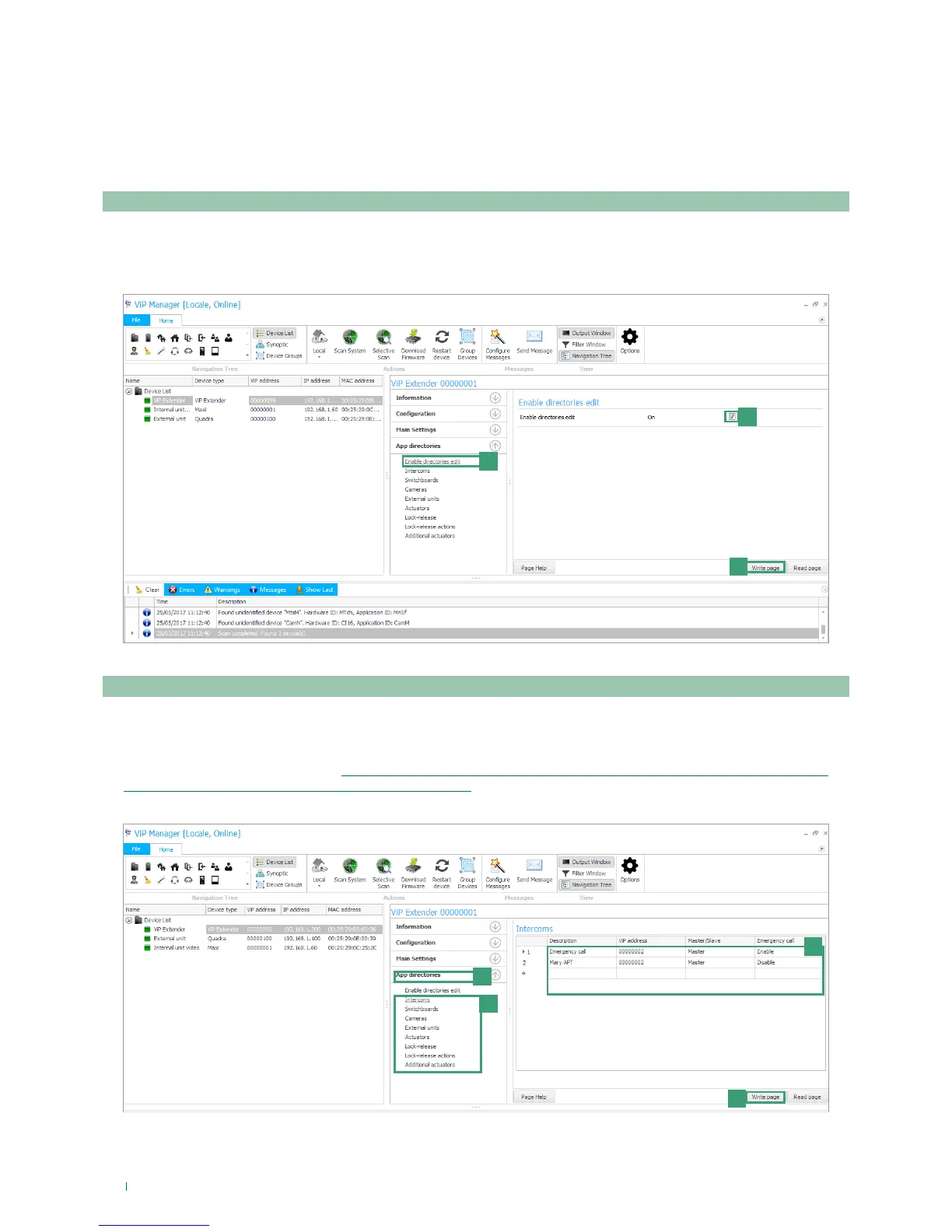
1. Select art. 1456 / 1456S and select App directories/Enable directory modifications [a].
2. Tick Enable directory modifications [b]
3. Press Write page [c] to save the current settings.
1. Select art. 1456 / 1456S and select App directories [a]
2. Select the element you wish to add to the directory (Intercoms, Switchboards, Cameras, External Units, Actuators, Lock
releases, Lock release actions, Additional Actuators) [b].
3. Complete the mandatory fields (see: “Intercoms”, “Switchboards”, “Cameras”, “External Units”, “Actuators”, “Lock-
release”, “Lock-release Actions”, “Additional Actuators”) [c].
4. Press Write page [d] to add the element to the directory.
Enable directory modifications
Directory enhancement
In the section “App directories” it is possible to configure the directories and enable the possibility to make modifications
visible on the individual devices.
The directory can contain elements of different types: Intercoms (addresses of apartments or individual devices), Switchboards,
Cameras, External Units, Actuators, Lock releases, Lock release actions, Additional Actuators.



 To Next Page