23
Backup and restore
a
b f g
c d e
The backup function allows you to save the current configuration, which can then be subsequently called up at any using the
restore function.
The backup and restore functions are only available from the configuration web pages (to access the web
pages, see Connection to the configuration web pages)
1. Connect to the web pages of the device (in local or remote) and log in.
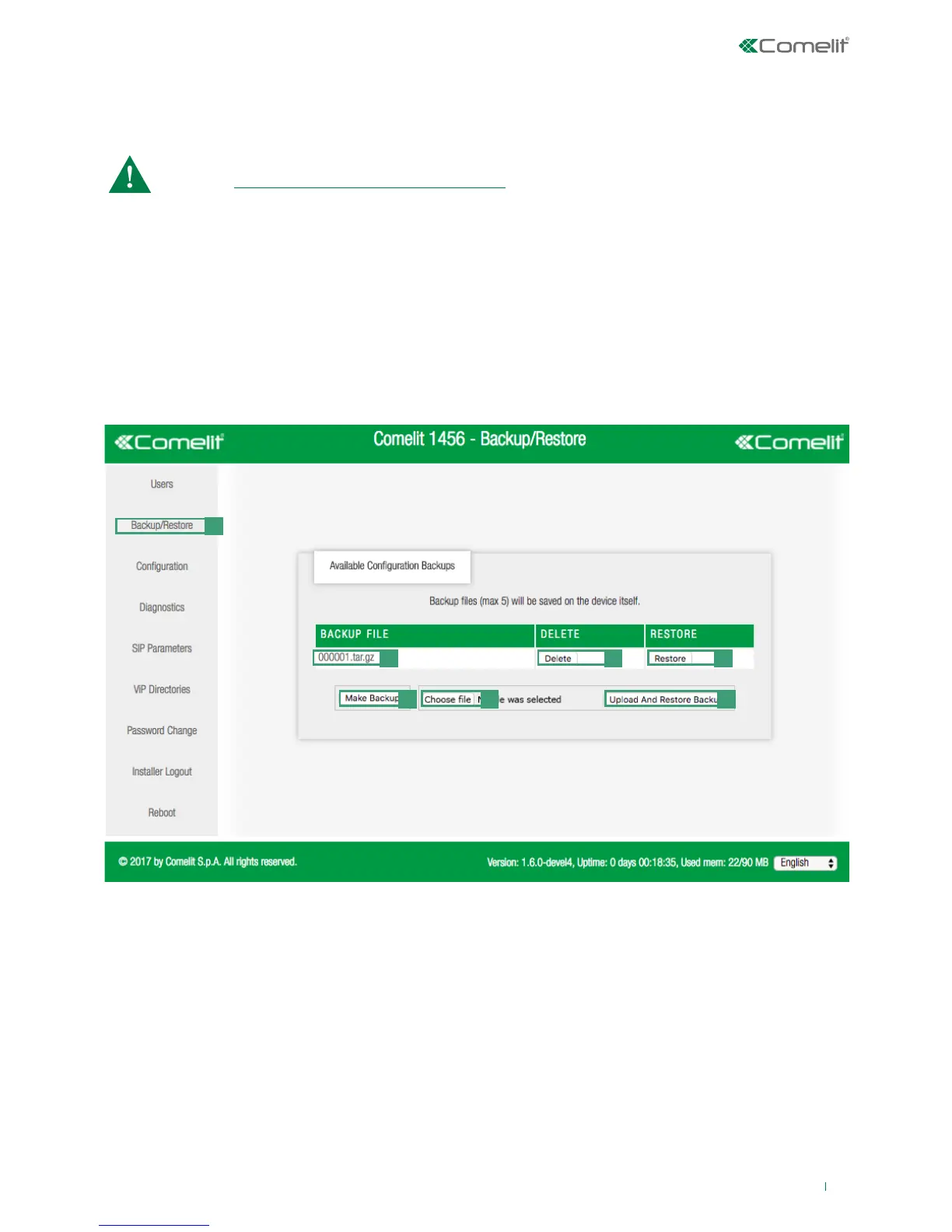
2. Access the Backup/Restore section by pressing Backup/Restore [a]
3. Press Make Backup [b] to create a backup of the current configuration.
» A file with the extension.tar.gz will appear in the window
f Press the file name [c] to save the configuration file in the downloads folder on your computer
f Press delete [d] to delete the configuration file
f Press restore [e] to restore the configuration file
f Press Choose file [f] to load a configuration file previously saved on your computer, confirming by pressing Upload
and restore backup [g]



 To Next Page