22
a
b
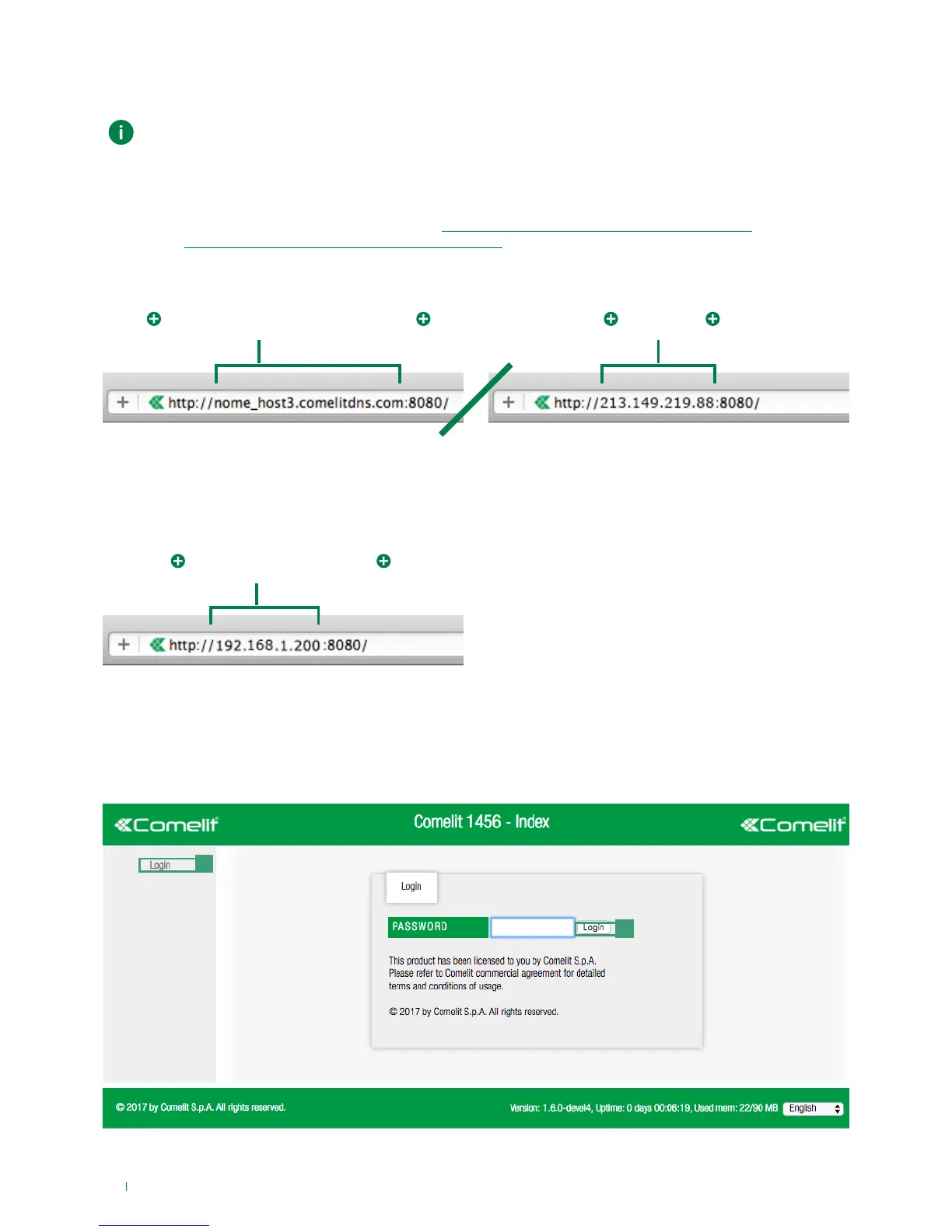
2) Login
1. Press Login [a]
2. Enter the installer password (default= comelit) and confirm by pressing Login [b]
http://
http://
:8080
:8080
.comelitdns.comregistered hostname
example = host_name3.comelitdns.com
public ip
example = 213.149.219.88
default = 192.168.1.200
1A) Remote connection
1B) Local connection
√ it is necessary to perform Dyn DNS configuration (see “3) DynDNS configuration for remote connection”) and open port
8080 (see “4) Port Forwarding setting for remote connection”) on the router
√ an active internet connection is also required.
1A. Enter the registered hostname or the public IP address, as in the following examples, and press enter.
√ With the PC connected via Ethernet cable to interface HOME of art. 1456 / 1456S and IP address belonging to the same
network as interface HOME.
1B. Enter the IP address of interface HOME as in the following example, and press enter.
Connection to the configuration web pages
From the web pages you can perform all of the operations available on ViP Manager.
The backup and restore function is only available on the web pages.



 To Next Page