14
a
b
c
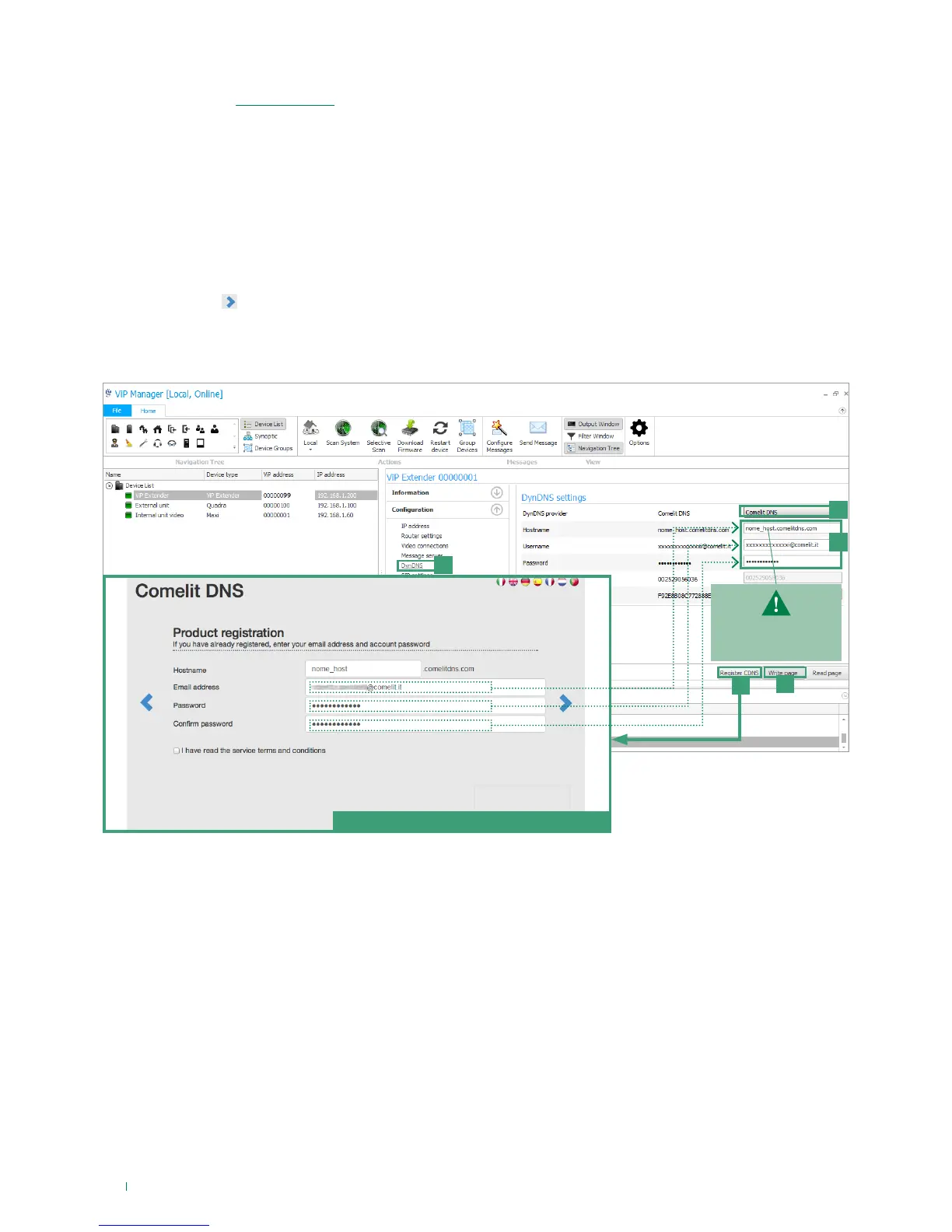
Comelit DNS registration form
e
d
write the complete host
name, for example:
nome_host.comelitdns.com
3) DynDNS configuration for remote connection
The DynDNS address (“Dynamic DNS”) allows a DNS name to be permanently associated with the IP address of the same
host, even if that address subsequently changes.
A DynDNS must be registered in order to make the 1456 /1456S accessible from a remote web page and to allow operation of
the ComelitViP remote / Comelit 1.0 application.
√ an active internet connection is also required.
1. Select article 1456 /1456S and select Configuration/DynDNS [a].
2. Select ComelitDNS [b] in order to use the free ComelitDNS service.
3. Press Register CDNS [c] to register a ComelitDNS hostname.
4. Complete the registration panel (NB: make a note of the data entered or copy and paste them directly into the configuration
page) and press
to complete the registration.
5. Enter the “hostname”, “user name” and “password” in the “DynDNS settings” screen of the ViP Manager software [d].
6. Press Write page [e] to confirm the current settings.



 To Next Page