TO THE PC
E.G. 192.168.0.30
During the system scan...
f
h
i
g
e
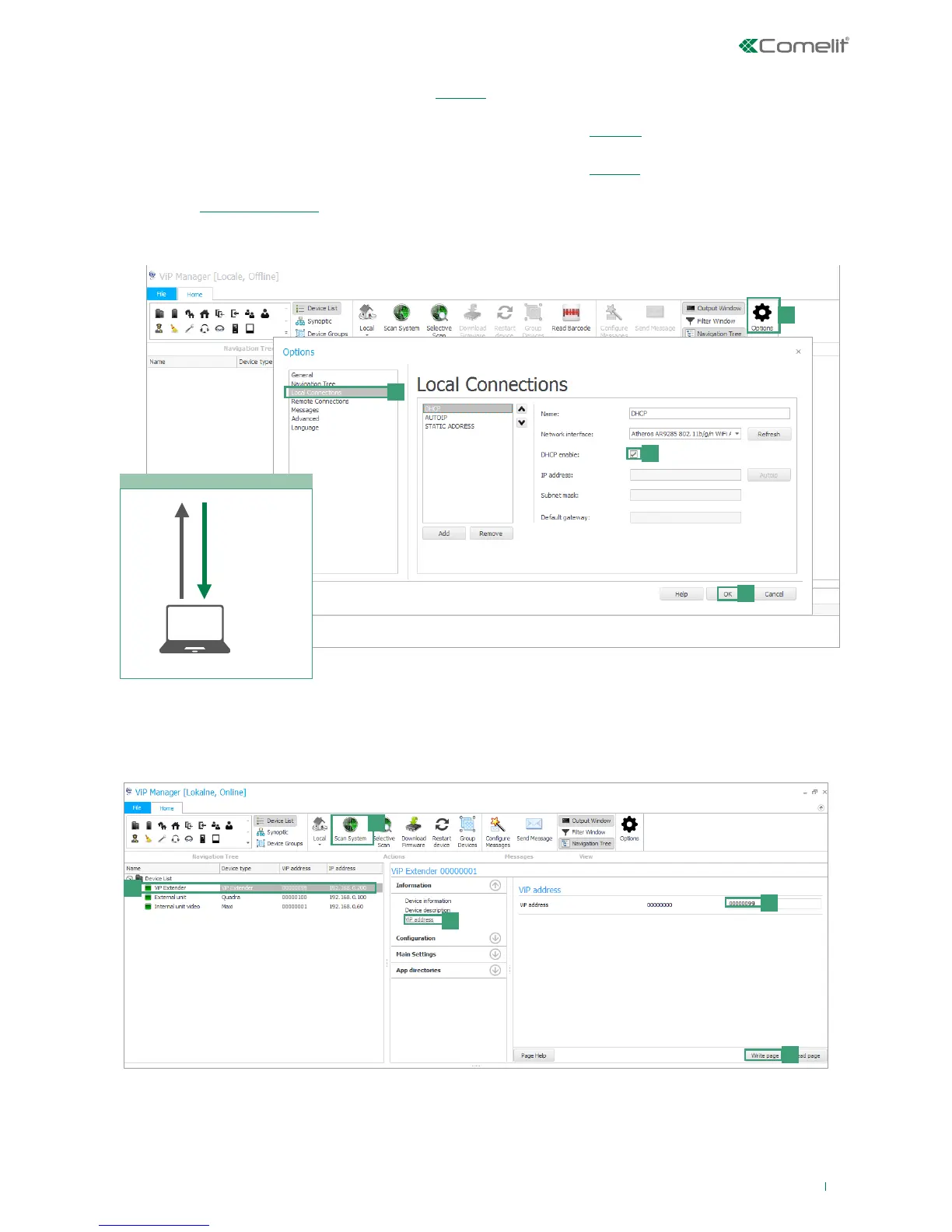
PERFORM A DHCP SYSTEM SCAN AND ASSIGN A ViP ADDRESS
Follow the procedure below to perform a system scan in “DHCP”, to locate all the devices connected to interfaces HOME and
VIP SYSTEM:
• an IP address will be automatically assigned to the devices in addressing mode “Autoip” (connected to interface VIP
SYSTEM);
• an IP address will be automatically assigned to the devices in addressing mode “DHCP” (connected to interface HOME), if
the system is connected to a server with the function active;
• devices with “Static IP address” will be identified only if they have a network address that is compatible with that of
interface HOME.
1. From Options [a] / Local connections [b] tick DHCP Enable [c] and confirm [d].
2. Launch the system scan by pressing Scan System [e].
» all the devices connected to the system will be displayed in the device list.
3. Select art.1456 / 1456S [f], select Information/ViP address [g], assign an unequivocal ViP address to the device[h] and
press Write page [i] to save the current settings.



 To Next Page