12
FLOOR VIP SYSTEM GAT E W AY
SOLO CON CAVO ROSSO COMELIT 2E7T000500
ONLY WITH COMELIT RED CABLE 2E7T000500
FIXED PO E SETTABLE POE NO POE
HOME 1 HOME 2 HOME 3 H OME 4
Art.1456
HOME INTERFACE
STATIC IP ADDRESS
192.168.0.5
192.168.0.X
192.168.0.1
ROUTER
...
Installer PC
...
e
h
g
f
m
i
n
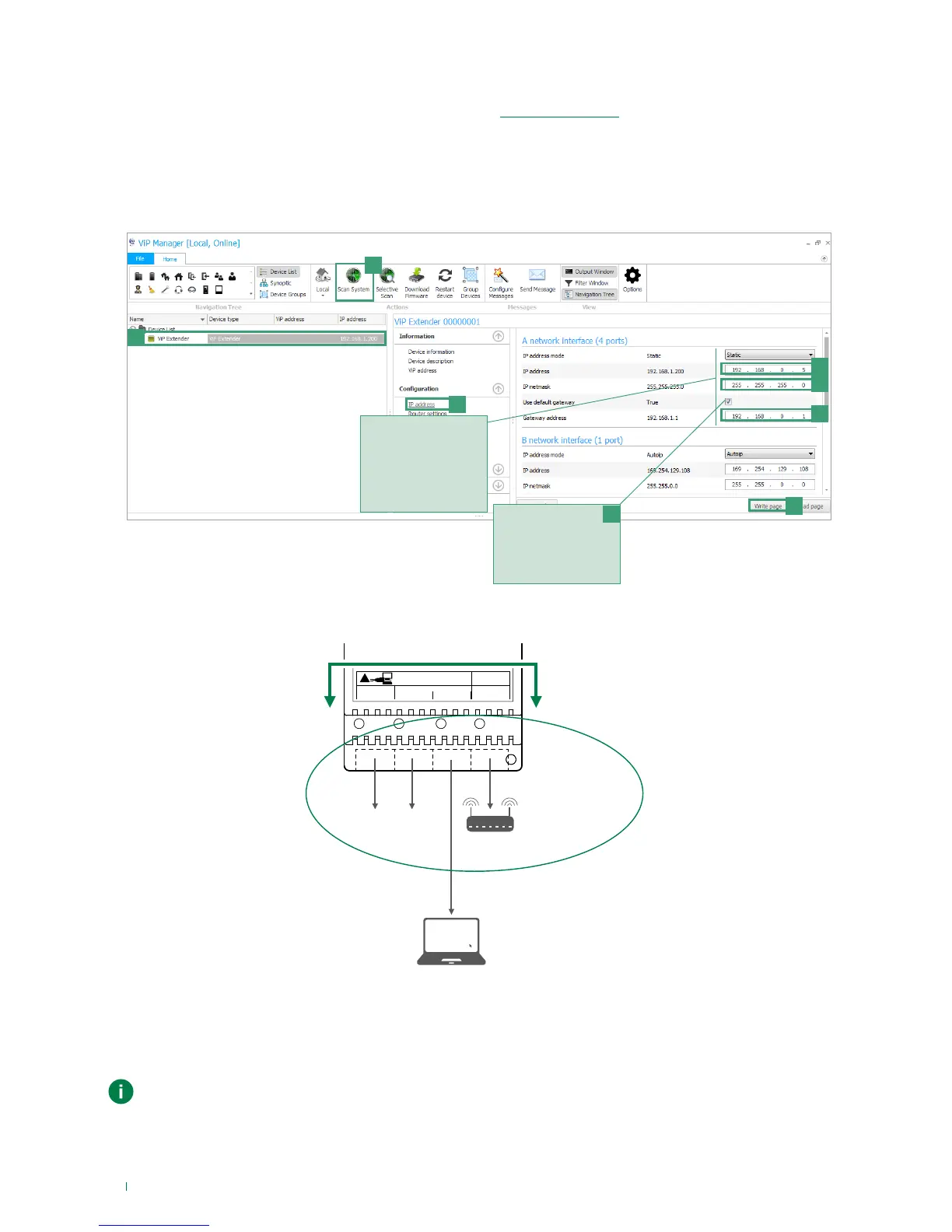
Assign to device 1456 /
1456S network settings
that are compatible with
those of the devices
connected to interface
HOME so that they can
communicate.
Enable "Use default
gateway" ONLY for the
interface connected
to the router (interface
HOME by default)
l
3. Launch the system scan by pressing Scan System [e]
» the 1456 / 1456S will appear in the device list [f]
4. In Configuration/ IP address [g] assign device 1456 / 1456S a “Static IP address” [h] and an IP netmask [i] compatible
with the system, for example IP: 192.168.0.5, netmask: 255.255.255.0 (warning: the IP address must not already be in
use).
5. Enable “Use default gateway” [l] ONLY for the interface connected to the router (interface A by default)
6. Set the gateway address [m], for example 192.168.0.1 press Write page [n] to save the current settings.
» device 1456 / 1456S will now be in the same network as the router (192.168.0.X)
In the cases of "ViP Network + Internet connection network" systems, take particular care with regard
to the network interface settings and do not configure interfaces HOME e VIP SYSTEM with the same
addresses or similar parameters: each IP address must be unequivocal, the addresses of the interfaces
HOME e VIP SYSTEM must not belong to the same subnet.



 To Next Page