26
EN
26
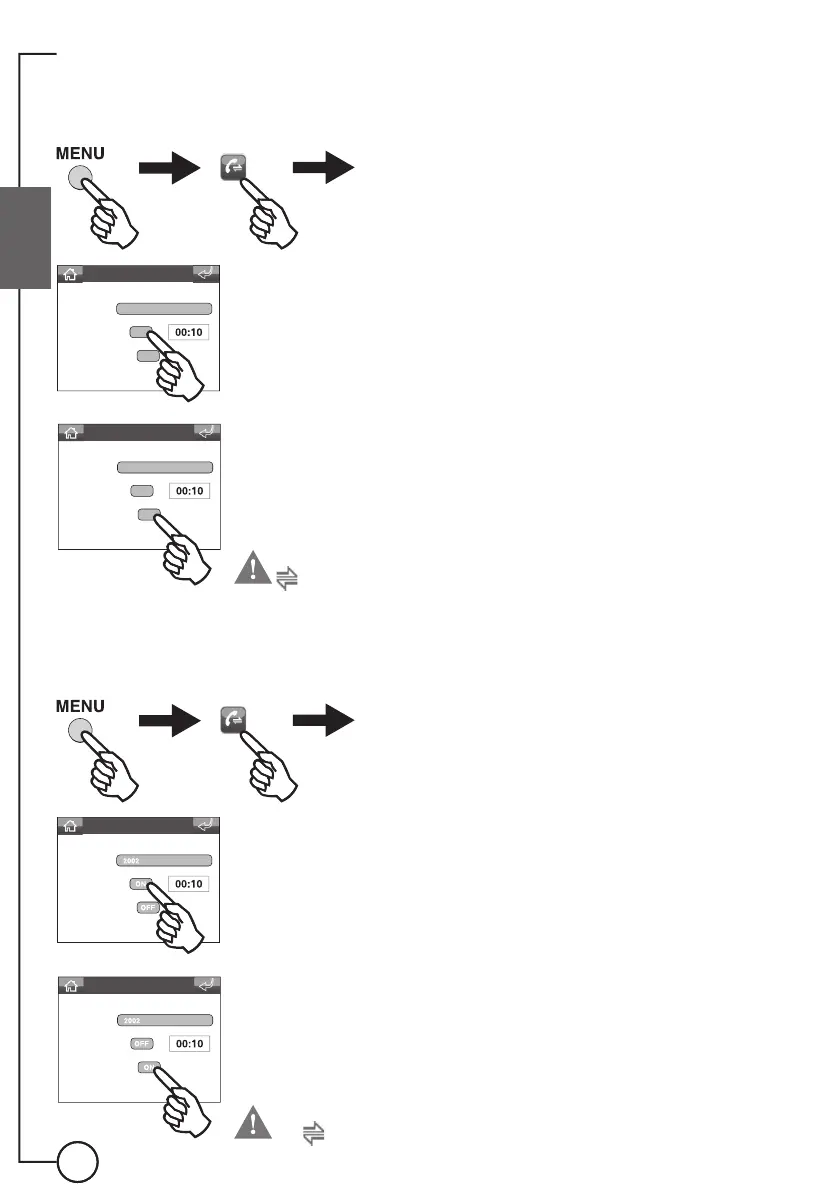
Disabling the divert calls function
Disabling of the divert calls function is indicated by the disappearance of
the
icon from the home screen.
Call divert menu
Recipient
Wait time
Divert if busy
To disable the divert on the basis of wait time
Call divert menu
Recipient
Wait time
Divert if busy
To disable the divert when the unit is already engaged in another conversation
To enable the diversion of calls to another switchboard, proceed as follows:
Enabling the divert calls function
Enabling of the divert calls function is indicated by the appearance of the
icon on the home screen.
Call divert menu
Recipient
Wait time
Divert if busy
2002
OFF
OFF
To enable the divert on the basis of wait time
Call divert menu
Recipient
Wait time
Divert if busy
2002
OFF
OFF
To enable the divert when the unit is already engaged in another conversation








 To Next Page