29
EN
29
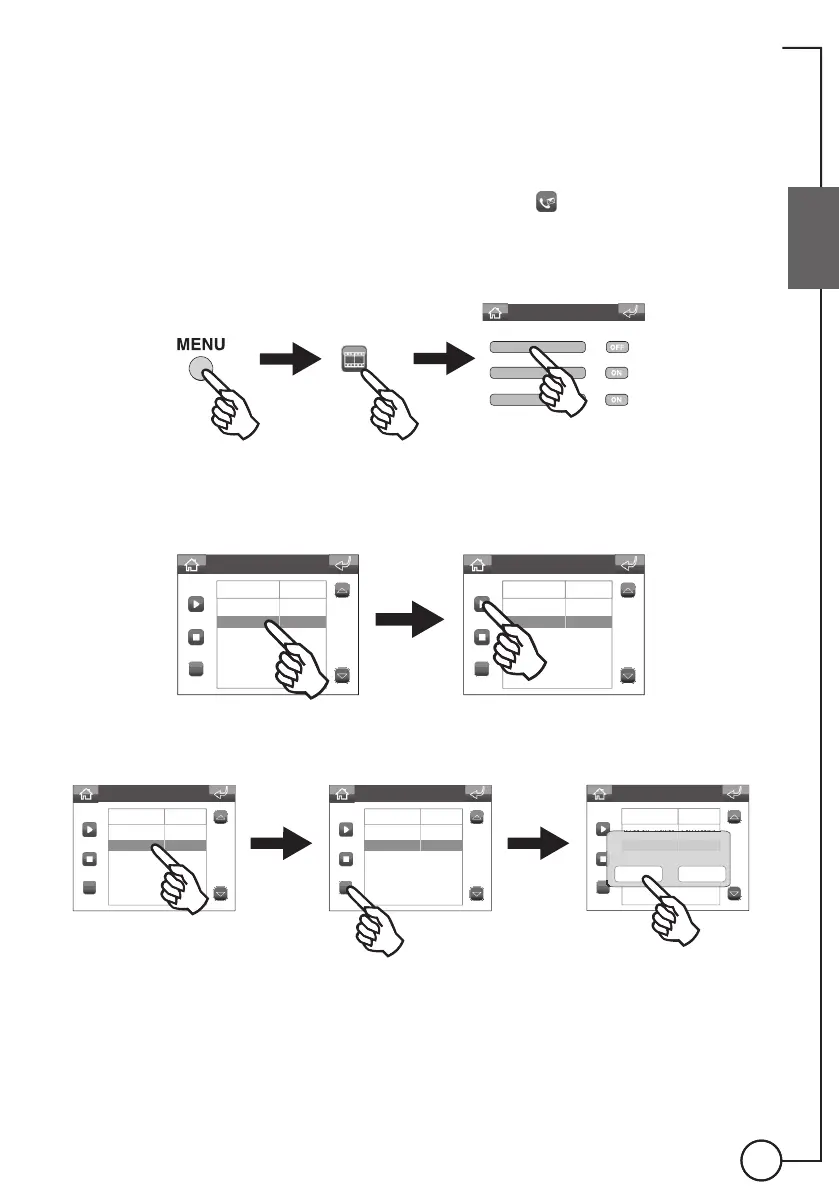
Using the Audio memory function
Accessing the Audio memory menu
You can access the audio memory menu in 2 ways:
◊ Via the Status menu: if there are any unheard messages, the
icon will appear in the Status
menu; if you press it you will be taken straight to the
audio memory menu
◊ Via the Menu: to consult the audio memory, proceed as follows:
Answering service menu
Audio memory
Entrance panel message
Internal unit message
Unheard messages in the audio memory menu are highlighted in yellow.
Listening to a message
C
27.11.13_7:40:11 ENTRANCE
25.11.13_8:21:15 ENTRANCE
C
27.11.13_7:40:11 ENTRANCE
25.11.13_8:21:15 ENTRANCE
Audio Memo List
Time Name
Audio Memo List
Time Name
Deleting a message
C
27.11.13_7:40:11 ENTRANCE
25.11.13_8:21:15 ENTRANCE
C
27.11.13_7:40:11 ENTRANCE
25.11.13_8:21:15 ENTRANCE
C
27.11.13_7:40:11 ENTRANCE
25.11.13_8:21:15 INGRESSO
.
.
_
25.11.13_8:21:1
INGRESS
Confirm deletion of
selected memo?
YES NO
Audio Memo List
Time Name
Audio Memo List
Time Name
Audio Memo List
Time Name








 To Next Page