2828
EN
2
4
3
3
5
1
-V
+V
optional
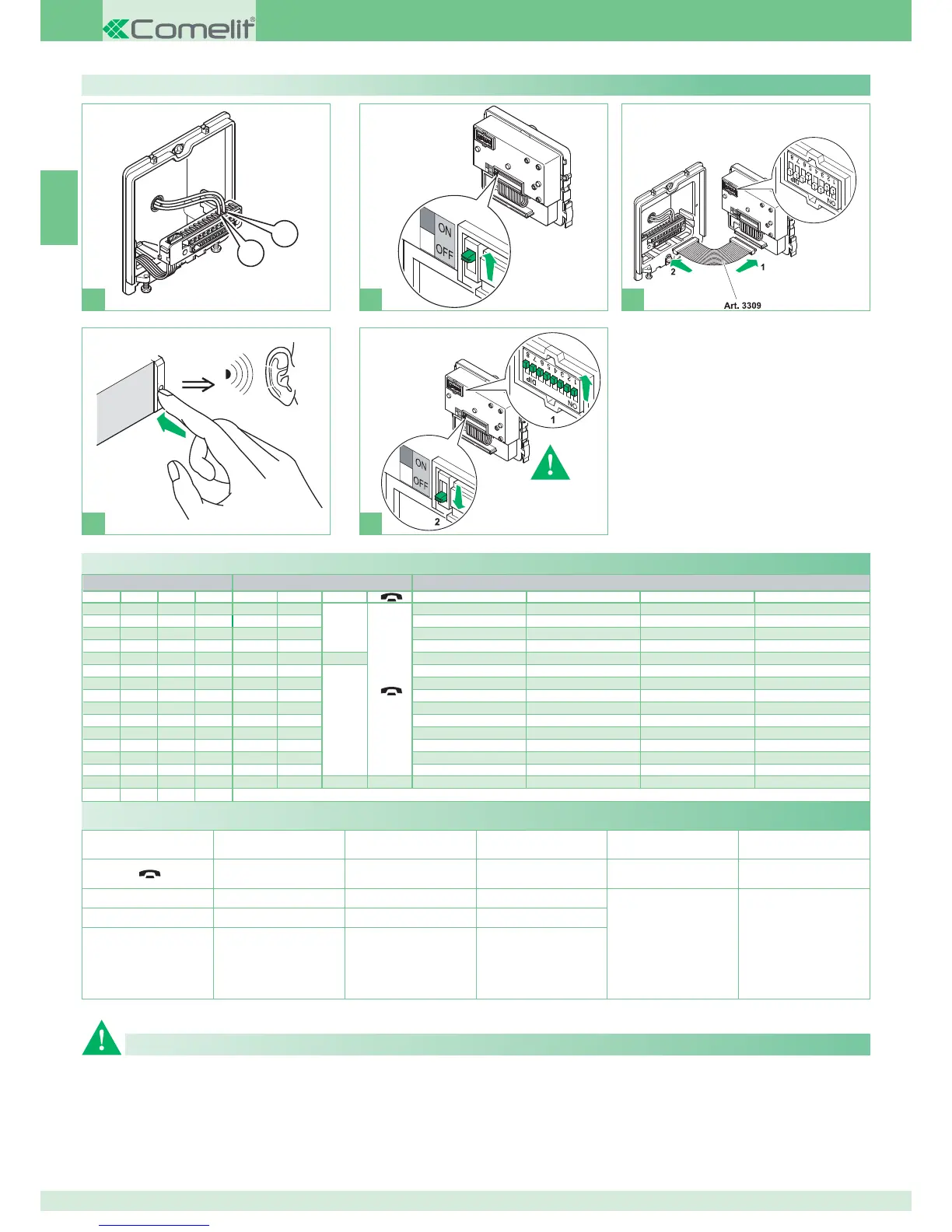
Ź Set the user code using the dip
switches, see table on page 26
Programming buttons on Art. 4680KC
Legend
A
Lock- release
CCS
Switchboard call
INTb
Two-family intercom
- for KIT only
Speech
K
Guardian door-entry phone
call
NULL
No function
ACT
Actuator
D
Doctor
PROG
Programmed functions,
see pages 28-29-30-31
In this Dip switch setting, the
buttons control the programmed
functions; the NON-programmed
buttons control functions
referred to on line 0000
AI
Self-ignition
PAN
Panic
CCP
Main switchboard call
INT
Programmable intercom,
general or selective
- standard single-family calling
for KIT and Simplebus Top
DIP S2 with Art. 6433, 6434
DIP 1 DIP 2 DIP 3 DIP 4 P1 P2
A
P3 P4 P5 P6
CCS AI
A
ACT D PAN K
ACT AI INT INTb D CCS
INT AI INTb ACT CCS CCP
ACT CCS CCP PAN K D
ACT ACT ACT ACT ACT ACT ACT
INT ACT
A
CCS CCP INTb PAN
AI D K CCS CCP INTb
INTb INT AI INT PAN D
CCS PAN D AI INT INTb
K CCS PAN CCP AI INT
CCP K PAN ACT INT AI
PAN CCP CCS K ACT D
D INTb INT ACT AI CCS
INT INT INT INT INT INT
NULL NULL NULL NULL NULL NULL NULL NULL
PROG
General button programming warnings
)FæTHEæDEFAULTæSETTINGSæSEEæTABLEæONæPAGEææDOæNOTæREmECTæREQUIREMENTSæTHEæ
BUTTONSæCANæBEæPROGRAMMEDæDIFFERENTLYæBYæCARRYINGæOUTæTHEæSTEPSæBELOW
At the end, set S2 DIP switches 1-2-3-4 to the combination 1111 (PROG
setting in the configuration tables on pages 28, 29, 30, 31).
In this dip switch setting, the buttons control the programmed functions;
the NON-programmed buttons control functions referred to on line 0000
(see table on page 28). Restore the user code setting on S1, see table A
on page 26.
Default button settings


 To Next Page