21
65
default
65
ON
OFF
1
ON
2 3 4 65
8765
8765
default
ON
OFF
1
ON
2 3 4 65
ON
1 2 3 4 65
ON
1 2 3 4 65
ON
1 2 3 4 65
ON
1 2 3 4 65
ON
1 2 3 4 65
1
2
4
3
5
Programming
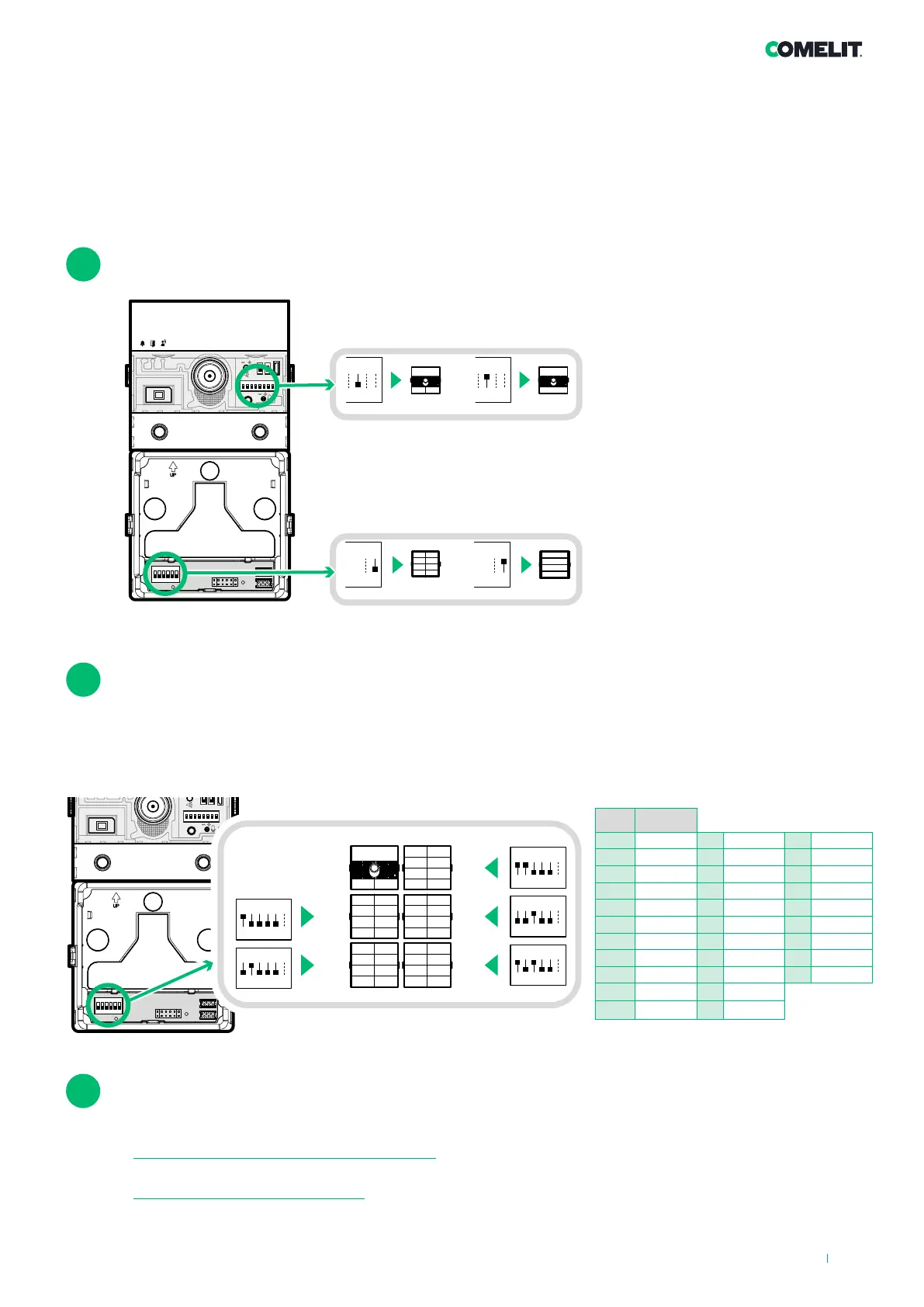
For correct programming, follow the instructions below in order
I. Configure button type
II. Address button modules
III. Program user codes
code
DIP ON
1 1 12 3,4 23 1,2,3,5
2 2 13 1,3,4 24 4,5
3 1,2 14 2,3,4 25 1,4,5
4 3 15 1,2,3,4 26 2,4,5
5 1,3 16 5 27 1,2,4,5
6 2,3 17 1,5 28 3,4,5
7 1,2,3 18 2,5 29 1,3,4,5
8 4 19 1,2,5 30 2,3,4,5
9 1,4 20 3,5 31 1,2,3,4,5
10 2,4 21 1,3,5
11 1,2,4 22 2,3,5
TAB. A
Configuring the button type to maintain during normal operation (single/dual)
DIP 6: configuring button type:
Single button (DIP6 ON).
Dual button (DIP6 OFF, default).
I
Addressing button modules
DIP 1-5: addressing call button module (see TAB. A)
Addressing call button modules means that, in the event they are replaced, it is not necessary to reprogram
the user codes associated with the
buttons. All you need to do is assign the same address as before to the new
module.
II
Programming user codes
There are 2 programming methods:
• Programming consecutive smart user codes: allows quick programming of buttons with consecutive user codes
(e.g.: 1, 2, 3, 4)
• Programming specific user codes: allows programming of specific user codes (e.g.: 25, 37, 70, 58)
III
DIP 6: configuring button type:
Single button (DIP6 ON).
Dual button (DIP6 OFF, default).












 To Next Page