23
1
S1 S2
8
9
OFF
ON
1 2 3 4 6 75 8
4
S1 S2
3
ON
1 2 3 4 6 75 8
5
2
=
25
6
ON
1 2 3 4 6 75 8
ON
1 2 3 4 6 75 8
ON
1 2 3 4 6 75 8
37
70
58
7
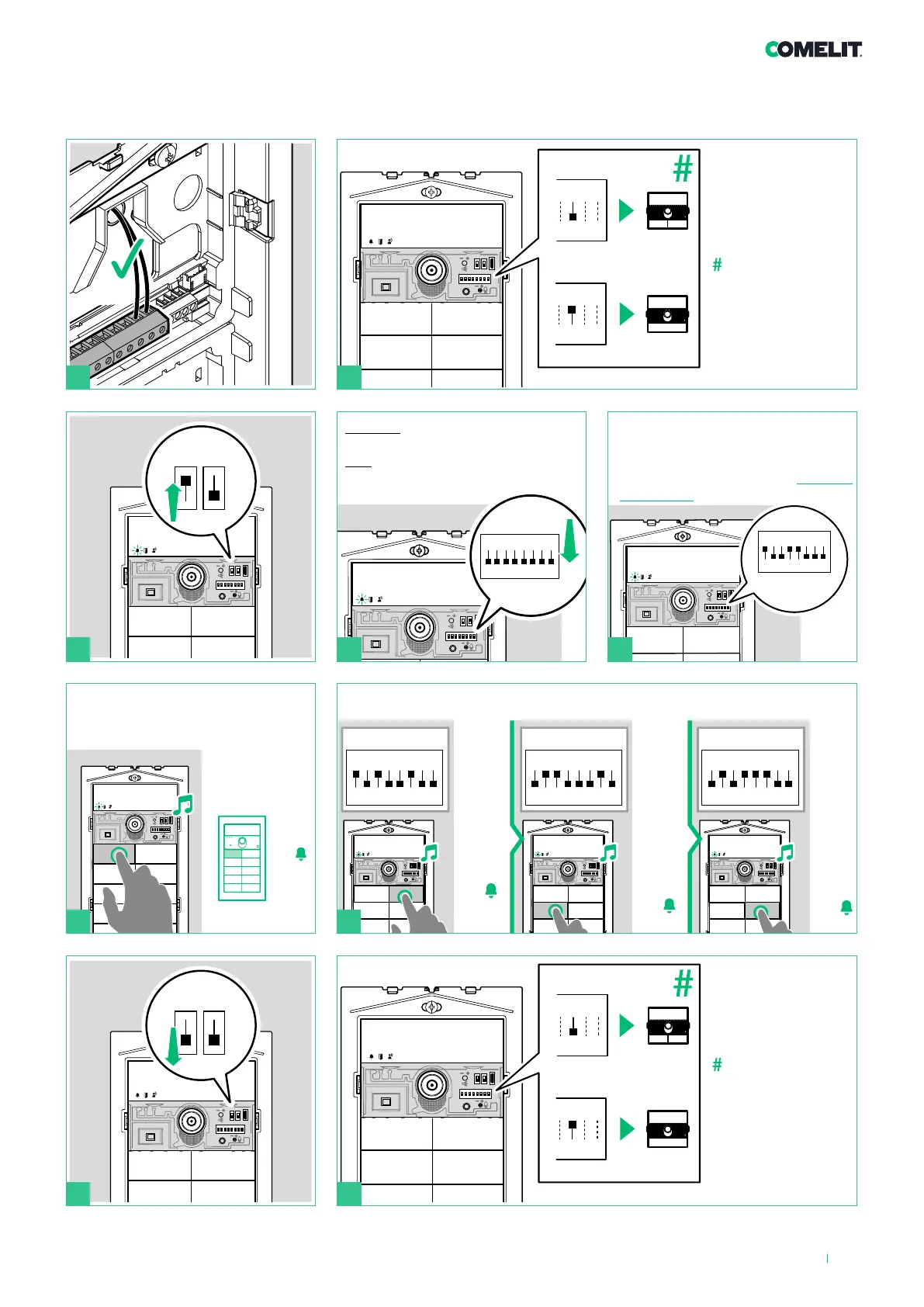
Programming specific user codes
Press the button you want to
associate with the user code set
using the DIP-switches
Repeat steps 4 and 5 to assign a specific user code to each button
example: code 37 example: code 70 example: code 58
DIP 6: configuring
button type:
Single button (DIP6
ON).
Dual button (DIP6
OFF, default).
5
example:
code 25
Set the user code of the apartment
you wish to call (for example:25)
using the DIP-switches (see Table of
user codes )
DIP 6: configuring
button type:
Single button (DIP6
ON).
Dual button (DIP6
OFF, default).
BEFORE you proceed:
Set
ALL DIP-switches to OFF, including
DIP 6.












 To Next Page