29
1
S1 S2
3
2
6 A
OFF
ON
1 2 3 4 6 75 8
2
cod. 161
cod. 171
ON
1 2 3 4 6 75 8
1
ON
1 2 3 4 6 75 8
4 5
6B
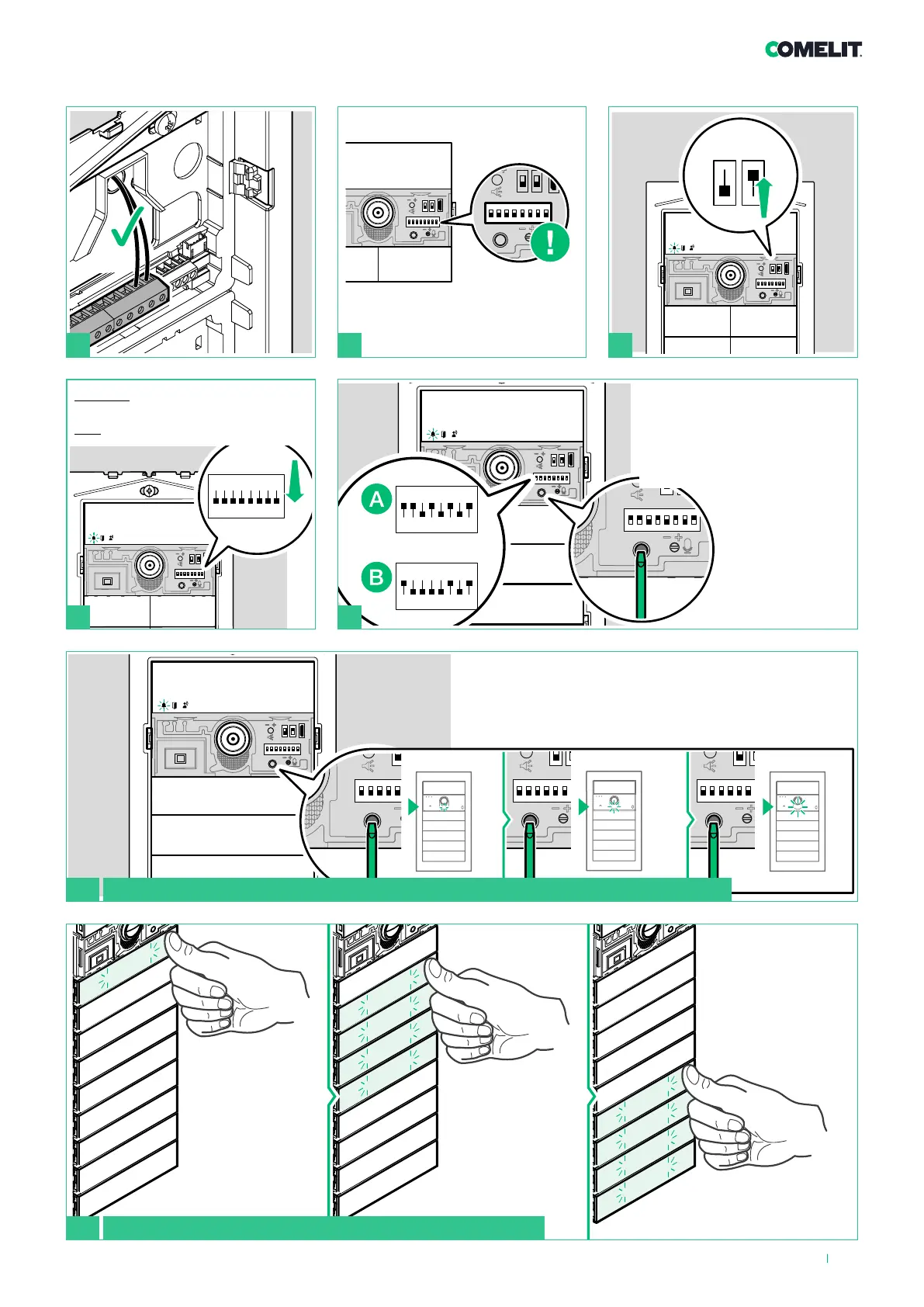
Adjusting the brightness of the button LEDs and the camera light
Take note of the DIP-switch
settings
Adjusting the camera light brightness
Press the programming confirmation button repeatedly to
adjust the brightness of the camera light
1. Enable brightness
control
(A) for the camera light (code
171) or
(B) for the buttons (code 161)
2. Set the
desired function
(code 171/161)
and press
the confirm
programming
button
Adjusting the button brightness
Press a button
repeatedly for each
module to change
the individual
brightness level of
the buttons
BEFORE you proceed:
Set
ALL DIP-switches to OFF, including
DIP 6.












 To Next Page