13
Operations
Table 8
Action description Tool Pictures/Notes
1 Inform COMEM about the
switching of the eSDB due
to a suspect overvoltage.
0039 0444 449311
comemservice@it.comem.com
2 Disconnect the supply
voltage
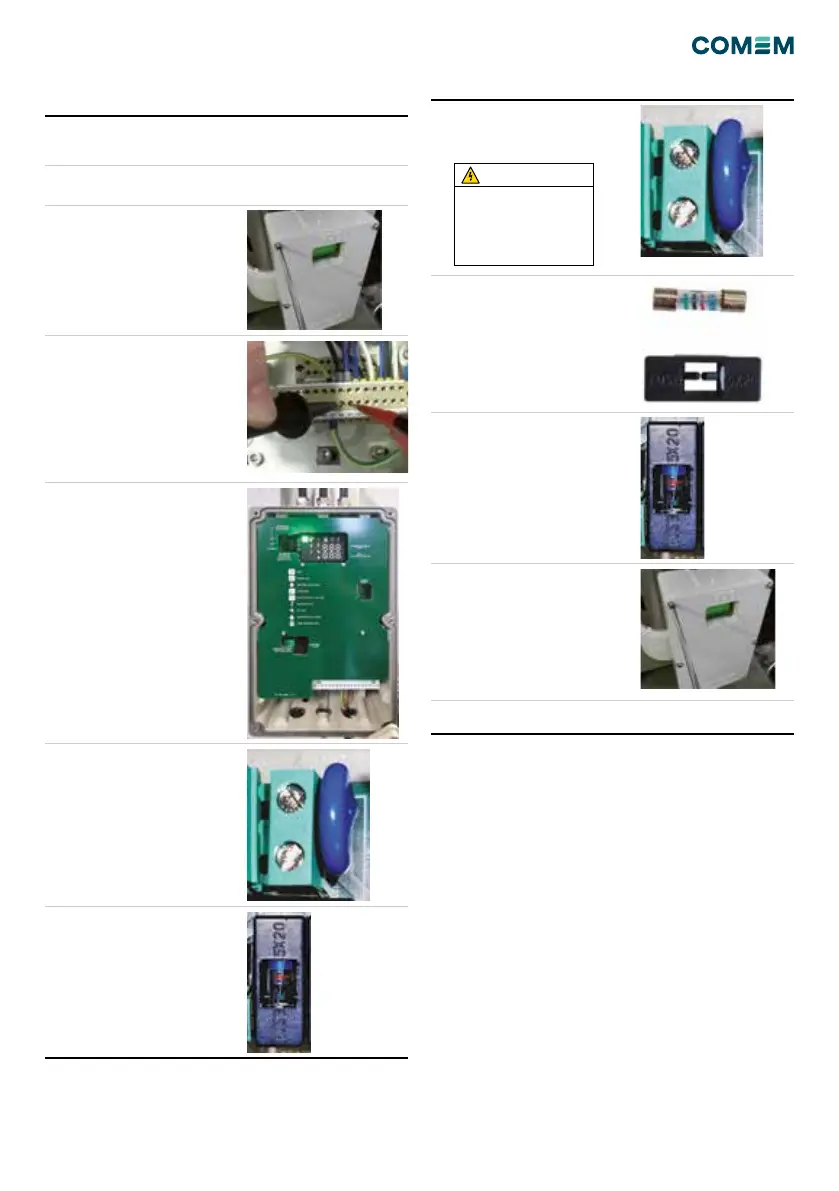
3 Remove the electronic box
cover unscrewing the 6
screws
B
4 Check with a tester on the
terminal 31-32 and verify
the absence of tension.
D
5 Locate the overvoltage
protection position on
the bottom left of the
electronic control board.
Look for the varistor and
the fuse.
6 Remove the Varistor
screwing the 2 screws on
the terminals and then slip
off the varistor.
A
7 Remove the fuse with its
plastic protection
Action description Tool Pictures/Notes
8 Insert the pin of the new
varistor in the terminal then
fasten the 2 screws on the
terminal.
A
9 Mount a new Fuse in its
plastic protection.
10 Mount the Fuse on the
board with its plastic
protection.
C
11 Close the electrical box B
12 Powering the device
The varistor has to be
assembled in the same
position of the before one
bending the pins in order to
guarantee a right position, far
from the other components.
WARNING


 To Next Page