14
Appendix C - How to operate the menu
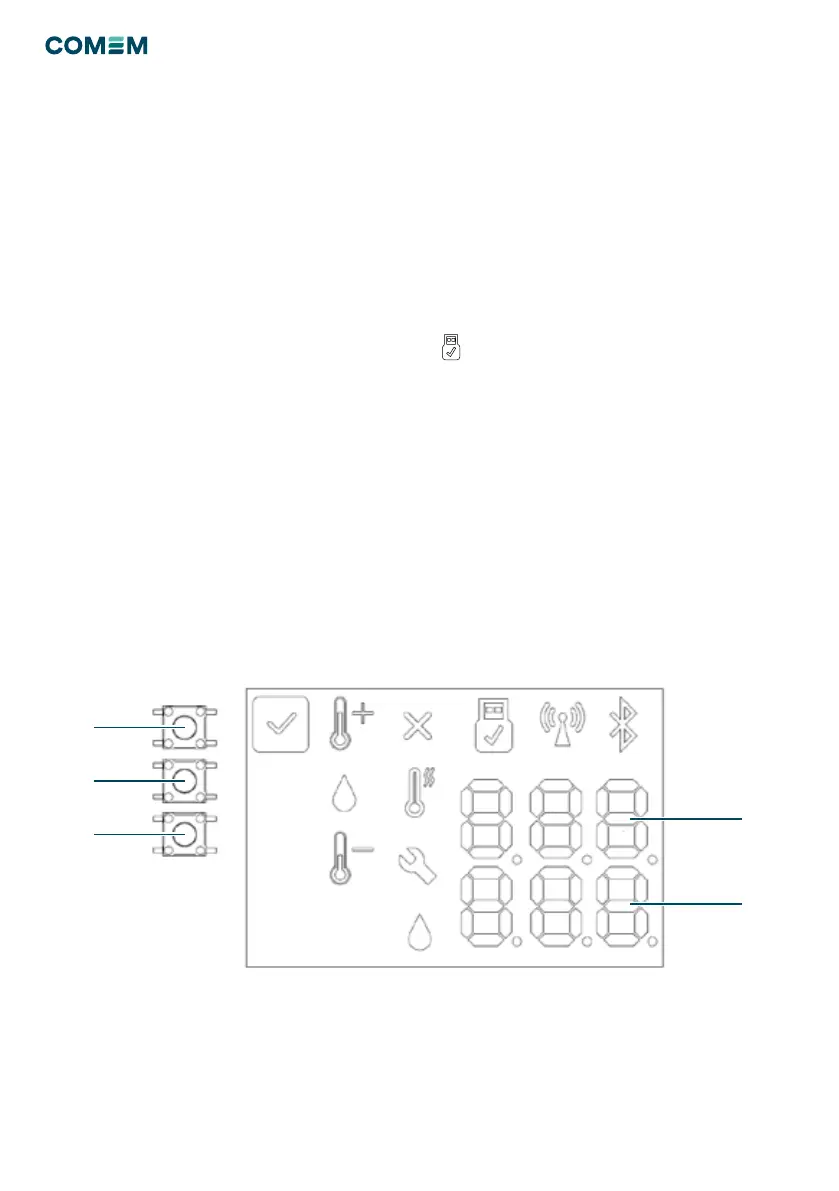
The board is equipped with three command buttons OK –
UP - DOWN (Fig. 15).
Main operations:
To START a regeneration cycle:
• Press for 5 seconds UP and DOWN at the same time.
“CMD” will appear.
• Press 1 time OK. “STR” will appear (rst line).
• Press 1 time OK. “ok” will appear (second line).
• After 30 seconds board exits automatically from user
menu
To ABORT a regeneration:
• Press for 5 seconds UP and DOWN at the same time.
“CMD” will appear.
• Press 1 time OK. “STR” will appear (rst line).
• Press 1 time DOWN. “ABR” will appear (rst line).
• Press 1 time OK. “ok” will appear (second line).
• After 30 seconds board exits automatically from user
menu.
To TEST the functionalities of LEDs and Relay :
• Press for 5 seconds UP and DOWN at the same time.
“CMD” will appear.
• Press 1 time OK. “STR” will appear (rst line).
• Press 2 time DOWN. “TST” will appear (rst line).
• Press 1 time OK. “ok” will appear (second line).
• After 30 seconds board exits automatically from user
menu.
Figure 15
To RESET the board:
• Press for 5 seconds UP and DOWN at the same time.
“CMD” will appear.
• Press 1 time OK. “STR” will appear (rst line).
• Press 4 time DOWN. “RES” will appear (rst line).
• Press 1 time OK. “ok” will appear (second line).
• After 30 seconds board exits automatically from user
menu.
To DOWNLOAD the data via USB Type B key:
• Insert USB Key
•
Icon turns on (Blue)
• Press for 5 seconds UP and DOWN at the same time.
“CMD” will appear.
• Press 4 time DOWN. “DOL” will appear (rst line).
• Press 1 time OK. “ok” will appear (second line).
• After 30 seconds board exits automatically from user
menu.
OK
UP
DOWN
First Line
Second Line


 To Next Page