31
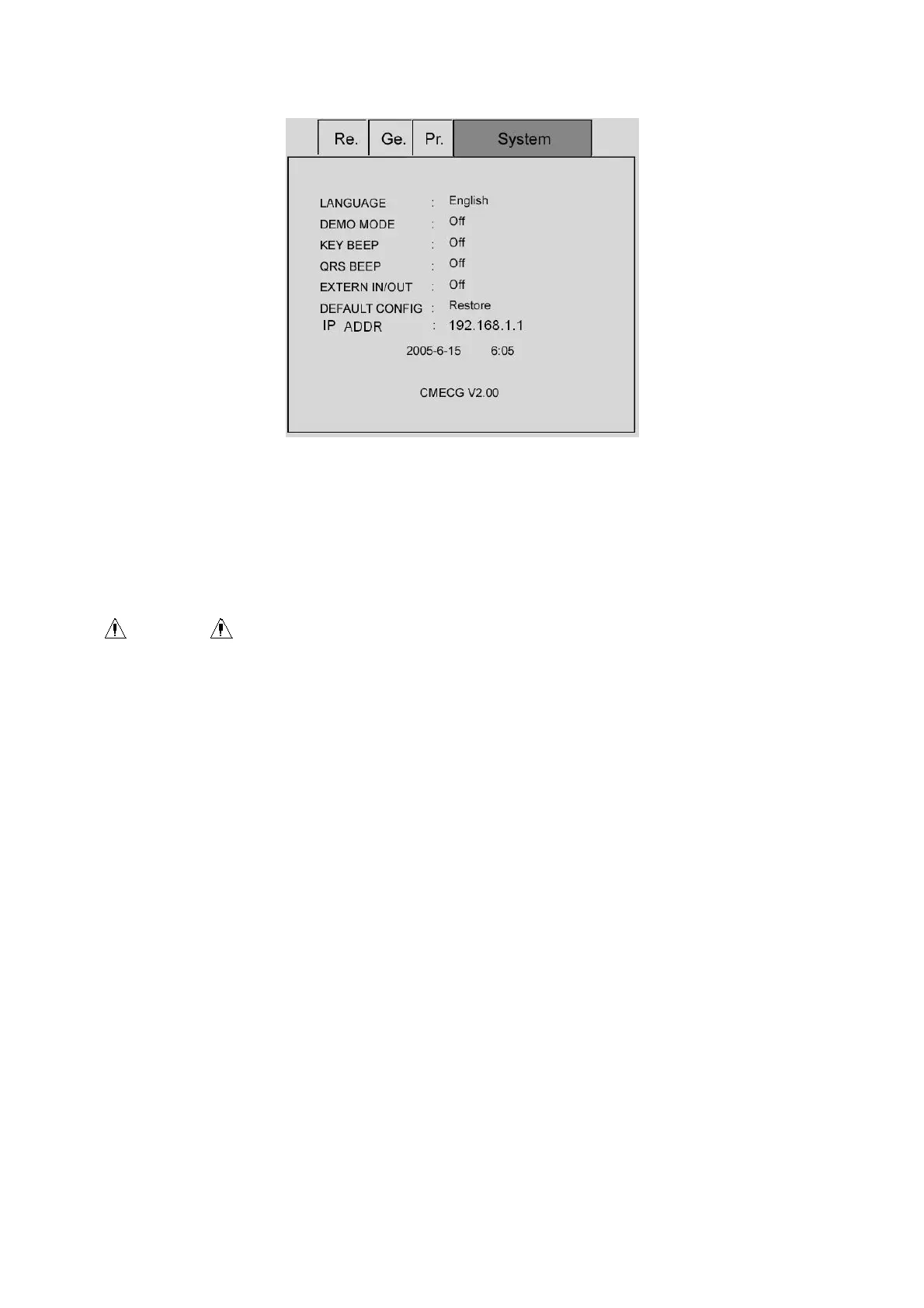
System Interface
(1) LANGUAGE: The user can set the language set on the display screen in the electrocardiograph and the
language used in the ECG records. English and English are provided to select.
(2) DEMO MODE: On, Off.
WARNING :
Waveform demonstration is the simulated demonstrate waveform set by the manufacturer to show the
equipment performance and help the user to conduct training. In the practical clinical application,
demonstration waveform is forbidden to use, because it is easier to mislead the medical personnel to
consider it as the monitored patient waveform and parameters and which may affect the patient care
and delay the diagnosis and treatment of the disease.
(3) KEY BEEP: On, off.
Key tone is the brief “Di” sound send out by the equipment when the user presses the keys on the
keyboard. When it is set as “off”, there will be no sound when pressing the key.
(4) QRS BEEP: On, off.
Heartbeat sound volume is the brief “Di” sound send out by the equipment when the R wave is detected in
the main interface waveform display and recording process. When the heartbeat sound volume is set as
“Off”, there will be no sound.
(5) EXTERN IN/OUT: on, off
(6) Default Setting: The user can select whether to recover the default value.
The system default values are shown in the following table:
The system default values are shown in the following table:



 To Next Page