(1) Check whether the setting size of the engraved picture exceeds 400*400;
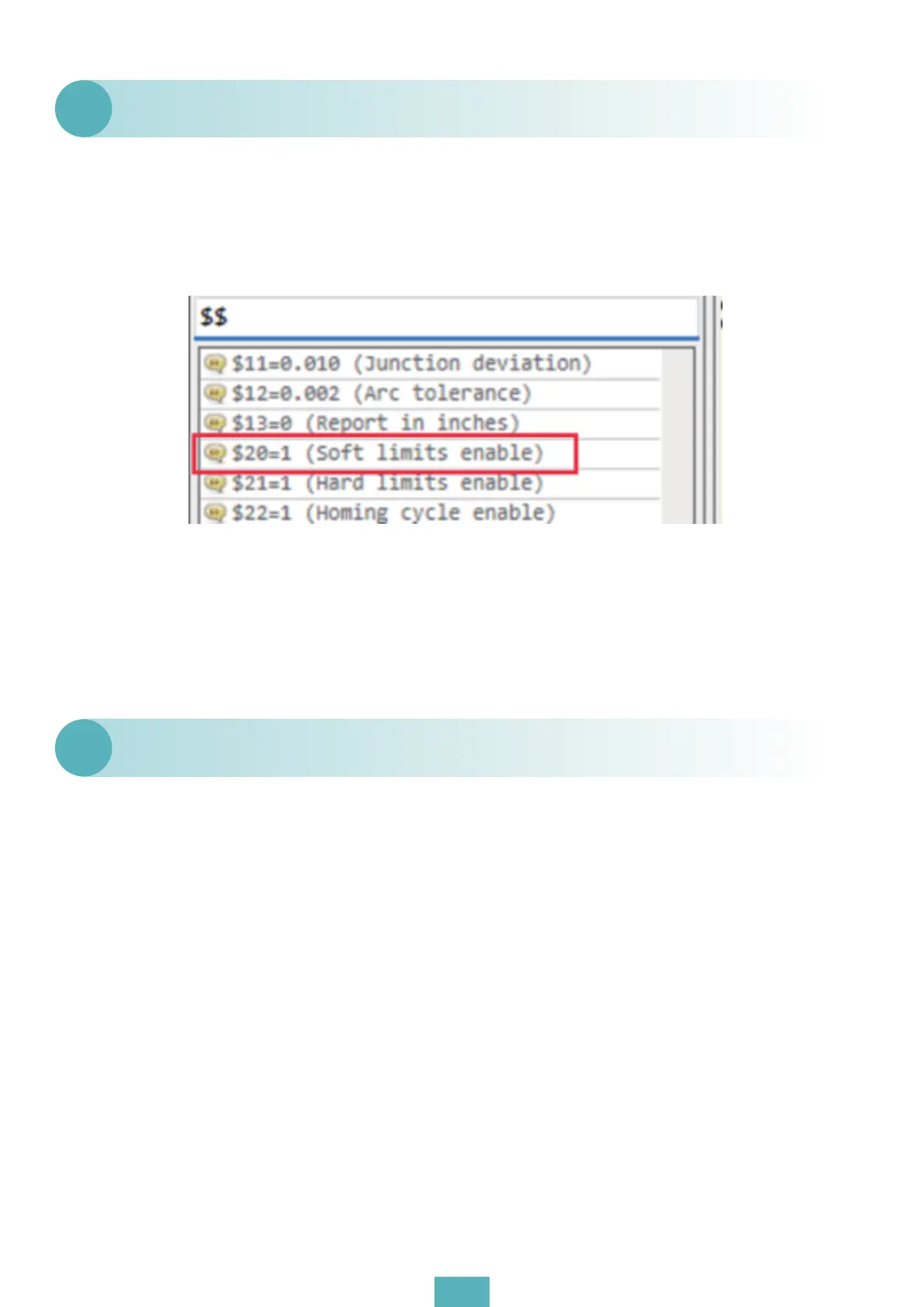
(2) Input “$$”, check whether it is “$20=1”. If not, modify “$20=1” and start the soft limit switch. It
can prevent the engraving range from exceeding 400 under artificial settings or other abnor-
mal conditions.
During GRBL engraving, the X-axis always hits the side.
Q3
(1) Check whether the wire is loose (fork the power line of the laser head), or loosen the PWM
line separately to check whether the laser head emits light normally;
(2) Please unplug the laser connecting wire, turn on LaserGRBL, adjust the laser brightness to
the maximum, and then measure the voltage of “POWER” and “PWM” wire respectively. If both
“POWER” and “PWM” have voltage, there is a problem with the laser module.
The machine moves normally, but the laser does not light.
Q4
03


 To Next Page