Appendix Symphony BF
20 1.4/0222
Device states – Overview
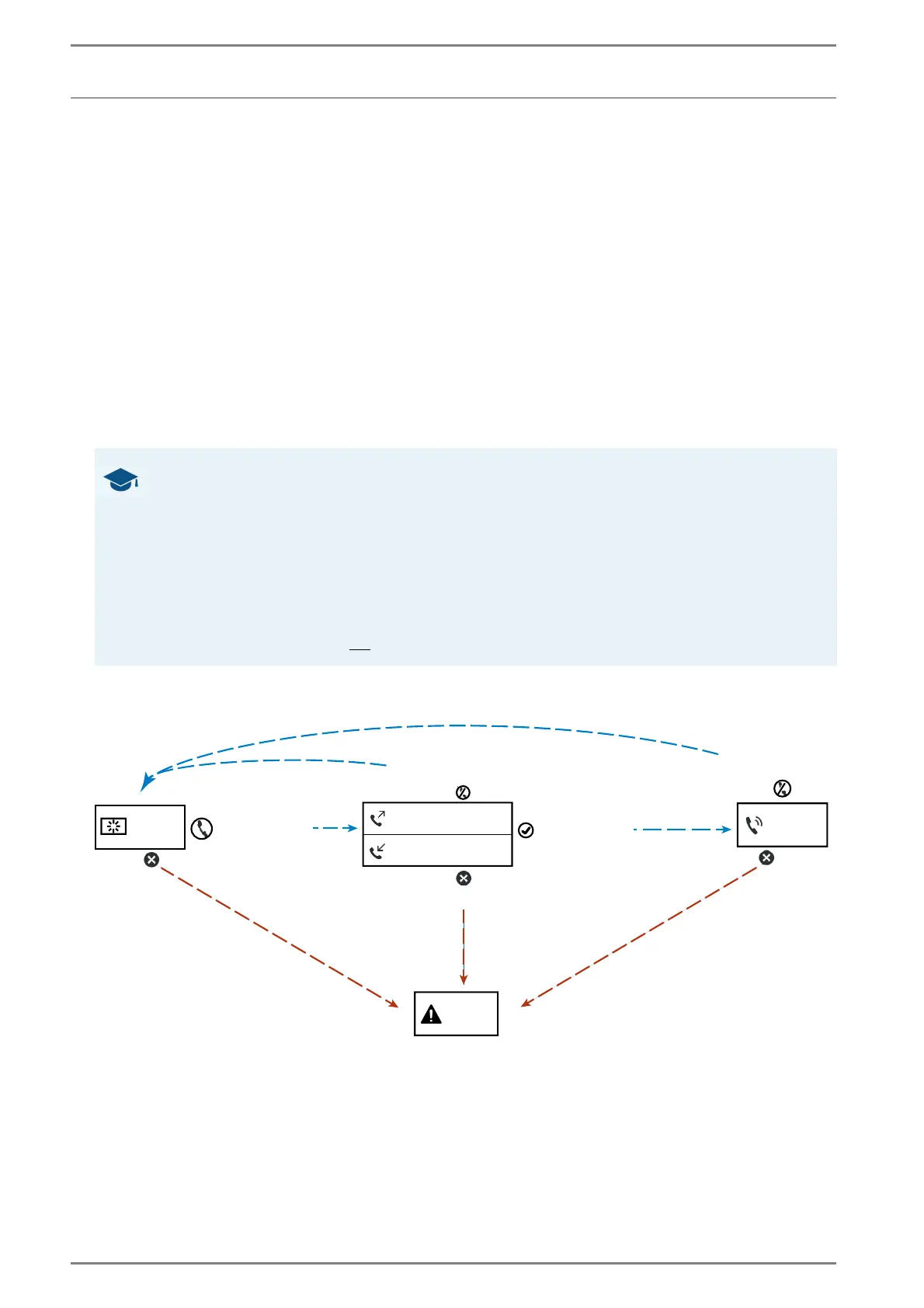
Device state depending on the operation state of the Symphony BF device:
Idle: If neither a call is triggered with the device nor another device tries to establish a call to the
Symphony BF device and no error has occurred, the Symphony BF device is in the device state
“Idle”.
Incoming Call: If a call is triggered by another device, the Symphony BF device switches to the de-
vice state “Incoming Call”.
Outgoing Call: If a call is triggered by the Symphony BF device (e.g. by pressing a button), the Sym-
phony BF device switches to the device state “Outgoing Call”.
In Call: If an incoming call is accepted via the Symphony BF device or an outgoing call is accepted
by another device, the Symphony BF device switches to the device state “In Call”. As soon as a call
is terminated (by the Symphony BF device or the remote station), the Symphony BF device switches
back to the device state “Idle”.
Error: In case of an error at the Symphony BF device (e.g. when disconnecting the Symphony BF
device from a connected SIP server), the Symphony BF device switches to the device state “Error”
and remains in that device state until the error has been resolved or the configuration has been
changed.
The Symphony BF device can never be in two device states at the same time (see also the following
illustration):
GOOD TO KNOW: What can cause device state “Error”?
The following system states can cause device state
“Error”:
If the Symphony BF device is in operation but cannot register at the SIP server.
If the Symphony BF device is in operation, connected with the SIP server and the TCP port check is
activated but the Symphony BF device is unable to register at the SIP server and the TCP port check
failed on all configured SIP servers.
If the Symphony BF device is in operation and connected with the SIP server and LS/MIC surveillance
fails and the option "Error on failure" is set in the LS/MIC surveillance configuration.
Note: If the Symphony BF device is in operation but is neither connected to the SIP server nor is TCP port
check activated, the device will not
change into device state “Error”.
Dependencies of device states
Idle
Error
Call initiated
Error detected
Outgoing call
Call accepted
Call declined
In call
End call
Incoming call













 To Next Page