Rear View
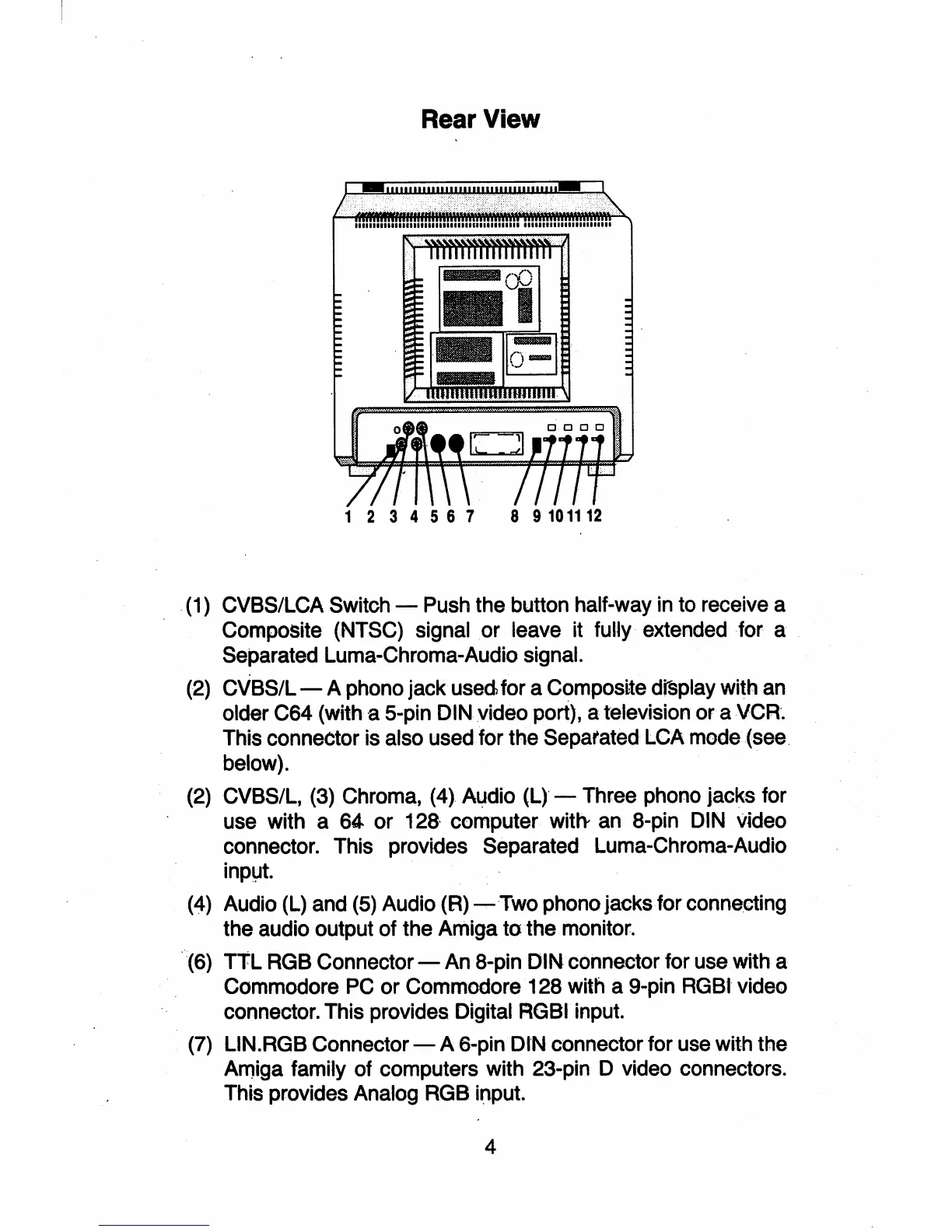
1 2 3 4 5 6 7 8 9 101112
(1) CVBS/LCA Switch - Push the button half-way in to receive a
Composite (NTSC) signal
or
leave it fully extended for a
Separated Luma-Chroma-Audio signal.
(2) CVBS/L - A phono jack
used,
for a Composite
d~play
with
an
older C64 (with a 5-pin DIN video port), a television or a VCR.
This connector is also used for the Separated LCA mode (see
below).
(2) CVBS/L, (3) Chroma, (4) Audio (L) - Three phono jacks for
use with a
64.
or
128-
computer
with-
an
8-pin DIN video
connector. This provides Separated Luma-Chroma-Audio
inplJt.
(4)
Audio (L) and (5) Audio (R)
-Two
phono jacks for connecting
the audio output of the Amiga
to
the monitor.
·(6)
TtL
RGB Connector - An 8-pin DIN connector for use with a
Commodore
PC
or Commodore 128 with a 9-pin RGBI video
connector. This provides Digital RGBI input.
(7)
L1N.RGB
Connector - A 6-pin DIN connector for use with the
Arniga family of computers with 23-pin D video connectors.
This provides Analog RGB input.
4



 To Next Page