The cables included with your 10848 monitor are
RF
shielded
cables. Be sure to use only RF shielded cables when connecting
this monitor to a computer.
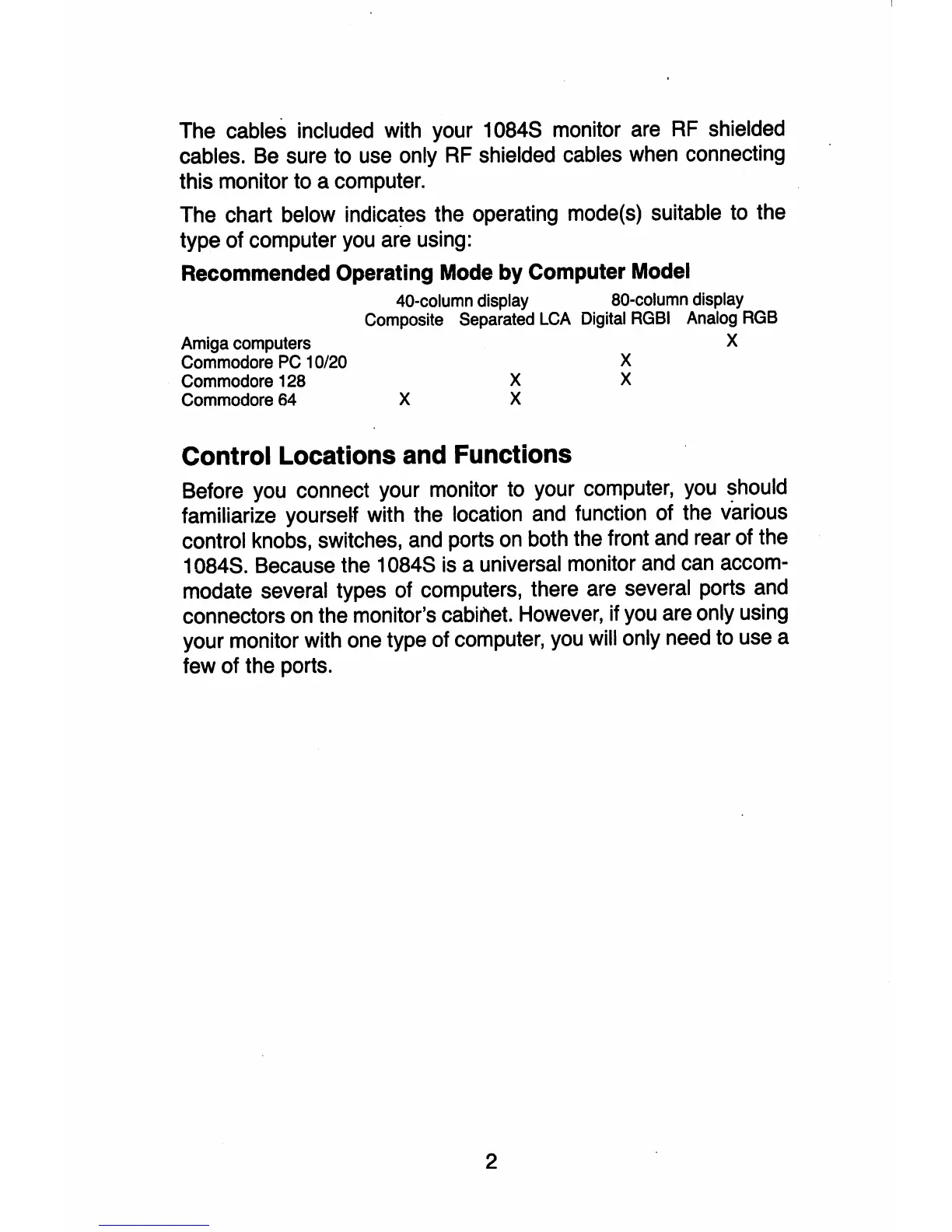
The chart below indicates the operating mode(s) suitable to the
type of computer you are using:
Recommended
Operating
Mode
by
Computer
Model
40-column display 80-column display
Composite Separated
LCA
Digital
RGBI
Analog
RGB
Amiga computers
Commodore
PC
10/20
Commodore 128
Commodore 64
X
X
X
Control Locations and Functions
X
X
X
Before you connect your monitor to your computer, you should
familiarize yourself with the location and function of the various
control knobs, switches, and ports
on
both the front and rear of the
10848. Because the 10848
is
a universal monitor and can accom-
modate several types of computers, there are several ports and
connectors
on
the monitor's cabinet. However, if you are only using
your monitor with one type of computer, you will only need to use a
few of the ports.
2



 To Next Page