(8) VCR
switch·-
This button allows you to adjust
your
monitor's
circuitry so that you can· use' it as a display for your VCR or .
Video Camera. Push
this button half-way in when using your
monitor with a VCR
or
video camera.
(9) V-Height - Adjusts the image height on the screen.
(10) Vert. Centering - Centers the image' vertically, from top to
bottom.
(11)
Horiz. Centering - Centers
the
image horizontally, from left to
. right. .
(12) H. Width - Adjusts the image width on the screen.
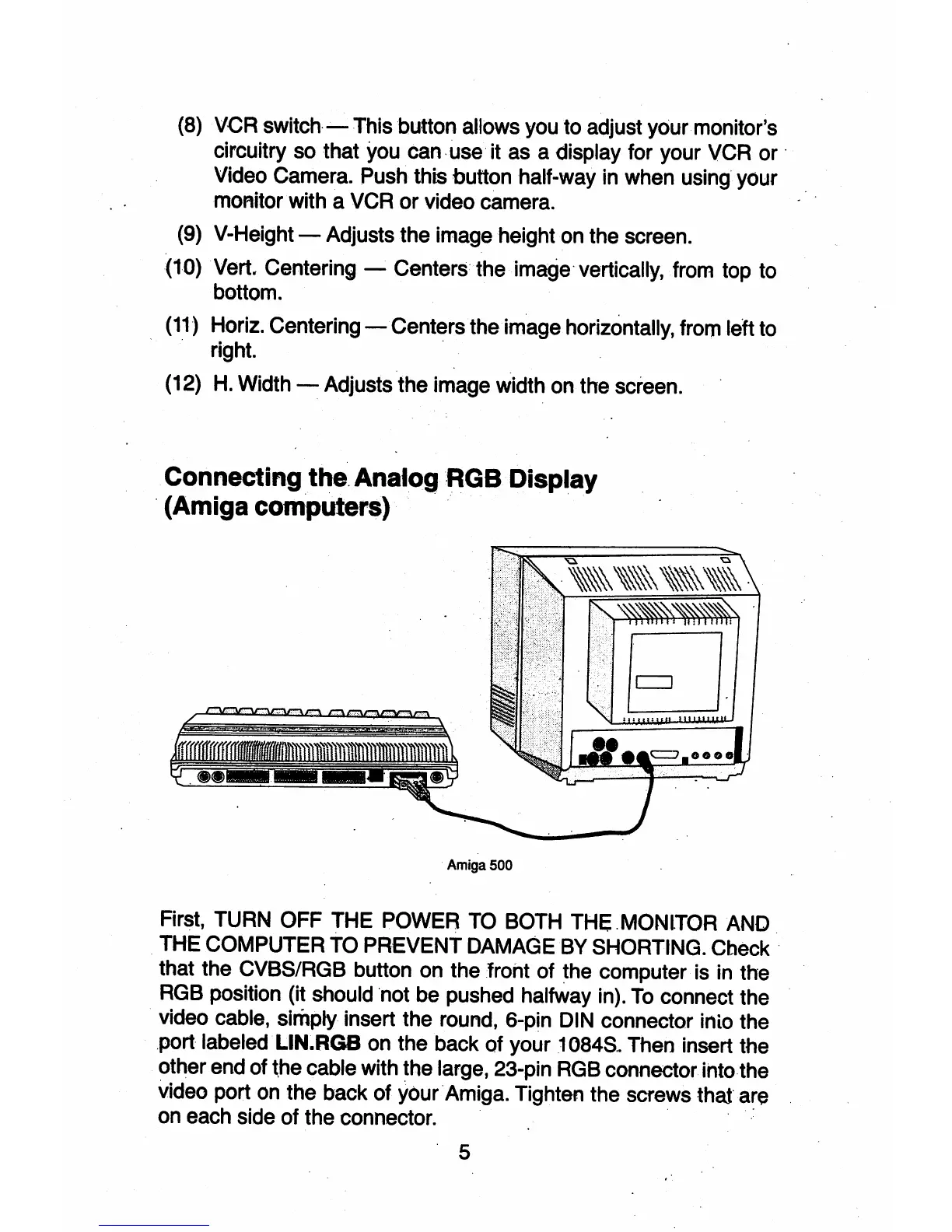
Connecting the. AnalogRGB Display
. (Amiga computers) '."
Amiga500
First, TURN OFF THE POWER TO BOTH THE.MONlTOR AND
THE COMPUTER TO PREVENT DAMAGE BY SHORTING. Cbeck .
that the CVBS/RGB button on the froht
of
the computer is in the
RGB position (it should 'not be pushed halfway in).
To
connect the
video cable, simply insert the round, 6-pin DIN connector inio the
.port labeled"
LlN~RG8
on the back
of
your 1 084S
..
Then insert the
other end of
~he
cable with the large, 23-pin RGB connector
ihtothe
video port on the back
of
YoufAmiga. Tighten the screws
that
are
on each side
of
the connector. ' ..
. 5



 To Next Page