EasyManua.ls Logo

Commodore 1541-II - Page 18

Commodore 1541-II
104 pages
Print Icon
To Next Page IconTo Next Page
To Previous Page IconTo Previous Page
Loading...
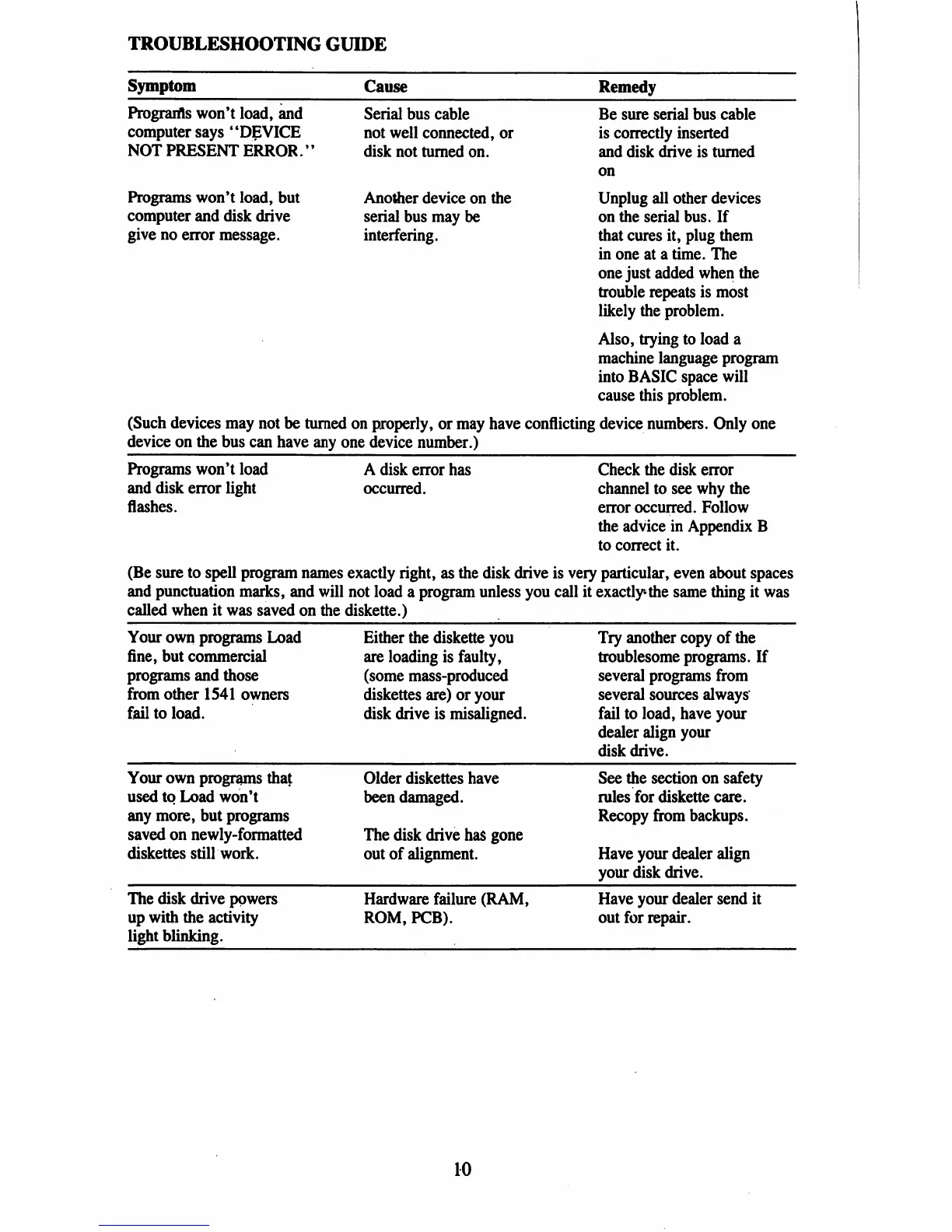
TROUBLESHOOTING
GUIDE
Symptom
Cause
Program's
won't
load,
and
computer
says
"DEVICE
NOT
PRESENT
ERROR.''
Programs
won't
load,
but
computer
and
disk
drive
give
no
error
message.
Serial
bus
cable
not
well
connected,
or
disk
not
turned
on.
Another
device
on
the
serial
bus
may
be
interfering.
Be
sure
serial
bus
cable
is
correctly
inserted
and
disk
drive
is
turned
on
Unplug
all
other
devices
on
the
serial
bus.
If
that
cures
it,
plug
them
in
one
at
a
time.
The
one
just
added
when
the
trouble
repeats
is
most
likely
the
problem.
Also,
trying
to
load
a
machine
language
program
into
BASIC
space
will
cause
this
problem.
(Such
devices
may
not
be
turned
on
properly,
or
may
have
conflicting
device
numbers.
Only
one
device
on
the
bus
can
have
any
one
device
number.)
Programs
won't
load
and
disk
error
light
flashes.
A
disk
error
has
occurred.
Check
the
disk
error
channel
to
see
why
the
error
occurred.
Follow
the
advice
in
Appendix
B
to
correct
it.
(Be
sure
to
spell
program
names
exactly
right,
as the
disk
drive
is
very
particular,
even
about
spaces
and
punctuation
marks,
and
will
not
load
a
program
unless
you
call
it
exactly
the
same
thing
it
was
called
when
it
was
saved
on
the
diskette.)
Your
own
programs
Load
fine,
but
commercial
programs
and
those
from
other
1541
owners
fail
to
load.
Either
the
diskette
you
are
loading
is
faulty,
(some
mass-produced
diskettes
are)
or
your
disk
drive
is
misaligned.
Try
another
copy
of
the
troublesome
programs.
If
several
programs
from
several
sources
always
fail
to
load,
have
your
dealer
align
your
disk
drive.
Your
own
programs
that
used
to
Load
won't
any
more,
but
programs
saved
on
newly-formatted
diskettes
still
work.
Older
diskettes
have
been
damaged.
The
disk
drive
has
gone
out
of
alignment.
See
the
section
on
safety
rules
for
diskette
care.
Recopy
from
backups.
Have
your
dealer
align
your
disk
drive.
The
disk
drive
powers
up
with
the
activity
light
blinking.
Hardware
failure
(RAM,
ROM,
PCB).
Have
your
dealer
send
it
out
for
repair.
10

Table of Contents

Related product manuals