EasyManua.ls Logo

Commodore 1541-II - Demonstration of Sequential Files

Commodore 1541-II
104 pages
Print Icon
To Next Page IconTo Next Page
To Previous Page IconTo Previous Page
Loading...
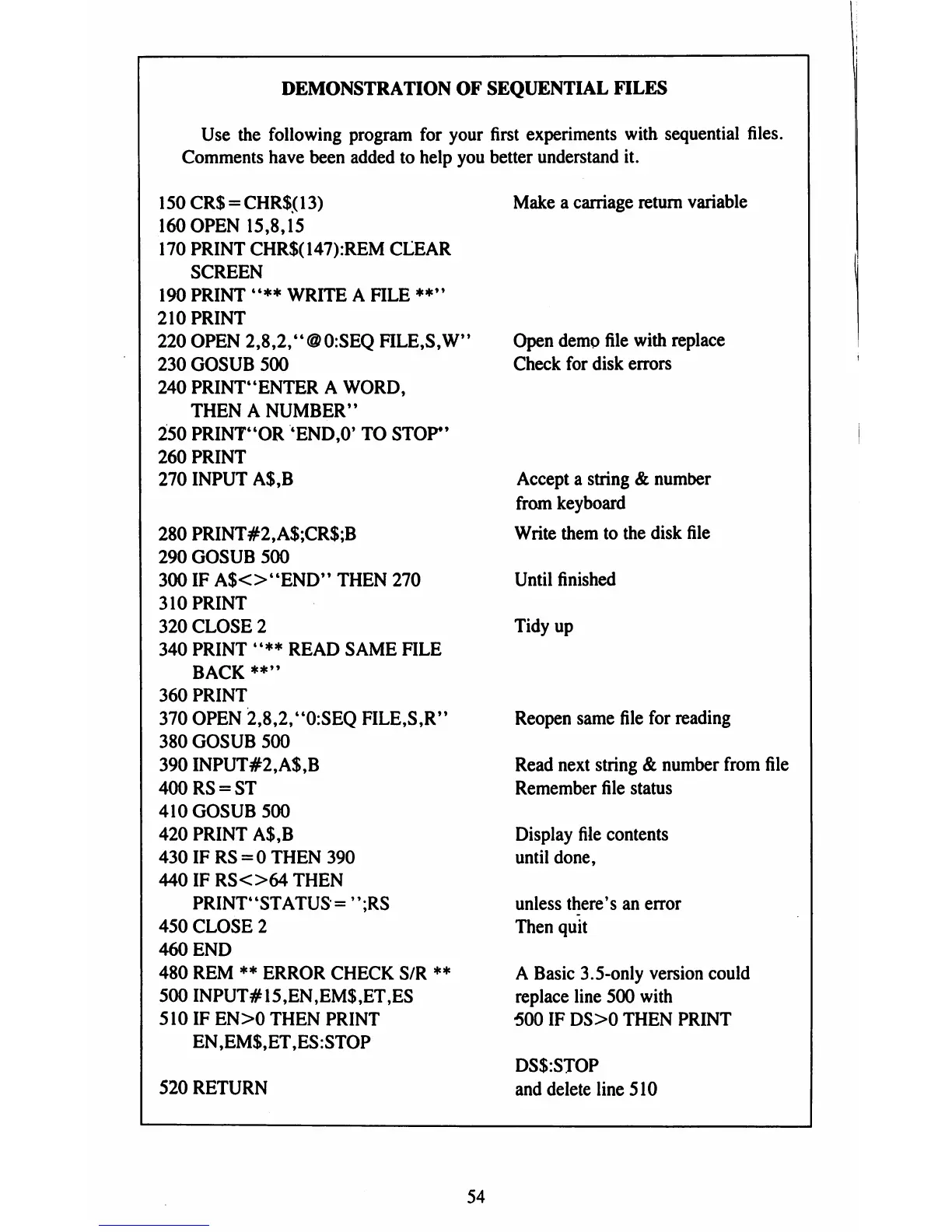
DEMONSTRATION
OF
SEQUENTIAL
FILES
Use
the
following
program
for
your
Comments
have
been
added
to
help
you
150CR$
=
CHR$(13)
160
OPEN
15,8,15
170
PRINT
CHR$(147):REM
CLEAR
SCREEN
190
PRINT
"**
WRITE
A
FILE
**"
210
PRINT
220
OPEN
2,8,2,"@0:SEQ
FILE,S,W"
230
GOSUB
500
240
PRINT'ENTER
A WORD,
THEN
A
NUMBER1*
250
PRINT"OR
4END,0'
TO
STOP*'
260
PRINT
270
INPUT
A$,B
280
PRINT#2,A$;CR$;B
290
GOSUB
500
300
IF
A$O"END"
THEN
270
310
PRINT
320
CLOSE
2
340
PRINT
"**
READ
SAME
FILE
BACK
**"
360
PRINT
370
OPEN
2,8,2,"0:SEQ
FILE,S,R"
380
GOSUB
500
390
INPUT#2,A$,B
400RS
=
ST
410
GOSUB
500
420
PRINT
A$,B
430
IF
RS
=
0
THEN
390
440
IF
RSO64
THEN
PRINTt4STATUS
=
";RS
450
CLOSE
2
460
END
480
REM
**
ERROR
CHECK
S/R
**
500
INPUT#15,EN,EM$,ET,ES
510
IF
EN>0
THEN
PRINT
EN,EM$,ET,ES:STOP
520
RETURN
first
experiments
with
sequential
files.
better
understand
it.
Make
a
carriage
return
variable
Open
demo
file
with
replace
Check
for
disk
errors
Accept
a
string
&
number
from
keyboard
Write
them
to
the
disk
file
Until
finished
Tidy
up
Reopen
same
file
for
reading
Read
next
string
&
number
from
file
Remember
file
status
Display
file
contents
until
done,
unless
there's
an
error
Then
quit
A
Basic
3.5-only
version
could
replace
line
500
with
500
IF
DS>0
THEN
PRINT
DS$:STOP
and
delete
line
510
54

Table of Contents

Related product manuals