EasyManua.ls Logo

Commodore 1541-II - Troubleshooting Common Disk Drive Issues

Commodore 1541-II
104 pages
Print Icon
To Next Page IconTo Next Page
To Previous Page IconTo Previous Page
Loading...
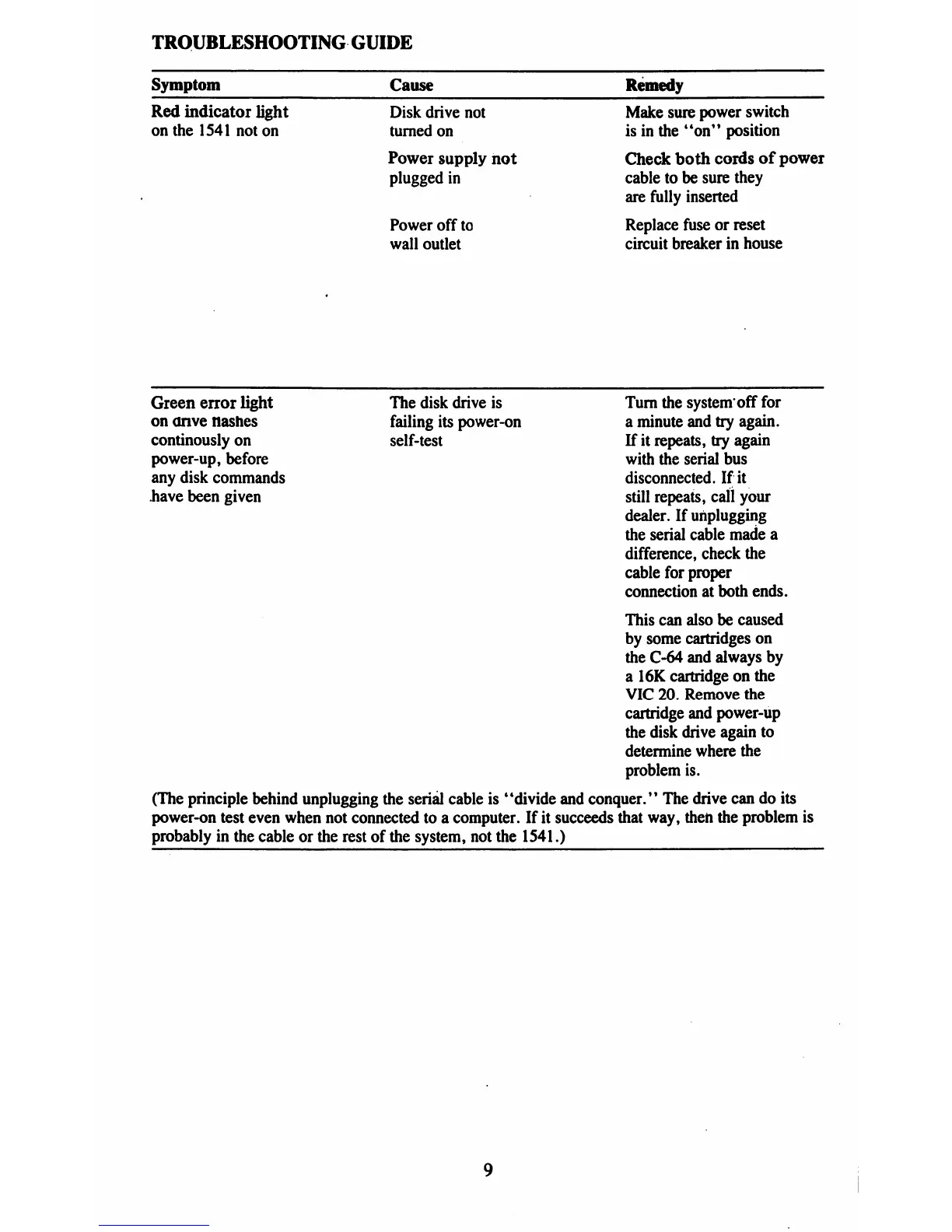
TROUBLESHOOTING
GUIDE
Symptom
Red
indicator
light
on
the
1541
not
on
Cause
Disk
drive
not
turned
on
Power
supply
not
plugged
in
Power
off
to
wall
outlet
Remedy
Make
sure
power
switch
is
in
the
"on"
position
Check
both
cords
of
power
cable
to
be
sure
they
are
fully
inserted
Replace
fuse
or
reset
circuit
breaker
in
house
Green
error
light
The
disk
drive
is
Turn
the
system'off
for
on
anve
Hashes
failing
its
power-on
a
minute
and
try
again,
continously
on
self-test
If
it
repeats,
try
again
power-up,
before
with
the
serial
bus
any
disk
commands
disconnected.
If
it
have
been
given
still
repeats,
call
your
dealer.
If
unplugging
the
serial
cable
made
a
difference,
check
the
cable
for
proper
connection
at
both
ends.
This
can
also
be
caused
by
some
cartridges
on
the
C-64
and
always
by
a
16K
cartridge
on
the
VIC
20.
Remove
the
cartridge
and
power-up
the
disk
drive
again
to
determine
where
the
problem
is.
(The
principle
behind
unplugging
the
serial
cable
is
"divide
and
conquer.'1
The
drive
can
do
its
power-on
test
even
when
not
connected
to
a
computer.
If
it
succeeds
that
way,
then
the
problem
is
probably
in
the
cable
or
the
rest
of
the
system,
not
the
1541.)

Table of Contents

Related product manuals