EasyManua.ls Logo

Commodore 1581 - Page 114

Commodore 1581
138 pages
Print Icon
To Next Page IconTo Next Page
To Previous Page IconTo Previous Page
Loading...
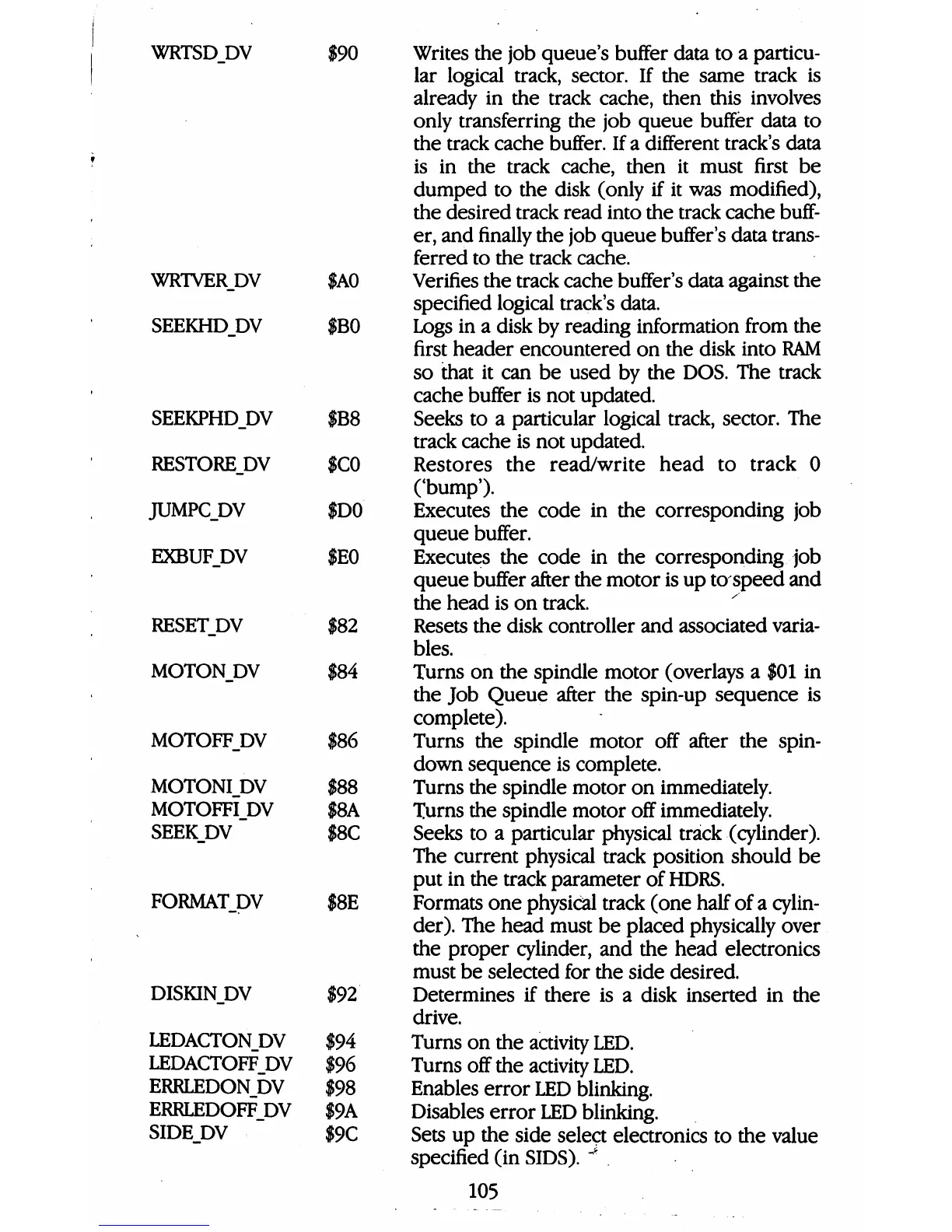
WRTSDDV
$90
WRTVER.DV
SEEKHD_DV
SEEKPHD_DV
RESTOREJW
JUMPC_DV
EXBUF_DV
RESET_DV
MOTONDV
MOTOFF_DV
MOTONI DV
MOTOFFI
DV
SEEKJDV
FORMAT_DV
DISKINJDV
LEDACTON
DV
LEDACTOFF
DV
ERRLEDON
DV
ERRLEDOFF
DV
SIDEDV
SAO
$B0
$B8
$C0
$D0
$E0
$82
$84
$86
$88
$8A
$8C
$8E
$92
$94
$96
$98
$9A
$9C
Writes
the
job
queue's
buffer
data
to
a
particu
lar
logical
track,
sector.
If
the
same
track
is
already
in
the
track
cache,
then
this
involves
only
transferring
the
job
queue
buffer
data
to
the
track
cache
buffer.
If
a
different
track's
data
is
in
the
track
cache,
then
it
must
first
be
dumped
to
the
disk
(only
if
it
was
modified),
the
desired
track
read
into
the
track
cache
buff
er,
and
finally
the job
queue
buffer's
data
trans
ferred
to
the
track
cache.
Verifies
the
track
cache
buffer's
data
against
the
specified
logical
track's
data.
Logs
in
a
disk
by
reading
information
from
the
first
header
encountered
on
the
disk
into
RAM
so
that
it
can
be
used
by
the
DOS. The
track
cache
buffer
is
not
updated.
Seeks
to
a
particular
logical
track,
sector.
The
track
cache
is
not
updated.
Restores
the
read/write
head
to
track
0
('bump').
Executes
the
code
in
the
corresponding
job
queue
buffer.
Executes
the
code
in
the
corresponding
job
queue
buffer
after
the
motor
is
up
to
speed
and
the
head
is
on
track.
Resets
the
disk
controller
and
associated
varia
bles.
Turns
on
the
spindle
motor
(overlays
a $01
in
the
Job
Queue
after
the
spin-up
sequence
is
complete).
Turns
the
spindle
motor
off
after
the
spin-
down
sequence
is
complete.
Turns
the
spindle
motor
on
immediately.
Turns
the
spindle
motor
off
immediately.
Seeks
to
a
particular
physical
track
(cylinder).
The
current
physical
track
position
should
be
put
in
the
track
parameter
of
HDRS.
Formats
one
physical
track
(one
half
of
a
cylin
der).
The
head
must
be
placed
physically
over
the
proper
cylinder,
and
the
head
electronics
must
be
selected
for
the
side
desired.
Determines
if
there
is
a
disk
inserted
in
the
drive.
Turns
on
the
activity
LED.
Turns
off
the
activity
LED.
Enables
error
LED
blinking.
Disables
error
LED
blinking.
Sets
up
the
side
select
electronics
to
the
value
specified
(in
SIDS).
"*
105

Table of Contents

Other manuals for Commodore 1581

Related product manuals