ADCP-90-545 • Issue 4 • July 2016
Page 11
© 2016 CommScope. All Rights Reserved.
1. Route the cable to the chassis and break out the cable corresponding to Figure 7.
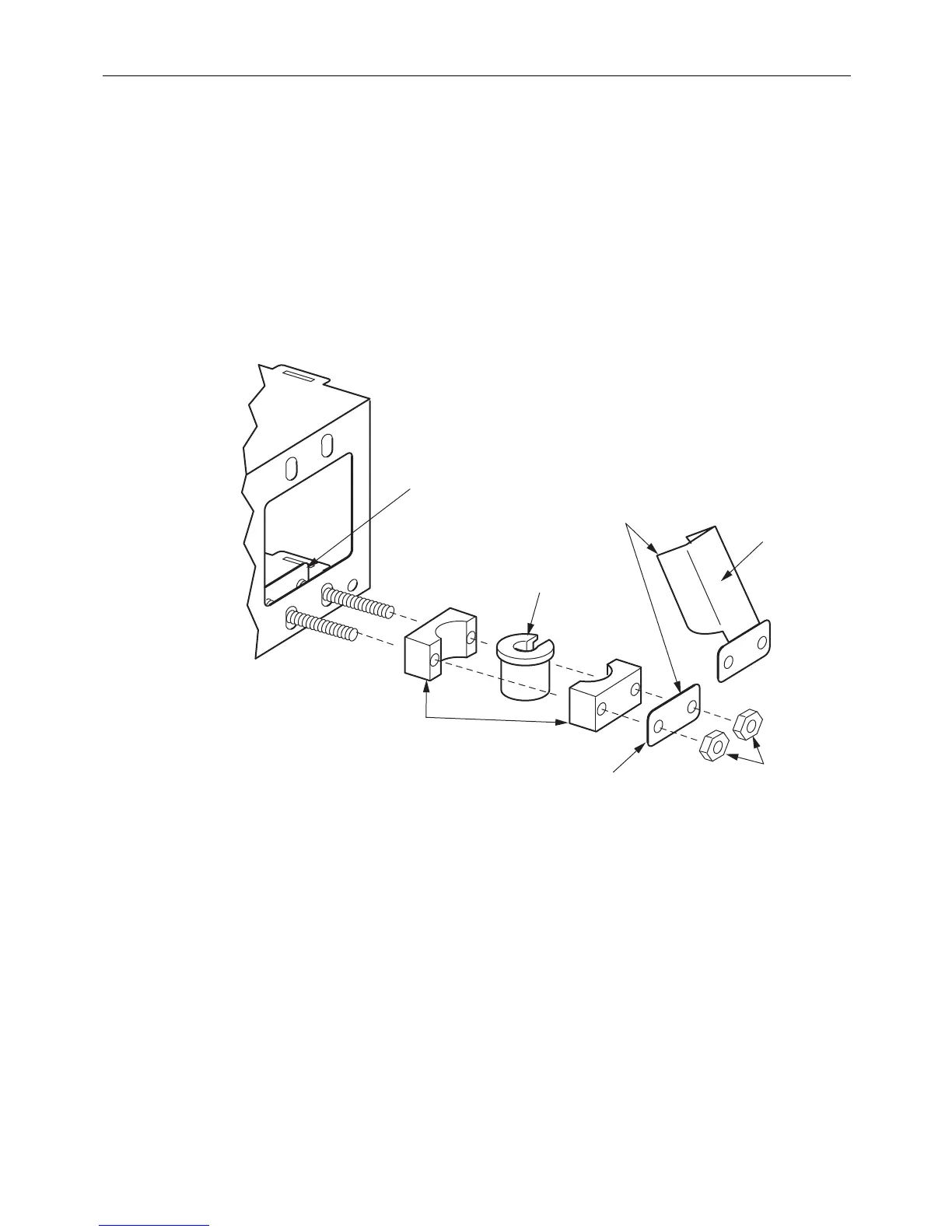
2. Secure the cable as follows (see Figure 8):
a. Install the clamp bracket at the chosen clamp lo
cation by inserting the two integral
bolts from inside the chassis.
b. Sort through the rubber grommets in the kit and find the
one that best fits the cable. If
the cable is too small to fit snugly in the smallest grommet, build up the cable with
tape of a suitable material per local standards.
c. Assemble the cable clamp components on the bracket studs in the order shown in the
figu
re and secure with the two nuts provided.
CLAMP
BRACKET
11363-B
CLAMP
YOKES (2)
RUBBER
GROMMET
USE EITHER COVER
OR PLATE IN THIS
POSITION
COVER
NUTS (2)
PLATE
Figure 8. Installing a Cable Clamp on a Rack-Mount Panel (Select from Four Mounting Locations)
3. If the cable being installed is an OSP cable with a metallic strength member, bond the
cable to ground following the instructions for the bonding/grounding kit.
4. Remove the rear door, if not already removed.
5. Route the fibers within the chas
sis as shown in Figure 7 and tie down the fibers in the B
position shown.



 To Next Page