ADCP-90-545 • Issue 4 • July 2016
Page 6
© 2016 CommScope. All Rights Reserved.
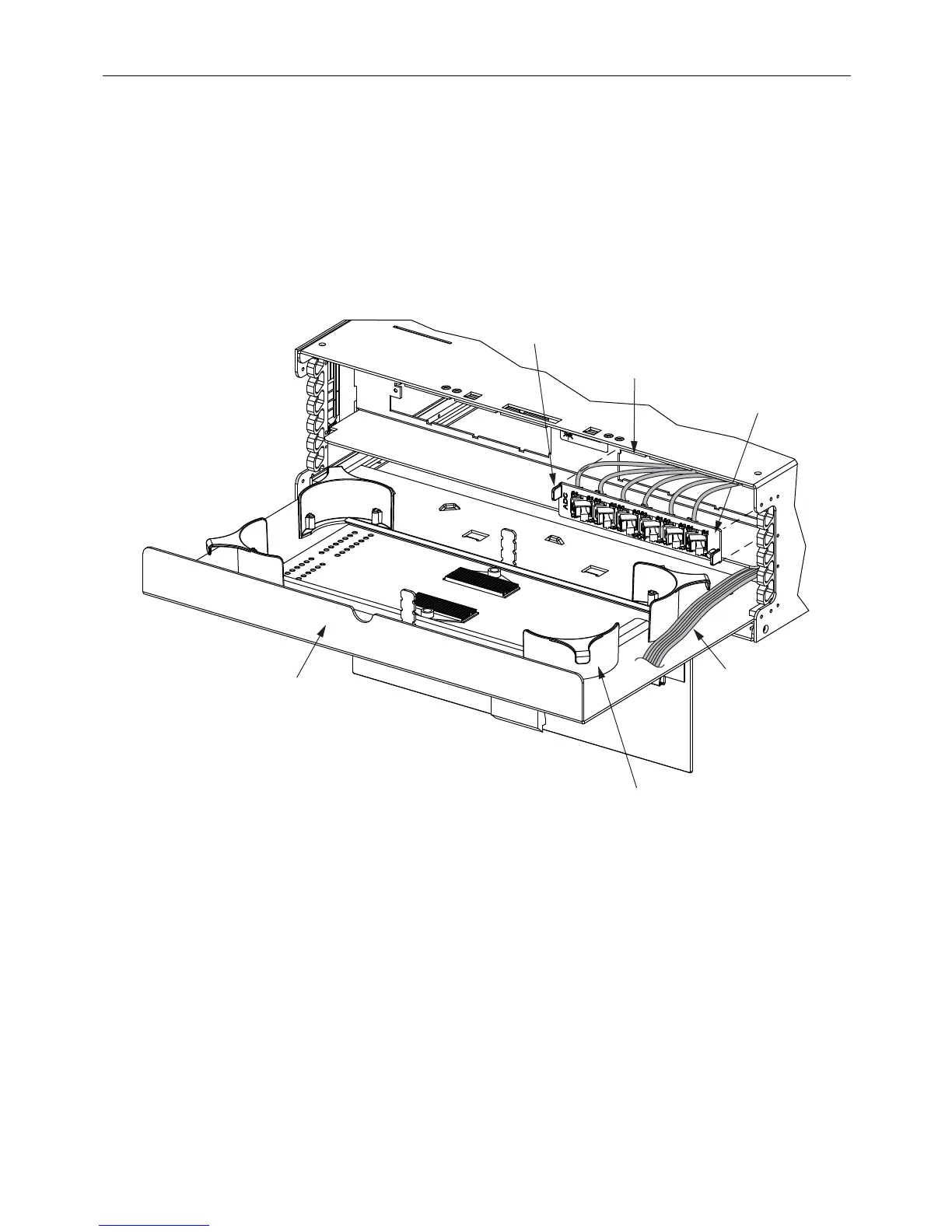
2.2.2 Adapter Plates With Pigtails
Use the following procedure to install 6pak plates wit
h pigtails in the 24-fiber termination/splicing
panel.
1. Remove the front cover and slide out the splice deck.
2. Thread the pigtails through the empty mounting slot and loop the pigtails around the
radius limiters i
n the chassis as shown in Figure 4.
11367-C
SLOT
RADIUS LIMITER
(4 PLACES)
PIGTAILS
END
TAB
6 PAK PLATE
(LOADED)
SPLICE
DECK
Figure 4. Installing 6pak Plates with Pigtails
3. Align the adapter plate tabs with the notches in the mounting slot as shown in Figure 4.
4. Slide the 6pak plate into the
slot until it snaps in place.
5. Fan out the fibers and tie them
to the radius limiter on the right rear side of the splice deck
as shown in Figure 5. To tie the fibers, use cord lacing.
6. Route the fibers to the splice tray. For an
illustration of correct routing, refer to
subsection 3.4, Splicing, below.



 To Next Page