Appendix A. RTS 1-Port Embedded System Installation 33
Appendix A. RTS 1-Port Embedded
System Installation
This Appendix only discusses the RTS 1-Port Embedded. See Hardware
Installation on Page 5 for installation procedures for other RTS models.
Installation Overview
Installing the RTS 1-Port Embedded system follows these basic steps:
• Building the serial ribbon cable.
• Mounting the RTS and installing light pipes.
• Attaching the serial and network cables.
• Applying power to the RTS and verifying installation.
Building the Serial Ribbon Cable
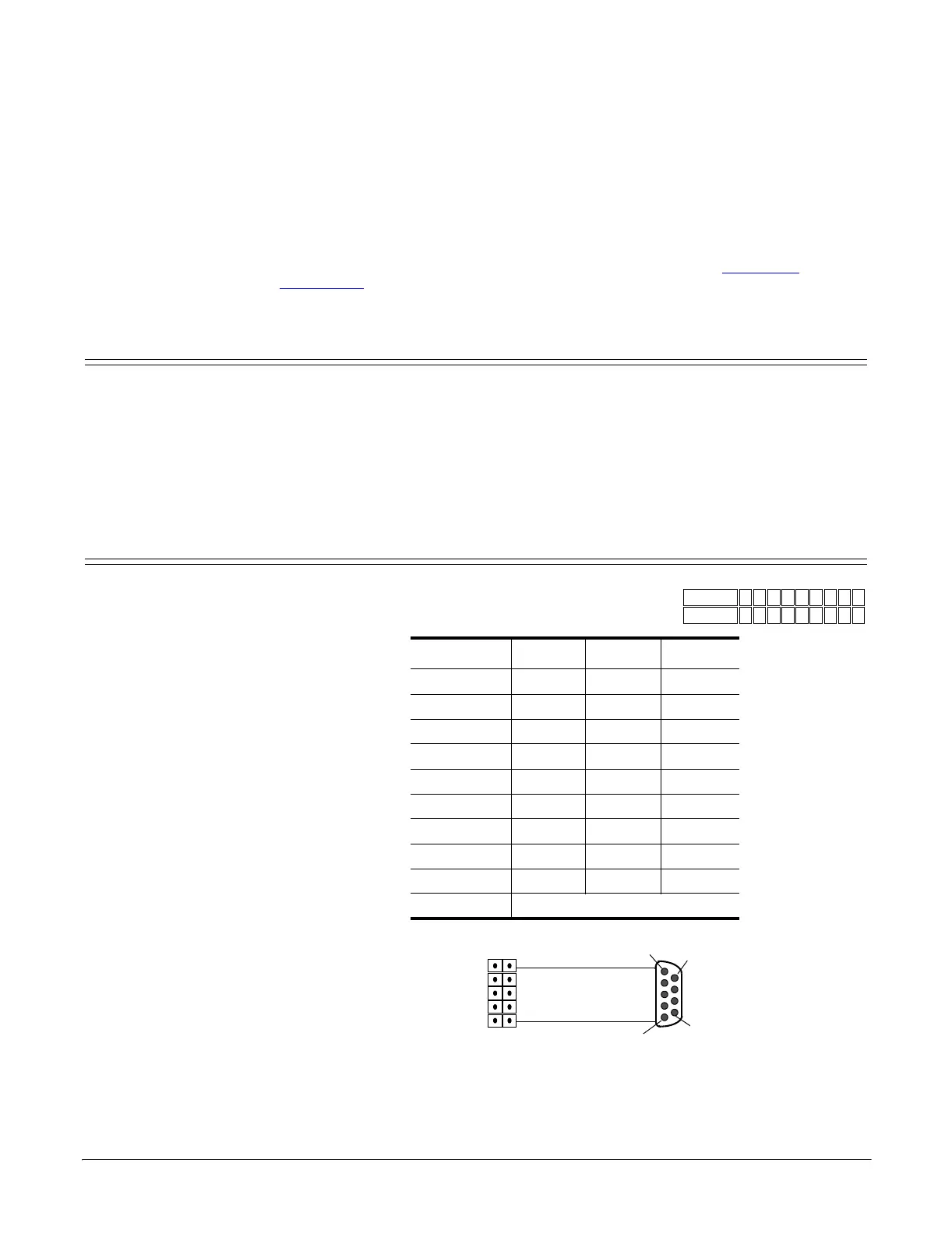
Use the following information to build a DB9 serial
ribbon cable to connect to the RTS 1-Port Embedded
IDC connector (J2).
J2 Header RS-232 RS-422 RS-485
1 CD Not used Not used
2 TxD TxD- TRX-
3 GND Not used Not used
4 RTS TxD+ TRX+
5 RI Not used Not used
6 RxD RxD- Not used
7 DTR Not used Not used
8 DSR Not used Not used
9CTSRxD+Not used
10 Not connected
IDC10
1 2 3 4 5 6 7 8 9
DB9M
1 6 2 7 3 8 4 9 5
Pin 1
Pin 6
12
9 10
Ribbon Cable
10-Pin
Socket
Pin 5
Pin 9
DB9
Male



 To Next Page