5. ROUTER DESIGN
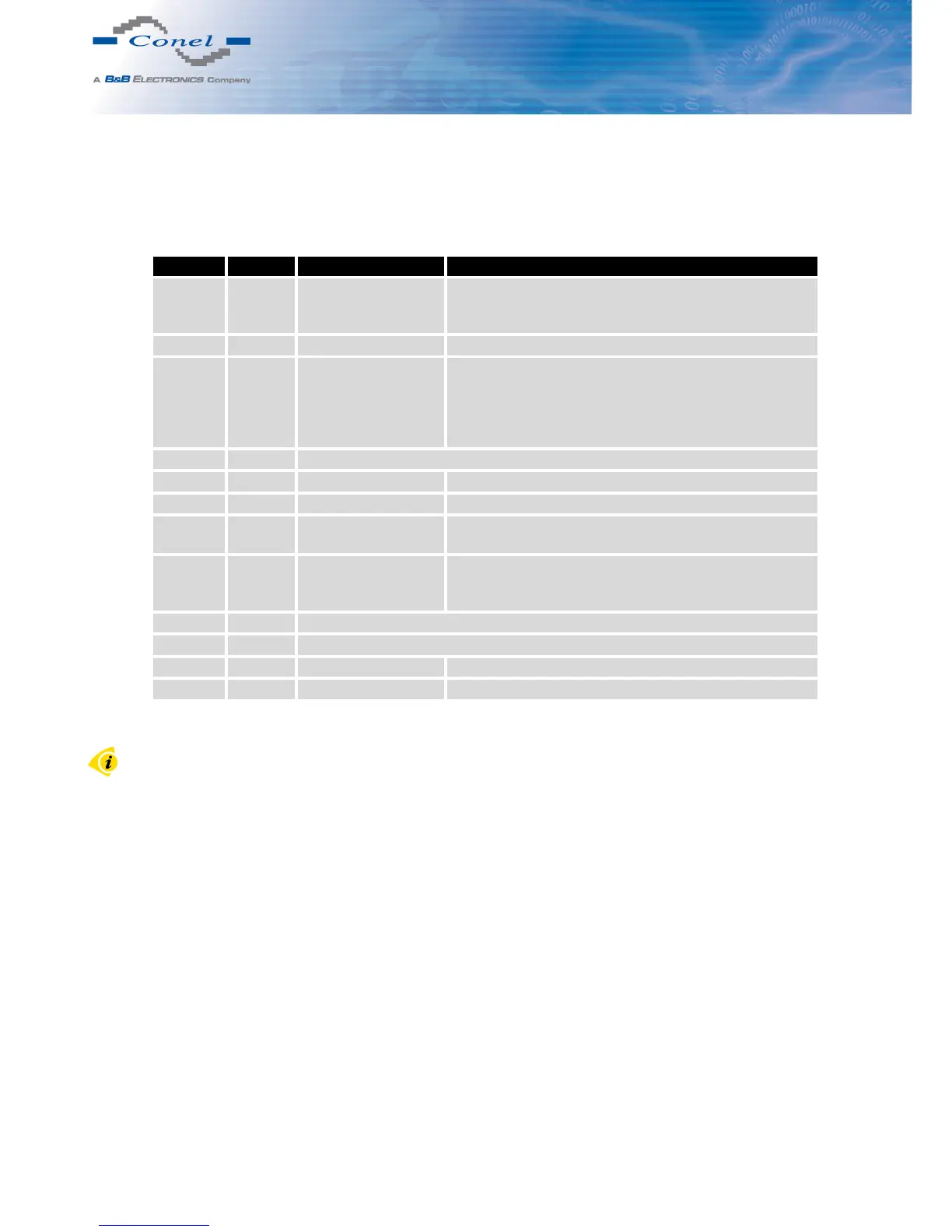
5.8.1 Status indication
About router status inform eight led indicators on the front panel and on every port are two
LED indicators, which inform about port status.
Caption Color State Description
PWR Green Blinking
On
Fast blinking
Router is ready
Star ting of the router
Updating firmware
DAT Red Blinking Communication in progress on radio channel
WAN Yellow 1x flash per second
2x flash per second
3x flash per second
Signal strength is from –50 dBm to –69 dBm
Signal strength is from –70 dBm to –89 dBm or differ-
ence between neighbours cells is exactly 3 dBm
Signal strength is from –90 dBm to –113 dBm or differ-
ence between neighbours cells is smaller than 3 dBm
USR Yellow Function selected by user
OUT Green On Binary output active
IN Green On Binary input active
ETH Green On
Off
Selected 100 Mbit/s
Selected 10 Mbit/s
ETH Yellow On
Blinking
Off
The network cable is connected
Data transmission
The network cable is not connected
PORT Green Depends on the expansion port (see user’s guide of used port)
PORT Yellow Depends on the expansion port (see user’s guide of used port)
SIM1 Yellow On SIM card 1 is active
SIM2 Yellow On SIM card 2 is active
Table 6: Router status indication
State indication of WAN LED is updated every 10 seconds.
13



 To Next Page